
uml
Author
Version
0.2.2
License
Apache-2.0
Repository
Last updated
3 days ago
Downloads
13K
Dependencies
- bobzhang/toml0.4.3
- kokic/metrics0.1.0
- kokic/identifier0.1.0
- moonbit-community/yaml0.0.6
- moonbit-community/graphviz0.1.5
- moonbitlang/lexer0.3.15
- moonbitlang/parser0.3.18
#uml
A MoonBit library that converts PlantUML source text to SVG, aiming to align
with PlantUML's behavior, including its layout.
This document is executable. Every example below is a real test that moon test
runs, and every image is the exact SVG those tests wrote into
__snapshot__/ with moon test --update. When rendering
changes, the pictures in this page change in the same commit.
#Quick start
moon add kokic/umlThe facade package is kokic/uml/api. Its entry points are:
- @api.render_svg(source) — parse a PlantUML source and render it to SVG in one call.
- @api.parse(source) — parse only; returns a Document whose kind() names the diagram family the source selected.
- Document::render_svg — render an already parsed document.
///|
test "quick start" {
  let source =
    #|@startuml
    #|participant Alice
    #|Alice -> Bob : hello
    #|@enduml
  let svg = @api.render_svg(source)
  assert_true(svg.contains("<svg"))
}#Gallery
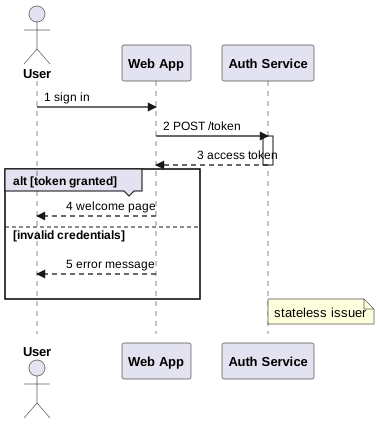
#Sequence diagram
Participants and actors, activations, autonumber, alt/else groups, and
notes:
///|
test "sequence diagram" (it : @test.Test) {
  let source =
    #|@startuml
    #|autonumber
    #|actor User
    #|participant "Web App" as App
    #|participant "Auth Service" as Auth
    #|User -> App : sign in
    #|App -> Auth : POST /token
    #|activate Auth
    #|Auth --> App : access token
    #|deactivate Auth
    #|alt token granted
    #|App --> User : welcome page
    #|else invalid credentials
    #|App --> User : error message
    #|end
    #|note right of Auth : stateless issuer
    #|@enduml
  it.write(@api.render_svg(source))
  it.snapshot(filename="sequence.svg")
}
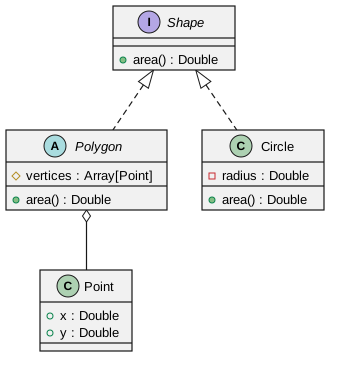
#Class diagram
Interfaces, abstract classes, visibility markers, and relations:
///|
test "class diagram" (it : @test.Test) {
  let source =
    #|@startuml
    #|interface Shape {
    #|  + area() : Double
    #|}
    #|abstract class Polygon {
    #|  # vertices : Array[Point]
    #|  + area() : Double
    #|}
    #|class Circle {
    #|  - radius : Double
    #|  + area() : Double
    #|}
    #|class Point {
    #|  + x : Double
    #|  + y : Double
    #|}
    #|Shape <|.. Polygon
    #|Shape <|.. Circle
    #|Polygon o-- Point
    #|@enduml
  it.write(@api.render_svg(source))
  it.snapshot(filename="class.svg")
}
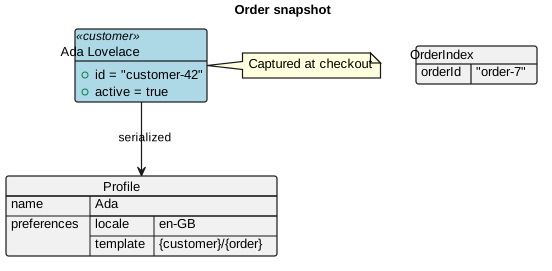
#Object diagram
Objects with slots, map tables, JSON trees, notes and relations; the title
chrome renders above the content:
///|
test "object diagram" (it : @test.Test) {
  let source =
    #|@startuml
    #|title
    #|Order snapshot
    #|end title
    #|object "Ada Lovelace" as ada <<customer>> #lightblue {
    #|  + id = "customer-42"
    #|  + active = true
    #|}
    #|map OrderIndex {
    #|  orderId => "order-7"
    #|}
    #|json Profile {
    #|  "name": "Ada",
    #|  "preferences": {
    #|    "locale": "en-GB",
    #|    "template": "{customer}/{order}"
    #|  }
    #|}
    #|ada --> Profile : serialized
    #|note right of ada
    #|  Captured at checkout
    #|end note
    #|@enduml
  it.write(@api.render_svg(source))
  it.snapshot(filename="object.svg")
}
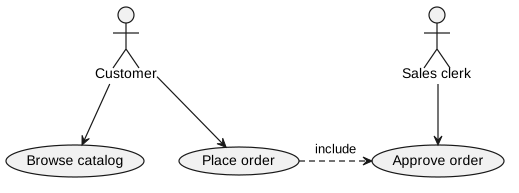
#Use case diagram
Actors, use cases, and dotted relations:
///|
test "use case diagram" (it : @test.Test) {
  let source =
    #|@startuml
    #|:Customer: --> (Browse catalog)
    #|:Customer: --> (Place order)
    #|:Sales clerk: --> (Approve order)
    #|(Place order) ..> (Approve order) : include
    #|@enduml
  it.write(@api.render_svg(source))
  it.snapshot(filename="usecase.svg")
}
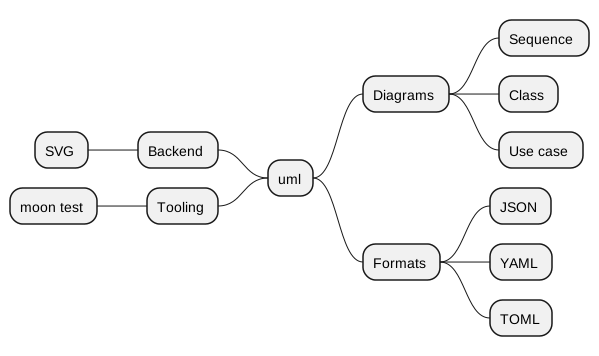
#Mindmap
* levels grow to the right, -- levels grow to the left:
///|
test "mindmap diagram" (it : @test.Test) {
  let source =
    #|@startmindmap
    #|* uml
    #|** Diagrams
    #|*** Sequence
    #|*** Class
    #|*** Use case
    #|** Formats
    #|*** JSON
    #|*** YAML
    #|*** TOML
    #|-- Backend
    #|--- SVG
    #|-- Tooling
    #|--- moon test
    #|@endmindmap
  it.write(@api.render_svg(source))
  it.snapshot(filename="mindmap.svg")
}
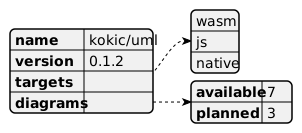
#JSON data diagram
///|
test "json diagram" (it : @test.Test) {
  let source =
    #|@startjson
    #|{
    #|  "name": "kokic/uml",
    #|  "version": "0.1.2",
    #|  "targets": ["wasm", "js", "native"],
    #|  "diagrams": {
    #|    "available": 7,
    #|    "planned": 3
    #|  }
    #|}
    #|@endjson
  it.write(@api.render_svg(source))
  it.snapshot(filename="json.svg")
}
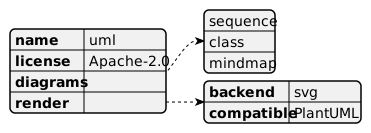
#YAML data diagram
///|
test "yaml diagram" (it : @test.Test) {
  let source =
    #|@startyaml
    #|name: uml
    #|license: Apache-2.0
    #|diagrams:
    #|  - sequence
    #|  - class
    #|  - mindmap
    #|render:
    #|  backend: svg
    #|  compatible: PlantUML
    #|@endyaml
  it.write(@api.render_svg(source))
  it.snapshot(filename="yaml.svg")
}
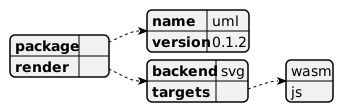
#TOML data diagram
///|
test "toml diagram" (it : @test.Test) {
  let source =
    #|@starttoml
    #|[package]
    #|name = "uml"
    #|version = "0.1.2"
    #|
    #|[render]
    #|backend = "svg"
    #|targets = ["wasm", "js"]
    #|@endtoml
  it.write(@api.render_svg(source))
  it.snapshot(filename="toml.svg")
}
#DOT diagram
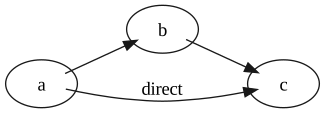
@startdot forwards the DOT source to the shared graphviz engine, like
PlantUML does with the system dot executable:
///|
test "dot diagram" (it : @test.Test) {
  let source =
    #|@startdot
    #|digraph G {
    #|  rankdir=LR;
    #|  a -> b -> c;
    #|  a -> c [label="direct"];
    #|}
    #|@enduml
  it.write(@api.render_svg(source))
  it.snapshot(filename="dot.svg")
}
#Theming
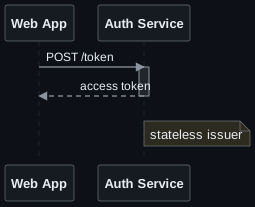
render_svg accepts a color_scheme. The two positional roles are the ink
colors (text and line); every other role is optional and may be a literal
color or a CSS variable such as var(--uml-text), so one scheme can target a
specific light or dark page without touching each diagram. Document-level
skinparam lines still win over the scheme.
///|
test "dark sequence diagram" (it : @test.Test) {
  let dark = @style.ColorScheme::ColorScheme(
    "#e6edf3", // text
    "#8b949e", // line
    canvas="#0d1117",
    participant="#161b22",
    activation="#21262d",
    lifeline="#30363d",
    note="#2d2a1f",
  )
  let source =
    #|@startuml
    #|participant "Web App" as App
    #|participant "Auth Service" as Auth
    #|App -> Auth : POST /token
    #|activate Auth
    #|Auth --> App : access token
    #|deactivate Auth
    #|note right of Auth : stateless issuer
    #|@enduml
  it.write(@api.render_svg(source, color_scheme=dark))
  it.snapshot(filename="sequence_dark.svg")
}
#Documents and diagram kinds
parse chooses the diagram family with the same per-line heuristics PlantUML
uses to pick a diagram factory, and Document::kind exposes the choice:
///|
test "documents expose their detected diagram kind" {
  let source =
    #|@startmindmap
    #|* root
    #|@endmindmap
  let document = @api.parse(source)
  assert_true(document.kind() is Mindmap)
  assert_true(document.render_svg().contains("<svg"))
}#Collapsible class members
With class_member_collapsible=true, class members render inside a
<details> disclosure (via <foreignObject>) so they can be folded in the
browser:
///|
test "collapsible class members" {
  let source =
    #|@startuml
    #|class User {
    #|- secret
    #|}
    #|@enduml
  let svg = @api.render_svg(source, class_member_collapsible=true)
  assert_true(svg.contains("<details"))
}#Snapshot workflow
The images in this page are ordinary snapshot tests:
moon test          # verifies the SVGs are unchanged
moon test --update # regenerates __snapshot__/*.svg after a rendering change#License
Apache-2.0
Install
Download zip
 0.2.2
0.2.2 Apache-2.0
 Updated 3 days ago
 13K downloads
Dependencies
- bobzhang/toml0.4.3
- kokic/metrics0.1.0
- kokic/identifier0.1.0
- moonbit-community/yaml0.0.6
- moonbit-community/graphviz0.1.5
- moonbitlang/lexer0.3.15
- moonbitlang/parser0.3.18