 README
- ::to_jsonChatMessage::to_json
- ::to_jsonChatRequest::to_json
- ::defaultCliOptions::default
- ::parseCliOptions::parse
- TDepNode
- ::to_jsonDepthCount::to_json
- ::atJsonDiagnostic::at
- ::for_recordJsonDiagnostic::for_record
- ::from_errorJsonDiagnostic::from_error
- ::renderJsonDiagnostic::render
- ::summaryJsonDiagnostic::summary
- ::ofJsonStats::of
- ::to_jsonJsonStats::to_json
- ::to_json_textJsonStats::to_json_text
- ::to_textJsonStats::to_text
- ::to_jsonKeyCount::to_json
- TModuleInfo
- TRunResult
- TSchemaError
- ::to_jsonTypeCount::to_json
- TVersionConflict
- Vanalyze
- Vapi_key_variable
- Vbuild_dep_tree
- Vbuild_dep_tree_from
- Vclamp_indent
- Vcollect_key_paths
- Vcollect_paths
- Vcolor_allowed
- Vdeepseek_endpoint
- Vdeepseek_model
- Vdefault_indent
- Vdefault_root_name
- Vdependency_directory
- Vdependency_warnings
- Vdescribe_json_error
- Vdescribe_limit_kind
- Vdescribe_syntax_error
- Vemit_moonbit
- Vendpoint_variable
- Venv_allows_color
- Vescape_json_string
- Vexit_ai_error
- Vexit_input_error
- Vexit_success
- Vexit_usage_error
- Vfallback_api_key_variable
- Vfind_cycles
- Vfind_version_conflicts
- Vflatten
- Vformat
- Vformat_compact
- Vis_tty
- Vjsonl_record_lines
- Vline_text
- Vlookup_path
- Vmax_indent
- Vmax_prompt_chars
- Vmodel_variable
- Vnon_empty_env
- Voffset_to_line_col
- Vparse
- Vparse_jsonl
- Vparse_jsonl_with_depth
- Vparse_module_file
- Vparse_module_text
- Vparse_with_diagnostic
- Vpattern_matches
- Vprogram_name
- Vprune_empty
- Vprune_null
- Vquote_for_message
- Vread_file
- Vread_module_manifest
- Vread_stdin
- Vred
- Vrender_dep_tree
- Vrender_schema_error
- Vrequest_timeout_ms
- Vresolve_api_key
- Vresolve_endpoint
- Vresolve_model
- Vrun
- Vschema_problems
- Vselect
- Vset_color_enabled
- Vsort_by
- Vsort_keys
- Vstandard_max_depth
- Vstandard_max_input_chars
- Vtrim_strings
- Vtype_name_problem
- Vunflatten
- Vunique
- Vusage
- Vvalidate_schema
- Vversion
- Vversion_line
- Vwrite_stats_file
- Vyellow
moonjson-toolkit
A JSON toolkit for MoonBit: format, validate, diagnose, analyse and visualise JSON documents.
json
formatter
cli
validation
ai
Author
Version
0.1.0
License
Apache-2.0
Repository
Last updated
13 hours ago
Downloads
3
Dependencies
- Nanaloveyuki/parsec0.1.3
- oboard/mio0.5.4
- moonbitlang/x0.5.5
- moonbitlang/async0.22.1
English | 简体中文
#MoonJSON Toolkit
A JSON toolkit for MoonBit: format, validate, diagnose, analyse and visualise
JSON documents. It ships as a command line tool plus a small web dashboard that
charts the statistics the tool writes.
#Features
- Formatting — pretty-prints any JSON document with 0 to 16 spaces per nesting level. Empty containers stay inline, strings are escaped correctly, and numbers keep the exact literal they had in the input. --compact puts the whole document on one line instead, --sort-keys orders the keys of every object before printing, and --trim-strings removes the whitespace around every string value while leaving the spaces inside one alone.
- Several documents at once — --file may be repeated. A few files are read at a time and answered in the order they were named, each under a ==> path <== heading once there is more than one of them, and a file that fails does not stop the ones after it. --fail-fast asks for the run to end at that file instead, and --continue-on-error adds a summary of which inputs passed and which failed.
- JSON Lines — --jsonl reads an input whose lines are documents, one per line, and formats each of them onto a line of its own. A line that is not valid JSON is reported by its line number while the others are still printed.
- Reshaping — --flatten collapses every nested object into dotted keys, turning {"a":{"b":1}} into {"a.b":1}, and --unflatten expands them again. Both reach objects inside arrays, and both refuse a document that names one path two ways, naming the two keys that disagree.
- Pruning — --prune-null removes every object member whose value is null, and --prune-empty removes every empty object and every empty array, then the containers left empty by that. The two may be given together, nulls first, so {"a":{"b":null}} becomes {} in one pass.
- Transforming — --select keeps the top-level fields a comma-separated list names, in the order it names them, --sort-by orders an array by the value a dotted path reaches inside each item, and --unique drops the items that repeat one already seen. At most one of the three may be given. See transforming data.
- MoonBit type generation — --emit-moonbit reads a sample document and prints the MoonBit structs that hold it, each deriving FromJson and ToJson, under the root name you give it or Root. See generating MoonBit types.
- Validation with diagnostics — a malformed document reports the line, the
column and the reason, and points at the offending character:
A line too long to print is elided around the column, the two ends it cut replaced by ..., so a document written on one line is not reported at its full length — the line and column in the summary are always the ones in the document, and the caret is the recomputed one.A repeated key inside one object is an error for the same reason, reported at the second spelling of the key and naming the line and column of the first — silently keeping one of the two would mean the value you get back depends on the parser rather than on the document. --max-depth <n> puts the same kind of bound on nesting: any document deeper than n is refused, with the position where it went too far.error: <stdin> is not valid JSON line 1, column 8: expected opening quote {"a":1,} ^ - JSON Schema checking — --schema <path> checks the input against a JSON Schema. Read with -v, it answers with a verdict rather than a document, and a document that does not match is reported with every place it disagrees, one to a line. See validating against a JSON Schema.
- Paths and keys — --paths lists the route to every value in the document, one per line, and --keys-only lists just the object members. Between them they answer "what is in here" without printing the document.
- Statistics — key counts, node counts, maximum nesting depth, the distribution of JSON types and a per-depth breakdown, written as JSON by --json-out or printed as a two-line summary by --stats.
- Colour — errors are coloured on a terminal and plain everywhere else, so a redirected run never has escape sequences in it. --no-color turns them off, as does the NO_COLOR and TERM=dumb conventions.
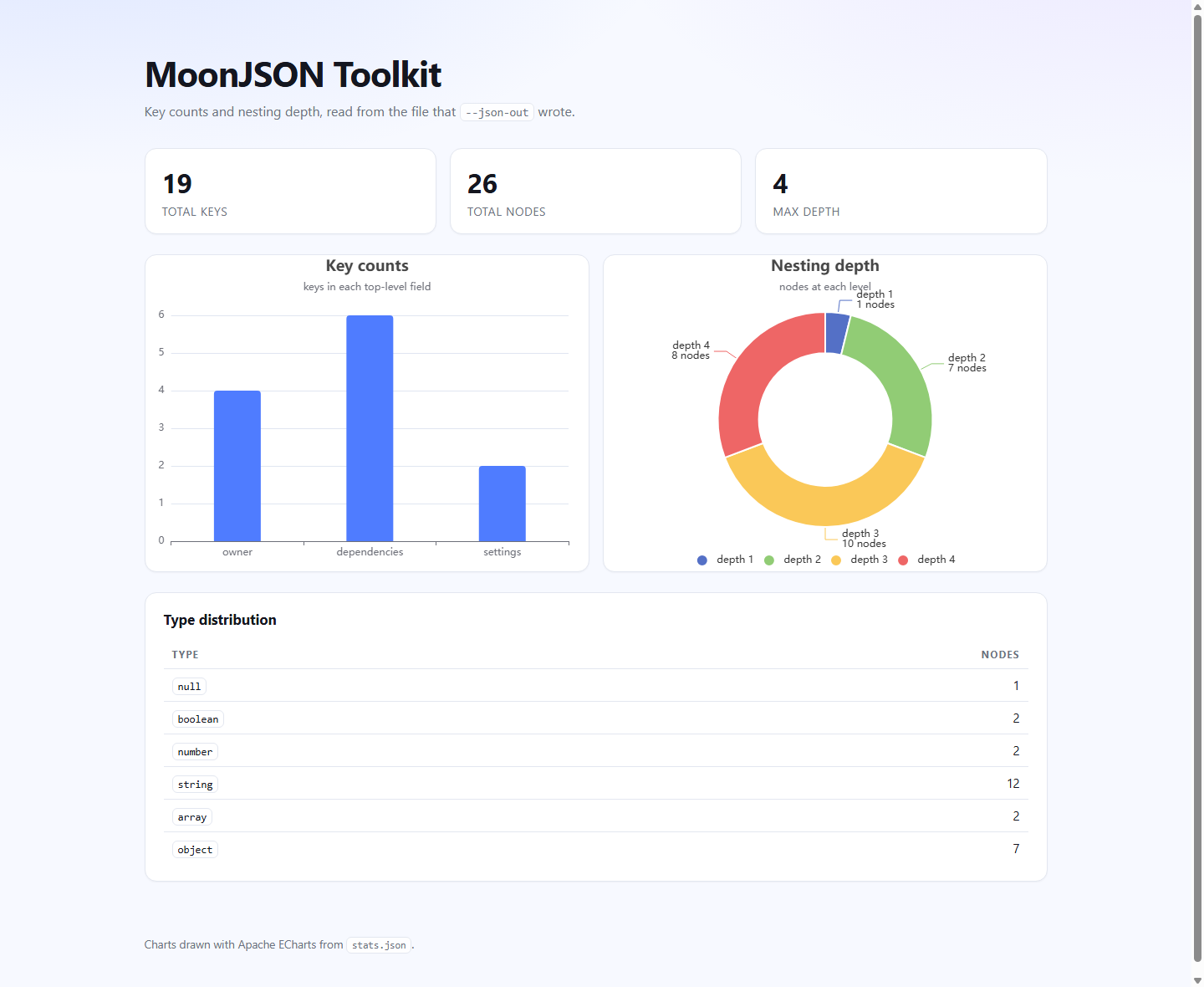
- Charts — a Rabbita web app renders the statistics file as a key-count bar chart, a nesting-depth pie chart and a type table.
- AI review — --ai sends the formatted document to an OpenAI-compatible API (DeepSeek by default) and prints a quality report with refactoring suggestions. The endpoint, the model and the key are all configurable.
- MoonBit dependency analysis — --moon-deps reads a module manifest and prints the tree of modules it depends on, drawn from the manifests in .mooncakes, and reports a module required at more than one version or a circular dependency beneath the tree. See analyzing MoonBit dependencies.
#Requirements
- The MoonBit toolchain (developed against moon 0.1.20260915).
- A native target. The HTTP client and the async runtime are native only, so the command line tool builds for native rather than wasm.
#Installation
git clone https://github.com/BigSaltyMan/moonjson-toolkit.git
cd moonjson-toolkit
moon build --target native
Dependencies are declared in moon.mod and fetched by moon build:
moon add Nanaloveyuki/parsec   # parser combinators, with a JSON grammar
moon add oboard/mio # HTTP client used by --ai#Usage
moonjson-toolkit - format, validate and analyse JSON documents

Usage:
  moonjson-toolkit [options]

Input is read from standard input unless --file is given.

Options:
  -f, --file <path>      Read one or more input files instead of standard input
  -i, --indent <n>       Spaces per nesting level, 0 to 16 (default: 2)
  -c, --compact          Print the document on one line, ignoring --indent
  -S, --sort-keys        Order the keys of every object before printing
      --trim-strings     Trim the whitespace around every string in the document
      --flatten          Collapse every nested object into dotted keys
      --unflatten        Expand every dotted key back into nested objects
      --prune-null       Remove every object member whose value is null
      --prune-empty      Remove every empty object and every empty array
      --select <fields>  Keep only the named top-level fields of an object
      --sort-by <path>   Sort an array by the value <path> names in each item
      --unique [path]    Drop repeated items, whole ones or by the value at <path>
      --jsonl            Read the input as JSON Lines, one document per line
      --max-depth <n>    Refuse documents nested deeper than <n> (default: 128)
      --paths            Print the path of every value instead of the document
      --keys-only        Print only the paths that name an object member
  -v, --validate         Only check the input and report the first error
      --schema <path>    Check the input against the JSON Schema in <path>
  -h, --help             Show this message and exit
  -V, --version          Show the version and exit
      --ai               Ask the AI for a quality report and suggestions
      --model <name>     Model to ask for instead of the default
      --ai-base-url <url>
                         Endpoint to post to instead of the default
      --moon-deps        Print the dependency tree of a MoonBit module
                         manifest
      --fail-fast        Stop at the first input that fails
      --continue-on-error
                         Process every input, then summarise the failures
      --json-out <path>  Write a statistics report as JSON to <path>
      --stats            Print a statistics summary instead of the document
      --emit-moonbit [name]
                         Print the MoonBit type of the document's shape
      --no-color         Never colour the output, even on a terminal

Short options may be combined, so -vh means -v -h. The value of --indent
may be attached, as in -i4, -i=4, --indent=4 or --indent 4.

--file may be repeated. Each file is handled in turn, each under a
'==> path <==' heading once more than one is given, and the run exits with
the first non-zero code among them.

--fail-fast stops the run at the first input that fails, so a batch of
files ends at the one that went wrong rather than at the end of the list.
Without it every input named is read and every failure is reported as it
happens, which is the default; --continue-on-error asks for that same
reading and adds a summary of it at the end, naming each input that failed
and the message it failed with. The two describe one run in opposite
directions, so asking for both is refused. Under --jsonl the input is one
file however many records it holds, so --fail-fast stops at the first
record that fails, and --continue-on-error summarises the file.

--paths and --keys-only each replace the printed document with a list of
names, one per line. Asking for both prints the longer list, and -v wins
over either of them, since it asks for no document output at all.

--stats replaces the document with a two-line summary of it. It joins the
same family: -v wins over it as it wins over the name lists, and --json-out
takes precedence over it, so asking for both writes the file and prints the
document as usual. --json-out describes one document, so it is refused when
several files are named.

--emit-moonbit replaces the document with a MoonBit type for it: a struct for
every object the sample holds, holding the members it showed with the types
they showed, each struct deriving FromJson and ToJson. The name after it is
the name of the root type, and it is Root when no name is given. A name has
to start with an upper case letter and go on with letters, digits and
underscores, and the names the generated code is itself written with (Int,
Double, String, Bool, Json and Array) are refused as well: a type named after
one of them would be a type made of itself.

The document the type is read off is the one the run prepared, so --sort-keys
decides the order the fields come out in, --select and the prunings decide
what there is to read, and --trim-strings decides what the strings look like.
A JSON key that is not a name MoonBit can spell is written as close to one as
the language allows, with the key in a comment beside the field: the derived
decoder reads the field name, so the mangled name is what the pasted type
will look for, and the comment is what says which key it stands for.

What a sample cannot say is not guessed at. A member the document holds as
null, or holds in one record and not in the next, is left as a Json or made
optional rather than given a type the sample does not show. --json-out, --ai,
--paths and --keys-only each answer with something else in place of the
document, so none of them can be asked for with --emit-moonbit; --stats gives
way to it, and -v wins over it as it wins over the name lists.

--schema <path> checks the input against a JSON Schema instead of printing
it, and is read with -v, which is the flag that asks for a verdict rather
than a document. The dialect read is the part of the one at json-schema.org
that a document of data is described with: type, required, properties, items,
enum, minimum, maximum, minLength, maxLength and pattern. Every other keyword
is passed over rather than refused, so a schema written for a full validator
can be handed to this one and the part of it this tool does not read is
simply not enforced.

A document that does not match is reported with every place it disagrees,
one to a line, and the run exits 1. A schema this tool cannot read is a
mistake in the command line rather than in the document: it is named, the
keyword to fix is quoted under it, and the run exits 2 without looking at
any input. Under --jsonl every record is checked on its own and reported
with the line it was written on.

--flatten collapses every nested object into dotted keys, and --unflatten
expands them again. The two are inverses of each other, so only one of them
may be given. A document that names one path two ways, with a key "a.b"
beside a key "a", has no flattened or unflattened form and is refused with
both keys named.

--prune-null drops every object member whose value is null, and --prune-empty
drops every empty object and every empty array, then the containers left empty
by that in turn. The two are independent and may be given together, in which
case the nulls go first, so a member left holding {} is dropped as well.
--prune-null keeps every item of an array: a null in an object is a member with
no value, while a null in an array is a value in a place, and dropping it would
renumber the items after it.

--select, --sort-by and --unique rewrite the document rather than lay it out,
and each answers one question about what it should hold. At most one of the
three may be given: two of them are two answers to the same question, and
neither is more nearly right than the other. They run before everything else
that removes or reshapes values, so --select decides what --prune-null,
--prune-empty, --flatten and --unflatten then see. Deduplicating is the one
of the three that compares values with one another, and it does so through
the tidying the run asked for, so --trim-strings and --sort-keys share in
deciding what counts as the same item there.

--select keeps the top-level fields its comma-separated list names, in the
order the list gives them, and drops the rest. A name the object does not
have is skipped rather than reported, so one selection works across a folder
of documents whose fields have drifted apart.

--sort-by sorts an array by the value its path names inside each item. The
document may be an array itself or an object holding exactly one, which is
sorted where it sits; an object holding several is refused, since there is no
telling which was meant. Numbers are ordered as numbers and strings by code
point, and values of different kinds are ordered by kind, as jq orders them:
null, false, true, numbers, strings, arrays, objects. Two arrays, and two
objects, are equal and keep the order they were written in. A record whose
path reaches nothing is sorted as though the field held null, which puts it
before the records that have a value there. The sort is stable.

--unique drops the items that repeat one already seen, keeping the first.
What is compared is the item as the run would print it, so --sort-keys makes
two objects whose members were written in a different order one item, and
--trim-strings makes " a" and "a" one item. With no path the whole item is
compared; with a path it is the value the path names that is. An item whose
path reaches nothing is kept, since it has no value to be compared.

--jsonl reads the input as JSON Lines: one document per line, with blank
lines skipped. Each record is handled on its own, so the other options apply
to every one of them in turn. A record that is not valid JSON is reported
with its line in the file and the rest are still printed; the run exits 1 if
any record failed. It describes many documents at once, so it is refused
with --json-out and with --ai.

--ai asks an OpenAI-compatible chat-completions API for a review of the
formatted document. The endpoint, the model and the key are taken from
--ai-base-url, --model and MOONJSON_AI_API_KEY, each falling back in turn
to MOONJSON_AI_BASE_URL, MOONJSON_AI_MODEL and DEEPSEEK_API_KEY, and then
to DeepSeek's own. There is no --api-key: a key on a command line is a key
in the shell history and in the process list.

--model and --ai-base-url describe that one request, so without --ai they
are read, accepted and ignored.

--moon-deps reads the input as a MoonBit module manifest and prints the
tree of modules it depends on, each dependency read in turn from the
.mooncakes directory beside the manifest. Both manifest forms are read:
moon.mod.json, and the moon.mod whose dependencies sit in an import block.
A dependency that has not been downloaded is shown with nothing under it,
and a module required at more than one version, or a circular dependency,
is reported beneath the tree. The tree is the whole of the output, so no
other option is consulted; --ai reviews the document instead, so under it
--moon-deps does nothing.

Exit codes:
  0  success
  1  the input could not be read, or is not valid JSON
  2  the command line was invalid
  3  the input was valid but the AI review failed
Short options may be combined, so -vh means -v -h. The value of --indent
may be attached, as in -i4, -i=4, --indent=4 or --indent 4.
Note that -v and -V are different flags: the lower case one validates, the
upper case one prints the version.
-v replaces the formatted document with a one-line verdict. It is the only
thing it changes: --json-out and --ai still run. --help and --version
both answer without reading any input at all.
--paths and --keys-only also replace the document, with a list of names
rather than a verdict. Asking for both prints the longer list, and -v wins
over either of them, since it asks for no document output at all. Like -v,
neither of them stops the rest of the work: --json-out and --ai still run.
--stats replaces the document with a two-line summary of it. It joins the same
family: -v wins over it as it wins over the name lists, and --json-out takes
precedence over it, so asking for both writes the file and prints the document
as usual.
--file may be repeated, and each document is handled on its own. --json-out
describes a single document, so it is refused when several files are named
rather than written for whichever one came first.
A run over several files does not stop at one that fails: the failure is
reported as it happens, the files after it are still read, and the run ends with
the first non-zero code among them. A batch is read a few files at a time and
answered in the order they were named, so the documents keep the order of the
command line whatever order they were ready in. --fail-fast asks for the
opposite reading and ends the run at the first input that fails: what is already
in hand is printed, and the inputs after it are given up rather than waited for.
--continue-on-error keeps the default reading and adds a roll-call at the end,
naming every input that failed and what it said:
moonjson-toolkit -f a.json -f broken.json -f c.json --continue-on-error
# ==> a.json <==
# {
#   "a": 1
# }
# ==> c.json <==
# {
#   "c": 3
# }
#
# Summary: 2 passed, 1 failed
#   failed: broken.json
#     error: broken.json is not valid JSON
#     line 1, column 8: expected opening quote
#       {"a":1,}
#              ^
The failure was reported on standard error as it happened, where a run of many
files says what went wrong while it is still going; the summary repeats it on
standard output, so the place a run ends also says what it found. The count is
of inputs rather than of documents: --jsonl reads one file however many
records it holds, so a JSON Lines file counts once, and --fail-fast stops such
a file at the first record that fails rather than at the next one.
--jsonl declares what the input is, not what to do with it: each line is read
as a document of its own and the other options apply to every one of them in
turn, so --compact, --sort-keys or --trim-strings reach every record the
same way they reach a single document. Blank lines are skipped. --json-out,
--ai, --stats, --paths and --keys-only each answer a question about one
document, and a JSON Lines input is many, so they are refused rather than
repeated once per record with nothing to say which record an answer belongs to.
-v is not among them: it asks whether the input is valid, which is as good a
question about a file of many documents as about a file of one.
--flatten and --unflatten are inverses of each other, so asking for both is
not a pair of changes but a question about which one was meant, and the command
line is refused. A document that can be read either way is answered either way:
{"a":{"b":1}} and {"a.b":1} are the same document written two ways, and each
flag rewrites one into the other. Neither of them invents or drops anything —
flattening joins keys that were already written and unflattening splits them at
their dots — so the values, their order and even the empty containers survive
the trip.
A document that spells one path two ways has no flattened form to be had. If a
member is named a.b while a sibling named a holds an object, lifting a
produces a second a.b, and one of the two would have to be dropped; the run
exits 1 rather than settling it by a rule about which of them matters less.
Both keys are named, so the message says which pair to reconcile:
error: <stdin> cannot be flattened
conflicting keys: "a" and "a.b"
--unflatten refuses those shapes too, and is stricter: it decides by the keys
alone, so a key that is the dotted start of another key means one place is named
twice, whatever the value at the shorter key holds. A literal dotted key beside a
key holding anything but an object is no trouble at all, since nothing is lifted
and nothing collides: {"a.b":1,"a":2} flattens to itself.
--prune-null and --prune-empty remove what a document does not need, and are
independent of each other and of everything else, so they may be given together
or one at a time. The first drops every object member whose value is null: a
member holding null says no more than the member being absent. The second drops
every empty object and every empty array, and the containers that removal leaves
empty go as well, however far up that reaches. The document itself is not a
member of anything, so a run that prunes everything away still prints {} rather
than nothing at all.
--prune-null leaves arrays alone. An array is a sequence and its positions are
part of what it says, so a null in the middle of one is a value in a place, and
removing it would renumber the items after it — which is why --prune-empty,
whose whole business is removing things, does reach into arrays to drop the
empty containers in them. The two are applied nulls first when both are given:
{"a":{"b":null}} is {} once the member holding the null is left empty and
--prune-empty takes it, where the other order would stop at {"a":{}}.
--flatten, --unflatten, --prune-null, --prune-empty, --sort-keys and
--trim-strings change the document rather than its layout, so everything else
in the run sees the result: the printed document, the path list, the AI review,
and the counts behind --stats and --json-out, which describe what the run
produced rather than what came in. Sorting and trimming cannot tell the
difference — neither moves a value or changes its type — but pruning and
reshaping can, and a summary still counting members the document no longer has
would be describing something the reader cannot see. --schema is the one check
that reads the document as it came in rather than as the run makes it: a schema
describes the input, and a document that has been flattened, selected or pruned
has stopped being the document the schema was written about.
#Exit codes
| Code | Meaning |
|---|---|
| 0 | the input was formatted, or validated successfully |
| 1 | the input could not be read, is not valid JSON, or does not match the schema |
| 2 | the command line itself was invalid |
| 3 | the input was valid, but the AI review could not be produced |
A run that fails writes nothing to standard output for the document that failed.
All the work that can fail for one document happens before the first byte of it
is printed, so a failure never leaves a partly written document for whatever is
reading the output. With several files this holds per file: the ones that worked
are printed, the ones that did not are on standard error, and the exit code is
the first one that was not 0. Under --jsonl it holds per record, since a
record is the unit that either parses or does not; a run that had any bad record
at all exits 1, however many good ones followed it.
#Examples
Format a file with the default two-space indent:
moon run cmd/main -- -f test.json{
"name": "moonjson-toolkit",
"version": 2,
"stable": true,
"tags": [
"json",
"cli",
"formatter"
],
"owner": {
"name": "MoonBit",
"contact": {
"email": "dev@moonbitlang.com",
"active": true
}
},
"dependencies": [
{
"name": "parsec",
"version": "0.1.3"
},
{
"name": "async",
"version": "0.22.1"
},
{
"name": "x",
"version": "0.5.5"
}
],
"settings": {
"indent": 2,
"theme": null
}
}Handle several documents in one run. Each is formatted on its own, under a
heading that names the file it came from, and the headings appear only when
there is more than one document to tell apart:
moon run cmd/main -- -f a.json -f b.json
# ==> a.json <==
# {
#   "a": 1
# }
# ==> b.json <==
# {
#   "b": 2
# }
A file that cannot be read or parsed does not end the run. Its error goes to
standard error and the next file is still processed, so one bad input does not
hide the state of the rest; the run then exits with the first code that was not
0, which is 1 here:
moon run cmd/main -- -f a.json -f c.json -f b.json
# ==> a.json <==
# {
#   "a": 1
# }
# ==> b.json <==
# {
#   "b": 2
# }
# error: c.json is not valid JSON
# line 1, column 8: expected opening quote
#   {"c":3,}
#          ^
Format a file whose lines are documents, which is the shape a log or an export
usually arrives in. Each record is printed on a line of its own, and the blank
line is not a record:
printf '{"a":1}\n\n{"b":[2]}\n' | moon run cmd/main -- --jsonl
# {
#   "a": 1
# }
# {
#   "b": [
#     2
#   ]
# }
One bad line does not cost the reader the others. It is reported on standard
error, with its line number in the file, while every record that could be read
is still printed; the run then exits 1:
printf '{"a":1}\n{"b":1,}\n{"c":3}\n' | moon run cmd/main -- --jsonl -c
# {"a":1}
# {"c":3}
# error: <stdin> is not valid JSON
# line 2, column 8: expected opening quote
#   {"b":1,}
#          ^
Trim the whitespace that crept into a document's strings. Only the ends of a
string are touched, so the spaces inside one are part of it and stay:
printf '{"name":"  moon  ","note":"  a  b  "}' | moon run cmd/main -- --trim-strings -c
# {"name":"moon","note":"a  b"}
Keys are names rather than values and are left exactly as they were written.
Trimming them would rename them, and two keys differing only in their surrounding
spaces would collapse into the repeated key the parser refuses — a document that
parsed would become one that would not.
Collapse the nesting of a document into dotted keys, which is the shape to hand
to anything that reads a flat table of names:
printf '{"a":{"b":{"c":1}},"d":[{"e":{"f":2}}]}' | moon run cmd/main -- --flatten -c
# {"a.b.c":1,"d":[{"e.f":2}]}
Expand them again, merging the keys that share a prefix as it goes:
printf '{"a.b":1,"a.c":{"d":2}}' | moon run cmd/main -- --unflatten -c
# {"a":{"b":1,"c":{"d":2}}}
A document that names one path two ways has no form to be had in either
direction, and is refused with both keys named:
printf '{"a":{"b":1},"a.b":2}' | moon run cmd/main -- --flatten -c
# error: <stdin> cannot be flattened
# conflicting keys: "a" and "a.b"
A literal dotted key beside a key holding something else is not that case:
nothing is lifted out of a, so nothing collides, and the document is already
flat.
Drop what a document does not say: the members that hold null, and the
containers that hold nothing. The two compose, and the nulls go first, so a
member left empty by a removal goes too:
printf '{"a":null,"b":{},"c":[1,null],"d":{"e":null}}' | moon run cmd/main -- --prune-null --prune-empty -c
# {"c":[1,null]}
The null inside the array is still there: an array is a sequence, and dropping
an item out of the middle would renumber the ones after it. An empty container is
a different matter, and --prune-empty does reach into arrays to remove one.
Read from a pipe and indent with four spaces:
echo '{"a":[1,2]}' | moon run cmd/main -- -i4Collapse a document onto one line and order its keys, which is the pair to
reach for when the output is going to be compared or diffed rather than read:
echo '{"b":{"z":1,"a":2},"a":[{"y":3,"x":4}]}' | moon run cmd/main -- -cS
# {"a":[{"x":4,"y":3}],"b":{"a":2,"z":1}}
--sort-keys reaches every object in the document, including the ones nested
inside arrays, and compares keys by code point, so an upper case letter sorts
before a lower case one. It changes what is printed, not what --json-out
records: the statistics file keeps the order the document was written in.
Check a document without printing it:
moon run cmd/main -- -v -f test.json
# test.json: valid JSON
-v suppresses the formatted document and nothing else: --json-out still
writes its file and --ai still produces its report. The combinations compose,
so -v --json-out stats.json checks a document and collects its statistics
without printing the document itself:
moon run cmd/main -- -v --json-out stats.json -f test.json
# test.json: valid JSON
# statistics written to stats.json
Reject a malformed document (exit code 1):
printf '{"a":1,}' | moon run cmd/main --
# error: <stdin> is not valid JSON
# line 1, column 8: expected opening quote
#   {"a":1,}
#          ^
Refuse a document that nests too deeply. The default limit is 128 levels; lower
it when the documents you expect are shallow and anything deeper is a mistake:
printf '[[[[]]]]' | moon run cmd/main -- --max-depth 3
# error: <stdin> is not valid JSON
# line 1, column 4: nesting depth exceeds limit 3
#   [[[[]]]]
#      ^
List what is in a document instead of printing it:
echo '{"name":"x","tags":["a","b"],"owner":{"email":"e"}}' | moon run cmd/main -- --paths
# name
# tags
# tags[0]
# tags[1]
# owner
# owner.email
--keys-only on the same input drops the array indices and stops at tags,
because a value inside an array is not reached:
echo '{"name":"x","tags":["a","b"],"owner":{"email":"e"}}' | moon run cmd/main -- --keys-only
# name
# tags
# owner
# owner.email
A repeated key is reported at the second spelling and names the first:
printf '{"a":1,"a":2}' | moon run cmd/main --
# error: <stdin> is not valid JSON
# line 1, column 8: duplicate object key "a" (first defined at line 1, column 2)
#   {"a":1,"a":2}
#          ^
Write a statistics report while formatting:
moon run cmd/main -- -f test.json --json-out stats.json{
"total_keys": 19,
"total_nodes": 26,
"max_depth": 4,
"type_counts": [
{ "kind": "null", "count": 1 },
{ "kind": "boolean", "count": 2 },
{ "kind": "number", "count": 2 },
{ "kind": "string", "count": 12 },
{ "kind": "array", "count": 2 },
{ "kind": "object", "count": 7 }
],
"key_counts": [
{ "name": "name", "count": 0 },
{ "name": "version", "count": 0 },
{ "name": "stable", "count": 0 },
{ "name": "tags", "count": 0 },
{ "name": "owner", "count": 4 },
{ "name": "dependencies", "count": 6 },
{ "name": "settings", "count": 2 }
],
"depth_counts": [
{ "depth": 1, "count": 1 },
{ "depth": 2, "count": 7 },
{ "depth": 3, "count": 10 },
{ "depth": 4, "count": 8 }
]
}key_counts counts the keys nested inside each top-level field, so a field
holding a scalar or an array of scalars reports 0 — name, version,
stable and tags all do — while owner reports the four keys it holds
across its two levels, and dependencies reports six across its three entries.
depth_counts is 1-based and covers every level up to max_depth.
Ask for the same numbers on standard output instead of in a file:
moon run cmd/main -- --stats -f test.json
# keys: 19  nodes: 26  depth: 4
# type counts: null=1 boolean=2 number=2 string=12 array=2 object=7
The two lines say what the report above says, in the order it says it, with the
types the document does not contain left out rather than shown as =0.
#Validating against a JSON Schema
--schema <path> checks the input against a JSON Schema rather than printing
it. It is read with -v, the flag that asks for a verdict rather than a
document, so the two together answer the question a schema is written to ask:
cat > person.schema.json <<'EOF'
{
  "type": "object",
  "required": ["id", "name"],
  "properties": {
    "id": { "type": "integer", "minimum": 1 },
    "name": { "type": "string", "minLength": 1, "maxLength": 20 },
    "email": { "type": "string", "pattern": "^[^@]+@[^@]+$" }
  }
}
EOF
printf '{"id":7,"name":"Moon","email":"moon@example.com"}' \
  | moon run cmd/main -- -v --schema person.schema.json
# <stdin>: valid JSON, and it matches the schema
The verdict says both things the run checked — the document parsed, and it
agreed with the schema — since a run that checked both and named one of them
would leave you guessing about the other.
A document that does not match is reported with every place the two disagree, in
the order the schema asks about them, each under the path of the value it is
about. The exit code is 1, the code for a mistake in the input, and nothing
reaches standard output: a verdict would be a lie, and there is no other answer
to print.
printf '{"id":0,"name":"","extra":true}' \
  | moon run cmd/main -- -v --schema person.schema.json
# error: <stdin> does not match the schema
#   id: it is less than the minimum 1
#   name: it is 0 characters long, and the schema asks for at least 1
The two violations above are reported in the order the schema asks about them,
which is not the order the document wrote them in; extra is not named by any
property, so nothing is asked of it.
The paths are the ones --paths prints, so a violation inside a member of a
member, or inside an item of an array, is named the same way here as it is
there:
cat > order.schema.json <<'EOF'
{
  "properties": {
    "customer": {
      "required": ["name"],
      "properties": { "name": { "type": "string" } }
    },
    "lines": { "items": { "properties": { "qty": { "type": "integer" } } } }
  }
}
EOF
printf '{"customer":{},"lines":[{"qty":2},{"qty":"three"}]}' \
  | moon run cmd/main -- -v --schema order.schema.json
# error: <stdin> does not match the schema
#   customer: required member "name" is missing
#   lines[1].qty: it is a string where the schema expects an integer
The dialect read is the part of the one at
json-schema.org that a document of data is
described with: type, required, properties, items, enum, minimum,
maximum, minLength, maxLength and pattern. Every other keyword is passed
over rather than refused, so a schema written for a full validator —
$schema, title, additionalProperties, anyOf — can be handed to this one,
and the part of it this tool does not read is simply not enforced:
cat > loose.schema.json <<'EOF'
{
  "$schema": "https://json-schema.org/draft/2020-12/schema",
  "title": "A person",
  "type": "object",
  "additionalProperties": false,
  "anyOf": [{ "required": ["id"] }, { "required": ["name"] }]
}
EOF
printf '{"id":1,"nickname":"Moon"}' \
  | moon run cmd/main -- -v --schema loose.schema.json
# <stdin>: valid JSON, and it matches the schema
The four keywords above are read and skipped; the type is the one this tool
enforces, and id is an integer, so the document passes. A member no property
names is left as it is, whatever additionalProperties says about it.
A schema this tool cannot read is another matter: it is a mistake in what the
run was told rather than in the document, so it is refused with exit code 2
before any input is looked at, and the keyword to fix is named with the reason:
printf '{"type":"object","properties":{"id":{"type":"int"}}}' > broken.schema.json
printf '{"id":1}' | moon run cmd/main -- -v --schema broken.schema.json
# error: the schema broken.schema.json is not one this tool can read
#   properties.id.type: "int" is not a JSON type; the types are object, array, string, number, integer, boolean and null
That is the same split the rest of the tool makes. A schema taking its values
from the command line — a pattern this tool cannot read, a minLength that is
not a whole number, a required that is not a list of names — is code 2 with
the schema named; a document that fails a schema this tool can read is code 1
with the document named.
--schema describes the input rather than what the run makes of it, so it is
applied as the document was read, before --flatten, --select and the
prunings have had their say: a schema was written about the document you have,
and a flattened or pruned document is a different one. Under --jsonl every
record is a document of its own, so every record is checked on its own and
reported with the line it was written on:
printf '{"id":1,"name":"Moon"}\n\n{"id":"two","name":"Moon"}\n' \
  | moon run cmd/main -- --jsonl -v --schema person.schema.json
# error: <stdin> line 3 does not match the schema
#   id: it is a string where the schema expects an integer
A file whose records all match is answered with the verdict for the file, and
the run ends 0:
printf '{"id":1,"name":"Moon"}\n{"id":2,"name":"JSON"}\n' \
  | moon run cmd/main -- --jsonl -v --schema person.schema.json
# <stdin>: valid JSON, and every record matches the schema
Two command lines are refused outright: --schema without -v, since a check
whose answer is never printed is not worth running, and --schema with
--moon-deps, which reads a module manifest rather than a document.
#Transforming data
Three options change what a document holds rather than how it looks: --select
chooses fields, --sort-by orders a list and --unique drops repeats. They are
the only three that can be asked for something a document cannot give, and each
answers that with a sentence naming what was asked for and what it was asked of
rather than with a document nobody asked for. At most one of the three may be
given, and the run refuses the pair before it reads a byte: two of them are two
answers to the same question about what the document should hold.
Keep a few fields of a top-level object, in the order the list names them:
printf '{"name":"moon","version":"0.1.0","tags":["json"],"debug":true}' \
  | moon run cmd/main -- --select name,tags -c
# {"name":"moon","tags":["json"]}
A field that is not there is skipped rather than reported, so one selection can
be written once and used over a folder of documents whose fields have drifted
apart:
printf '{"name":"moon","private":true}' | moon run cmd/main -- --select name,version -c
# {"name":"moon"}
Sort a list of records, or the one list an object holds under a name. The path
is dotted, so it reaches inside each record:
printf '[{"n":3,"tag":"c"},{"n":1,"tag":"a"},{"n":2,"tag":"b"}]' \
  | moon run cmd/main -- --sort-by n -c
# [{"n":1,"tag":"a"},{"n":2,"tag":"b"},{"n":3,"tag":"c"}]
printf '{"records":[{"user":{"age":30}},{"user":{"age":25}}]}' \
| moon run cmd/main -- --sort-by user.age -c
# {"records":[{"user":{"age":25}},{"user":{"age":30}}]}Numbers are ordered as the numbers they denote — a literal past the end of a
double's range, such as 1e400, is read as the end it went past rather than
left with no place at all — and strings by code point, and values of different
kinds are ordered by kind, the way jq orders them, so every two values have an
order between them:
printf '[{"k":"9"},{"k":10},{"k":2},{"k":"3"}]' | moon run cmd/main -- --sort-by k -c
# [{"k":2},{"k":10},{"k":"3"},{"k":"9"}]
That order is null, false, true, numbers, strings, arrays, objects. A record
whose path reaches nothing sorts as though the field held null, which puts it in
front of the records that have a value there:
printf '[{"n":2},{"other":1},{"n":1}]' | moon run cmd/main -- --sort-by n -c
# [{"other":1},{"n":1},{"n":2}]
An empty path names the item itself, which is how a list of plain values is
sorted:
printf '[3,1,2]' | moon run cmd/main -- --sort-by '' -c
# [1,2,3]
The sort is stable: items whose keys compare equal keep the order the document
gave them, so a list already in order comes back unchanged. An object holding
more than one array is refused rather than guessed at, and the sentence names
the arrays it found, since there is no telling which of them the path was meant
for.
Drop the items that repeat one already seen, keeping the first. With a path, it
is the value the path names that is compared:
printf '[{"id":1,"v":"a"},{"id":2,"v":"b"},{"id":1,"v":"c"}]' \
  | moon run cmd/main -- --unique id -c
# [{"id":1,"v":"a"},{"id":2,"v":"b"}]
With no path the whole item is compared, and it is compared as the run would
print it — so --sort-keys makes two records whose members were written in
different orders one item, and --trim-strings does the same for " a" and
"a". Without either of those the comparison is of the text as it was written:
printf '["a","b","a"]' | moon run cmd/main -- --unique -c
# ["a","b"]
printf '[{"a":1,"b":2},{"b":2,"a":1}]' | moon run cmd/main -- --unique --sort-keys -c
# [{"a":1,"b":2}]An item whose path reaches nothing is kept rather than counted as a repeat of
another such item: it has no value to be compared, and there is nothing to say
which of the two was the same as which.
These run before everything else that removes or reshapes values, so what they
leave is what the rest of the run sees — --select decides here which fields
--prune-null is then free to drop:
printf '{"name":"moon","note":null,"tags":[]}' \
  | moon run cmd/main -- --select name,note,tags --prune-null -c
# {"name":"moon","tags":[]}
printf '{"name":"moon","note":null,"tags":[]}' \
| moon run cmd/main -- --select name,note,tags --prune-null --prune-empty -c
# {"name":"moon"}Two of the three at once is a command line that cannot be obeyed, so the run
stops before it reads anything and exits 2:
printf '[1,2]' | moon run cmd/main -- --select a --unique -c
# error: --select and --unique each rewrite the document, so at most one of them can be given
# run 'moonjson-toolkit --help' to see the available options
A document that cannot answer the one that was asked is a failure like a
document that does not parse: exit 1, nothing on standard output, and the
reason on standard error.
printf '{"a":1}' | moon run cmd/main -- --sort-by a
# error: <stdin> cannot be sorted
# --sort-by sorts an array, and this document is an object with no array in it#Generating MoonBit types
--emit-moonbit reads the document and prints the MoonBit type that holds it
instead of printing the document: a struct for every object the sample holds,
with the members it showed under the names it used, deriving FromJson and
ToJson. The type is meant to be pasted into a package that imports
moonbitlang/core/json, which is what the header at the top of the output says.
printf '{"name":"moon","version":1,"tags":["json"],"meta":{"private":true}}' \
  | moon run cmd/main -- --emit-moonbit
# /// A MoonBit type for the shape of a JSON document, generated by
# /// moonjson-toolkit --emit-moonbit.
# ///
# /// Paste it into a package that imports "moonbitlang/core/json": that is
# /// where FromJson and ToJson come from. The `extend` lines under each struct
# /// keep the derived methods from being promoted implicitly, which the
# /// compiler reports as deprecated.
# ///
# /// A field is named after the JSON key it holds. A key that is not a name
# /// moonbit can spell appears mangled, with the key written beside it.
#
# pub struct Root {
#   name : String
#   version : Int
#   tags : Array[String]
#   meta : RootMeta
# } derive(FromJson, ToJson)
#
# pub extend Root with FromJson::{from_json}
# pub extend Root with ToJson::{to_json}
#
# pub struct RootMeta {
#   private : Bool
# } derive(FromJson, ToJson)
#
# pub extend RootMeta with FromJson::{from_json}
# pub extend RootMeta with ToJson::{to_json}
A nested object becomes a struct of its own, named after the path that reached
it, so meta inside Root is RootMeta. The rest of the examples here leave
the header out, since it is the same in every answer.
The root type is called Root unless the option names it. A list of records is
not a struct at all, so the name goes on a type alias and the records are
declared under the name the alias uses for them:
printf '[{"id":1,"tag":"a"},{"id":2}]' \
  | moon run cmd/main -- --emit-moonbit Payload | sed -n '/^pub /,$p'
# pub type Payload = Array[PayloadItem]
#
# pub struct PayloadItem {
#   id : Int
#   tag : String?
# } derive(FromJson, ToJson)
#
# pub extend PayloadItem with FromJson::{from_json}
# pub extend PayloadItem with ToJson::{to_json}
A name that cannot be declared is refused before the document is read, so the
run exits 2 rather than answering with a type that will not compile:
printf '{"a":1}' | moon run cmd/main -- --emit-moonbit payload
# error: --emit-moonbit takes the name of the root type, and "payload" starts with a lower case letter (a type name starts with an upper case one)
# run 'moonjson-toolkit --help' to see the available options
A number is an Int if the parser reads it as one and a Double otherwise, and
a list whose items are all records is one record type holding the union of them:
a member only some of the records have is a member that may be missing.
printf '{"a":1,"b":1.5,"c":2147483648,"d":[]}' \
  | moon run cmd/main -- --emit-moonbit | sed -n '/^pub /,$p'
# pub struct Root {
#   a : Int
#   b : Double
#   c : Double
#   d : Array[Json]
# } derive(FromJson, ToJson)
#
# pub extend Root with FromJson::{from_json}
# pub extend Root with ToJson::{to_json}
printf '[{"id":1,"n":null},{"id":2,"extra":"x"}]' \
| moon run cmd/main -- --emit-moonbit | sed -n '/^pub /,$p'
# pub type Root = Array[RootItem]
#
# pub struct RootItem {
# id : Int
# n : Json?
# extra : String?
# } derive(FromJson, ToJson)
#
# pub extend RootItem with FromJson::{from_json}
# pub extend RootItem with ToJson::{to_json}What a sample cannot say is not guessed at. A member the document holds as null
is a Json, since the sample shows a value of no shape at all; a member it holds
in one record and not in the next is optional; a value that is a number in one
place and a string in another is a Json rather than a wrong type. A Json and
a Json? are not two spellings of one thing: the key is expected in the first
and may be absent in the second. An empty list is a third kind of nothing — it
says nothing about what belongs in it — so its items are Json too.
A key that is not a name MoonBit can spell is written as close to one as the
language allows, and the key itself goes in a comment beside the field. The
derived decoder reads the field name, so the mangled name is what the pasted type
will look for:
printf '{"user-name":"a","2fa":true,"type":"t"}' \
  | moon run cmd/main -- --emit-moonbit | sed -n '/^pub /,$p'
# pub struct Root {
#   user_name : String // "user-name"
#   _2fa : Bool // "2fa"
#   type_ : String // "type"
# } derive(FromJson, ToJson)
#
# pub extend Root with FromJson::{from_json}
# pub extend Root with ToJson::{to_json}
The type is read off the document the run prepared, so the options that reshape
the document reshape the type with it: --sort-keys decides the order the fields
come out in, --select and the prunings decide what there is to read, and
--trim-strings decides what the strings look like.
printf '{"b":1,"a":{"z":1}}' \
  | moon run cmd/main -- --sort-keys --emit-moonbit | sed -n '/^pub /,$p'
# pub struct Root {
#   a : RootA
#   b : Int
# } derive(FromJson, ToJson)
#
# pub extend Root with FromJson::{from_json}
# pub extend Root with ToJson::{to_json}
#
# pub struct RootA {
#   z : Int
# } derive(FromJson, ToJson)
#
# pub extend RootA with FromJson::{from_json}
# pub extend RootA with ToJson::{to_json}--json-out, --ai, --paths and --keys-only each answer with something
else in place of the document, so none of them can be asked for together with
--emit-moonbit; --stats gives way to it, and -v wins over it as it wins
over the name lists.
The generated type is arranged to decode the document it was read off, and the
one in the first example does: {"name":"moon","version":1,...} reads back as a
Root whose fields are those values, and writing it out again gives the same
document with each record's members in the order the struct declares them.
#The statistics dashboard
The dashboard reads the file written by --json-out. It is a separate MoonBit
module under frontend/, built with Rabbita and compiled to JavaScript.
cd frontend

# 1. Produce the data the page reads.
moon run ../cmd/main -- -f ../test.json --json-out public/stats.json

# 2. Build the browser bundle.
warren build --browser-entry main

# 3. Serve dist/ over HTTP and open it.
python3 -m http.server 8000 --directory dist
Open http://localhost:8000/ to see the bar chart of top-level key counts, the
pie chart of the nesting-depth distribution and the type table.
During development, warren dev --browser-entry main serves the app with live
reload instead.
Apache ECharts is vendored at
frontend/public/echarts.min.js, so the page needs no network access and no
CDN. If the file is missing, charts.js falls back to loading ECharts from a
CDN.
#AI review
--ai asks an OpenAI-compatible API for a review of the formatted document.
Left alone it asks DeepSeek, which is what this does:
export DEEPSEEK_API_KEY=sk-...
moon run cmd/main -- --ai -f test.json
The key is read from the environment and is never hardcoded, and there is no
--api-key: a key on a command line is a key in the shell history and in the
process list. A review that cannot be produced exits with code 3 and prints
the reason on standard error, leaving standard output empty. Documents longer
than 20 000 characters are truncated before they are sent, and the request times
out after 60 seconds.
#Using other LLM providers
The request is the chat-completions shape every provider now speaks, so pointing
it somewhere else is a matter of naming the endpoint and the model. Both come
from a flag or an environment variable, and a flag wins over the variable, which
wins over the default:
| Setting | Flag | Environment variable | Default |
|---|---|---|---|
| Endpoint | --ai-base-url <url> | MOONJSON_AI_BASE_URL | DeepSeek's |
| Model | --model <name> | MOONJSON_AI_MODEL | deepseek-flash |
| API key | — | MOONJSON_AI_API_KEY, else DEEPSEEK_API_KEY | — |
The endpoint is the whole URL rather than a base for the tool to append a path
to, because that is the spelling every provider documents and the one that
leaves nothing to guess. The two flags describe the one request --ai makes, so
without --ai they are read, accepted and ignored.
| Provider | --ai-base-url | --model |
|---|---|---|
| DeepSeek (the default) | https://api.deepseek.com/chat/completions | deepseek-flash |
| Kimi (Moonshot) | https://api.moonshot.cn/v1/chat/completions | kimi-k3 |
| 智谱 GLM | https://open.bigmodel.cn/api/paas/v4/chat/completions | glm-4-flash |
| OpenAI | https://api.openai.com/v1/chat/completions | gpt-4o-mini |
| Ollama (local) | http://localhost:11434/v1/chat/completions | llama3.1 |
One command each, the key passed for that one run rather than exported:
# DeepSeek, which needs neither flag: this is the default
MOONJSON_AI_API_KEY=sk-... moon run cmd/main -- --ai -f test.json

# Kimi
MOONJSON_AI_API_KEY=sk-... moon run cmd/main -- --ai \
  --ai-base-url https://api.moonshot.cn/v1/chat/completions --model kimi-k3 -f test.json

# 智谱 GLM
MOONJSON_AI_API_KEY=... moon run cmd/main -- --ai \
  --ai-base-url https://open.bigmodel.cn/api/paas/v4/chat/completions --model glm-4-flash -f test.json

# OpenAI
MOONJSON_AI_API_KEY=sk-... moon run cmd/main -- --ai \
  --ai-base-url https://api.openai.com/v1/chat/completions --model gpt-4o-mini -f test.json

# Ollama, which asks for no key of its own: the tool still wants one to start
# a review, so any placeholder will do
MOONJSON_AI_API_KEY=ollama moon run cmd/main -- --ai \
  --ai-base-url http://localhost:11434/v1/chat/completions --model llama3.1 -f test.json
A shell that already exports DEEPSEEK_API_KEY keeps working untouched: that
name is still read, second only to MOONJSON_AI_API_KEY. Nothing else about the
exchange changes — the report is read from choices[0].message.content, and a
provider that reports a failure in the usual error.message envelope has its
message shown rather than swallowed.
#Analyzing MoonBit dependencies
--moon-deps reads its input as a MoonBit module manifest rather than as a
document, and prints the tree of modules it depends on. Run it in this
repository:
moon run cmd/main -- --moon-deps -f moon.mod
# BigSaltyMan/moonjson-toolkit@0.1.0
# ├── Nanaloveyuki/parsec@0.1.3
# ├── oboard/mio@0.5.4
# │   ├── moonbitlang/x@0.5.5
# │   ├── moonbitlang/async@0.22.1
# │   └── bikallem/compress@0.3.4
# │       ├── moonbitlang/async@0.22.1
# │       └── bikallem/blit@0.2.2
# ├── moonbitlang/x@0.5.5
# └── moonbitlang/async@0.22.1
#
# warning: 2 versions of moonbitlang/x are required
#   0.5.5 by BigSaltyMan/moonjson-toolkit@0.1.0
#   0.4.50 by oboard/mio@0.5.4
#
# warning: 3 versions of moonbitlang/async are required
#   0.22.1 by BigSaltyMan/moonjson-toolkit@0.1.0
#   0.20.6 by oboard/mio@0.5.4
#   0.16.7 by bikallem/compress@0.3.4
Each dependency's own manifest is read from the .mooncakes directory beside
the manifest, which is where moon downloads them for a run made from that
directory. A dependency that was not downloaded is shown by name with nothing
beneath it, so the tree reaches exactly as far as the fetch that preceded it.
A module is printed with the version of the manifest that was read from it. For
a module that was downloaded that is the version the toolchain resolved — the
copy sitting in .mooncakes — so moonbitlang/x above is shown under
oboard/mio as 0.5.5 even though mio asks for 0.4.50: that is the copy
that is there. The warnings underneath are where the asking is written down
instead, and the same module reached from two places is drawn twice rather than
recognised, which is what moon tree does and what makes each warning readable
on its own.
Both manifest forms are read. moon.mod.json is JSON:
echo '{"name":"myproject","version":"0.1.0","deps":{"moonbitlang/x":"0.5.5"}}' \
  | moon run cmd/main -- --moon-deps
# myproject@0.1.0
# └── moonbitlang/x@0.5.5
moon.mod is a list of key = value lines whose dependencies sit in an
import { "name@version", ... } block, which is what the manifest of this
repository ends with:
tail -6 moon.mod
# import {
#   "Nanaloveyuki/parsec@0.1.3",
#   "oboard/mio@0.5.4",
#   "moonbitlang/x@0.5.5",
#   "moonbitlang/async@0.22.1",
# }
Which form a manifest is in is decided by the first character that is not white
space, not by the file name, so a manifest is read as what it is rather than as
what it is called. An entry that pins no version — "moonbitlang/x" on its own
— is a dependency that may be any version, and is printed by name.
A circular dependency is reported in the same place as the version warnings,
with the path that closes it:
# Two manifests in a scratch directory, each asking for the other.
mkdir -p /tmp/cycle/.mooncakes/b
printf 'name = "b"\n\nversion = "1.0.0"\n\nimport {\n  "a@1.0.0",\n}\n' > /tmp/cycle/.mooncakes/b/moon.mod
printf 'name = "a"\n\nversion = "1.0.0"\n\nimport {\n  "b@1.0.0",\n}\n' > /tmp/cycle/moon.mod

moon run cmd/main -- --moon-deps -f /tmp/cycle/moon.mod
# a@1.0.0
# └── b@1.0.0
#     └── a@1.0.0
#
# warning: circular dependency detected
#   a → b → a
Nothing that was published can have one — no build order exists for a module
that depends on itself — so this is a reading of a manifest rather than of a
working project. The walk stops at the module it would have entered a second
time rather than going round forever, which is why the name that closes the
circle is left in the tree as well as named underneath it.
The tree is the whole of the output: --moon-deps replaces the document rather
than adding to it, so no other option is consulted. --jsonl and --json-out
are refused beside it, since each would be answering about a different kind of
input than the one the tree describes, and --ai wins over it, since a review
describes the document.
#Project layout
moonjson-toolkit/
├── moon.mod              module metadata and dependencies
├── moon.pkg              the library package and its imports
├── formatter.mbt         pretty-printing
├── flatten.mbt           dotted keys out of nesting, and back again
├── prune.mbt             dropping null members and empty containers
├── transform.mbt         selecting, sorting and deduplicating
├── emit.mbt              a MoonBit type read off the shape of a document
├── schema.mbt            checking a document against a JSON Schema
├── pattern.mbt           the regular expressions a schema pattern is read with
├── jsonl.mbt             splitting a JSON Lines input into records
├── diagnostics.mbt       offsets to line/column, rendered error snippets
├── color.mbt             the colour decision and the escape wrapping
├── cli.mbt               argument parsing and usage text
├── parser.mbt            parsing and file/standard-input reading
├── paths.mbt             the path of every value, and of every object member
├── ai.mbt                the AI request, its settings and its response handling
├── moondeps.mbt          module manifests, read into a dependency tree
├── stats.mbt             the statistics model and its JSON form
├── runner.mbt            one run of the tool, and the exit codes
├── cmd/main/             the process entry point
└── frontend/             the Rabbita dashboard
    ├── main/main.mbt     the app: model, update and view
    └── public/           index.html, styles.css, charts.js, echarts.min.js
Every module is covered by whitebox tests in the matching _wbtest.mbt file.
The formatter, the diagnostics, the argument parser, the statistics, the
dependency analysis and the AI response handling all run without network access,
so moon test is the same command on every machine.
#Development
moon check --target native   # type-check
moon test  --target native   # 305 tests
moon fmt                     # format

cd frontend
moon test --target js # 4 tests#Test coverage
moon test can be run with instrumentation, which reports how much of every
module the suite reaches:
moon coverage analyze -- -f summaryai.mbt: 80/90
cli.mbt: 160/164
cmd/main/main.mbt: 0/14
color.mbt: 41/43
diagnostics.mbt: 81/98
emit.mbt: 162/164
flatten.mbt: 100/102
parser.mbt: 261/276
pattern.mbt: 283/290
runner.mbt: 330/358
schema.mbt: 345/351
transform.mbt: 141/143
Total: 2558/2667That is 2558 of the 2667 points the instrumentation watches, or 95.9%. The count
is of positions in the source rather than lines — a line carrying two expressions
is two points, and one of them can go unexecuted while the line itself is read as
covered — so a module is listed whenever any of its points went unexecuted, and
the six this block leaves out, formatter.mbt, jsonl.mbt, moondeps.mbt,
paths.mbt, prune.mbt and stats.mbt, are covered point for point. The same
numbers, ordered by how much of each module is reached:
| Module | Coverage |
|---|---|
| formatter.mbt, jsonl.mbt, moondeps.mbt, paths.mbt, prune.mbt, stats.mbt | 100% |
| emit.mbt | 98.8% |
| transform.mbt | 98.6% |
| schema.mbt | 98.3% |
| flatten.mbt | 98.0% |
| cli.mbt | 97.6% |
| pattern.mbt | 97.6% |
| color.mbt | 95.3% |
| parser.mbt | 94.6% |
| runner.mbt | 92.2% |
| ai.mbt | 88.9% |
| diagnostics.mbt | 82.7% |
| cmd/main/main.mbt | 0% |
cmd/main/main.mbt is the one deliberate zero: it is the process entry point,
and moon test never runs main. What it does is hand the real command line and
the two real streams to run, which the suite covers directly instead.
The rest of what is missed is what needs something from outside the process.
analyze in ai.mbt — the only function that talks to a provider — is never
called, because no test may reach a real API. The standard-input paths in
parser.mbt and runner.mbt stay untouched, because every test names a file.
The two points left in color.mbt are both answers the kernel gives about a
standard output the suite cannot choose: a pipe resolves to no path, so the
branch that reads one back is never taken, and a pipe is a kind the kernel
describes plainly, so the branch for a probe that fails is never taken either.
diagnostics.mbt keeps the parse-error variants and limit kinds no input in the
suite manages to provoke. The two points left in transform.mbt are one line:
the branch taken while an object holding an array is rebuilt a member at a time,
which cannot be reached because the member it rebuilds is the one the name was
taken from. It is written out rather than left out so that a member could never
be dropped silently if that ever stopped being true. The one point left in
emit.mbt is the same kind of thing: the merge of two shapes that were both left
optional, which cannot happen because only a member an earlier record left out is
optional, and what is merged into it is read off a record that has the member. It
is written out rather than left to the catch-all below it, which would answer
Json for a pair that may some day meet. The six points left in schema.mbt are
the same shape: fallbacks for a schema this tool refuses to read rather than for
any document — a schema that is not an object, a type name it does not know, an
empty list of names being joined into a phrase — each written out so that a walk
can never fall through to nothing, and none of them reachable while
schema_problems answers first. The point inside is_whole_number guards
against a numeral holding something that is not a digit, which the parser does
not write, and the one in raw_of is that same guard for a value that is not a
number, which its caller has read already.
The seven points left in pattern.mbt are the reader's own written-out arms: the
ones that would read a range back out of an escape or a class item when neither
can produce one, the catch under two parses of digits that cannot fail, and
class_item_matches answering false for a set letter the escape reader never
writes. Each says what happens if the reading above it changes, and none of them
happens while it does not.
Most of what is left in parser.mbt is the fast path, and the points there that
go unexecuted go unexecuted because reaching them would mean a bug: the two
abort lines after loops that leave only by returning, and the guards against an
escape cut short by the end of a string. The rest of them can only be
reached by a document the suite does not carry — one over the 64 MiB input cap,
which is the subject of the next section.
#Performance
bench/run.sh generates three documents and times the release build on each of
them, formatting and then validating:
bench/run.shmoonjson-toolkit 0.1.0
best of 3 runs, times in seconds
file size format validate
small.json 982 B 0.002 s 0.002 s
medium.json 1.1 MB 0.042 s 0.035 s
large.json 9.6 MB 0.304 s 0.248 sThose numbers are from a Ryzen 9 8940HX under WSL2, and move by about a tenth
from run to run. bench/generate.sh writes the documents, and it is the only
part of the benchmark in the repository: the documents are output rather than
source, and are in .gitignore. The three are shaped differently on purpose —
1 KB of nested objects, 1 MB of objects and arrays mixed, and 10 MB of a
forty-deep chain beside a 60,000-item array, a 200×250 matrix and a
250,000-character string.
A list of files is read four at a time, and what that overlaps is the reading.
bench/batch.sh copies bench/small.json two hundred times and times one
process per file against one process for all of them:
bench/batch.shmoonjson-toolkit 0.1.0
best of 7 runs, times in seconds
input files separate batch
small.json 200 0.735 s 0.039 sThe same batch takes 0.117 s with the window set to one file. That row is not in
the script's table because the window is not a flag: it is max_parallel_inputs
in runner.mbt, so measuring it means rebuilding with that constant set to 1.
With two hundred documents of a kilobyte each, the window is worth three times
the speed — 0.039 s against 0.117 s — and eight files at a time measures no
better than four. A small file is mostly the wait for it to arrive, and four of
those waits are enough to cover each other.
The window is worth nothing measurable on sixteen documents of a megabyte each:
0.68 s against 0.71 s, which is inside the run-to-run spread. What a megabyte
costs is formatting it, and two files are never formatted at the same time —
moonbitlang/async runs its tasks on one thread and switches between them only
where one of them waits, so a batch overlaps its reading and nothing else. Over a
handful of large documents a batch is worth having for the one process and the
one command line, not for the window.
Ten megabytes is a size this tool could not read at all until recently. The
library parser refuses any document over 1 MiB, a cap it keeps to itself and
reports only when a document is already too long, so parser.mbt reads documents
itself now, up to 64 MiB. Reading was also where the time went: parsec/json
takes about a megabyte a second, which would have made ten megabytes ten seconds.
parser.mbt follows the same grammar with a scanner over the document's own code
units. On medium.json the library takes 1.21 s and the scanner takes 48 ms,
measured in the same build, which is the ratio behind the third of a second in
the large row.
The scanner is not a second opinion on what is wrong with a document. Everything
it will not accept is handed to the library parser, which is what names the
problem and says where it is, so every diagnostic is exactly the one the tool
gave before. What it does have to get right is which documents are good, and
parser_differential_wbtest.mbt measures that: over a corpus of documents and of
every single-character edit of them, the two readers accept the same documents
and read the same values out of them.
#Tech stack
| Piece | Used for |
|---|---|
| MoonBit | the whole project |
| Nanaloveyuki/parsec | parser combinators, with the JSON grammar in parsec/json |
| oboard/mio | the HTTP request behind --ai |
| moonbitlang/async | async runtime, timeouts, file and standard-stream IO |
| moonbitlang/x | system helpers |
| Rabbita | the web dashboard, compiled to JavaScript |
| Apache ECharts | the bar and pie charts |
#Known limitations
- --ai ignores proxy settings. The request is written with a direct socket through mio, which does not read http_proxy or https_proxy. On a network that reaches the internet only through a proxy, --ai will fail to connect; run it somewhere the API is directly reachable, or route the traffic yourself. Everything else in the tool works offline.
- Colour detection outside Linux falls back to the environment. On Linux the tool asks the kernel whether standard output is a terminal, so a document redirected to a file is never coloured. Platforms without /proc have no such answer to hand without platform-specific calls this project does not make, so TERM is taken as the answer there instead. TERM stays set when output is redirected, so a redirected run on those platforms may be coloured after all; --no-color or NO_COLOR=1 is the answer there, and both work everywhere.
- A redirected run is recognised as not a terminal by its destination, and /dev/null is the only character device named. > /dev/null is coloured nothing, because a character device output was sent to on purpose is otherwise what a terminal looks like, and the null device is the one such destination worth listing. > /dev/zero and > /dev/full are consequently treated as terminals, which costs nothing visible — the output is thrown away either way — and the alternative, listing which character devices are terminals, would risk the opposite mistake on a terminal this project has not seen.
- A path is ambiguous when a key contains ., [ or ]. Paths are written the way they are read rather than escaped, so {"a.b": 1} and {"a": {"b": 1}} both produce a.b, and {"a[0]": 1} is indistinguishable from the first element of an array named a. Keys that use those characters are rare enough to be worth the readable form; quote them, or read the path list alongside the document, when they turn up. The paths --sort-by and --unique are given are read the same way, so a member whose name contains a dot cannot be sorted or deduplicated on, while --select takes the top-level names as they were written, dot and all.
#Dependencies and Licenses
Every dependency is Apache-2.0, which is permissive and compatible with this
project's own license: it is not copyleft, it does not require this project to be
released under the same terms, and it asks only that the copyright and license
notices be kept. Nothing in the tree is GPL or AGPL.
| Dependency | Version | License |
|---|---|---|
| Nanaloveyuki/parsec | 0.1.3 | Apache-2.0 |
| oboard/mio | 0.5.4 | Apache-2.0 |
| moonbitlang/async | 0.22.1 | Apache-2.0 |
| moonbitlang/x | 0.5.5 | Apache-2.0 |
| moonbit-community/rabbita | 0.15.2 | Apache-2.0 |
The first four are the command line tool's dependencies and are declared in
moon.mod; Rabbita is the dashboard's and is declared in frontend/moon.mod.
The license of each is the one declared in that package's own moon.mod on
Mooncakes, which is also what the copy under .mooncakes/ carries.
The dependencies those pull in are Apache-2.0 as well: bikallem/compress@0.3.4
and bikallem/blit@0.2.2, which oboard/mio needs, and
moonbitlang/async@0.20.5, which Rabbita pins. moon tree prints the whole
closure from either module. The dashboard build also uses
moonbit-community/warren
(Apache-2.0) from the command line, and the chart library is vendored: see the
license section below.
#License
Apache-2.0. ECharts is licensed under Apache-2.0 as well; its license text ships
with the vendored bundle at frontend/public/echarts.LICENSE.txt.
ChatMessage
One turn of the chat-completions conversation.
ChatMessage::to_json
Name the to_json method that derive(ToJson) provides.
The implicit promotion of an impl's methods to regular methods is deprecated
as of moon 0.1.20260920, and --deny-warn refuses it. Spelling the promotion
out changes nothing about the type or the JSON it produces: derive still
writes the method, and this says which one it is.
ChatRequest
The chat-completions request body.
ChatRequest::to_json
As for ChatMessage: the promotion derive(ToJson) makes, spelled out.
CliOptions
pub(all) struct CliOptions {
  files : Array[String]
  indent : Int
  max_depth : Int?
  compact : Bool
  sort_keys : Bool
  trim_strings : Bool
  jsonl : Bool
  flatten : Bool
  unflatten : Bool
  prune_null : Bool
  prune_empty : Bool
  select : String?
  sort_by : String?
  unique : String?
  paths : Bool
  keys_only : Bool
  stats : Bool
  emit_moonbit : String?
  validate : Bool
  schema : String?
  help : Bool
  version : Bool
  ai : Bool
  model : String?
  ai_base_url : String?
  moon_deps : Bool
  fail_fast : Bool
  continue_on_error : Bool
  json_out : String?
  no_color : Bool
}
Options accepted by the command-line interface.
CliOptions::default
The options used when no argument changes them.
CliOptions::parse
Parse command-line arguments into CliOptions.
This is a pure function: it touches no file, environment or console state,
so every branch is cheap to unit test. The message in Err is written for
the user and is meant to be printed verbatim before exiting with code 2.
DepNode
One module in a dependency tree, with everything it depends on beneath it.
The shape is a tree rather than a graph: a module asked for twice is shown
twice, once under each module that asks for it. That is what moon tree
prints, and it is what makes a version conflict visible — the same name
appearing at two versions in one tree is the whole report.
DepthCount
How many nodes sit at one nesting depth.
DepthCount::to_json
As for TypeCount: the promotion derive(ToJson) makes, spelled out.
JsonDiagnostic
pub struct JsonDiagnostic {
  offset : Int
  line : Int
  column : Int
  message : String
  snippet : String
}
A syntax or limit problem located in a specific piece of JSON text.
Offsets are character offsets into the original input, matching the offsets
reported by Nanaloveyuki/parsec/json.
JsonDiagnostic::at
Build a diagnostic for an explicit offset and message.
JsonDiagnostic::for_record
Build a diagnostic for an error in the record of whole that starts base
characters in.
The error's offsets are relative to the record rather than to whole; both
the position and the snippet are reported against whole, so a bad record
three lines down a JSON Lines file is reported at its real line and quotes
its own line of the file. from_error is this with nothing before the
record, which is the ordinary single-document case.
JsonDiagnostic::from_error
Build a diagnostic for error located in input.
JsonDiagnostic::render
A multi-line report: the summary followed by the offending source line and
a caret marking the column.
The line is elided when it is too long to print, the caret keeping its place
under the character the column names; the summary still reports the line and
column of the original document, which is what a person needs to find it in
an editor.
JsonDiagnostic::summary
A one-line summary: line 3, column 5: expected value.
The position is coloured and the reason is not, which is the only division
the message offers: the position is where to look and the reason is what to
do about it. yellow returns its argument unchanged unless colour is on, so
this is the same string it has always been when the output is not a
terminal — which is what every test compares against.
JsonStats
Summary statistics for one JSON document.
This is the shape written by --json-out and read by the frontend, so the
field names are part of the tool's interface rather than an internal detail.
JsonStats::to_json
As for TypeCount: the promotion derive(ToJson) makes, spelled out.
JsonStats::to_json_text
Render the statistics as indented JSON, ready for the frontend to read.
JsonStats::to_text
Render the statistics as the two lines --stats prints:
keys: 6  nodes: 9  depth: 4
type counts: object=3 array=1 string=3 number=2
A type that does not occur is left out rather than printed as kind=0. The
line is a summary of what the document holds, and the absence of a type says
that in less room than a row of zeroes would.
The counts that remain keep the canonical order of type_counts — the order
to_json_text writes and the dashboard charts — rather than being sorted by
size, so a reader comparing two documents can follow one type with their eye
down both lines. It also means the two lines agree with the statistics file
entry for entry: --stats is the same numbers in less space.
KeyCount
ModuleInfo
One MoonBit module as its manifest declares it: the name it is published
under, the version this copy is, and the modules it asks for.
A dependency is a (name, version) pair, and the version may be empty. The
moon.mod form allows an entry that pins nothing — "moonbitlang/x" beside
"moonbitlang/async@0.22.1" — and an empty string is how such an entry is
carried: it is the difference between a version that is unknown and a
version that is a number.
RunResult
pub(all) struct RunResult {
  out : String
  err : String
  code : Int
}
Everything one run produced: the text destined for each output stream, and
the code the process should end with.
SchemaError
pub(all) struct SchemaError {
  path : String
  message : String
}
One place where a schema and something else disagree.
path names where the trouble is and message says what it is, in a
sentence about the value at that path: a report is the two joined with a
colon, one error to a line. The message never names the path itself, so the
same error reads the same wherever it is found.
TypeCount
How many nodes of one JSON type the document holds.
TypeCount::to_json
Name the to_json method that derive(ToJson) provides.
The implicit promotion of an impl's methods to regular methods is deprecated
as of moon 0.1.20260920, and --deny-warn refuses it. Spelling the promotion
out changes nothing about the type or the JSON it produces: derive still
writes the method, and this says which one it is.
VersionConflict
A module that more than one manifest in a tree asks for, at more than one
version.
analyze
async fn analyze(json_text : String, endpoint : String, model : String, api_key : String) -> Result[String, String]Ask the configured API for a quality report and refactoring suggestions for
the formatted json_text.
Everything the call needs is handed in, so this function reads no
environment and holds no opinion about who is answering: endpoint is
posted to as given, model is the name the request asks for, and api_key
goes into the Authorization header. The three come from resolve_model,
resolve_endpoint and resolve_api_key, which the runner calls — the key
is still never taken from a file or an argument, so it cannot leak through
shell history or a process listing.
The key is expected to be non-empty, which is what the resolver guarantees;
an empty one would be sent as a bare Bearer and rejected by the service
with a less useful message than the resolver's.
api_key_variable
let api_key_variable : StringEnvironment variable holding the API key, read first.
build_dep_tree
Build the tree beneath root, reading each dependency's manifest from
deps_dir.
A dependency directory holds one directory per module, named the way the
module is, each with the manifest of the version that was downloaded — which
is not always the version that was asked for, and is why the tree prints
what each manifest declares rather than what its dependents wanted.
build_dep_tree_from
async fn build_dep_tree_from(root : ModuleInfo, lookup : async (String) -> Result[ModuleInfo, String]) -> DepNodeBuild the dependency tree that starts at root, asking lookup for each
dependency's own manifest in turn.
A module lookup cannot answer for becomes a leaf rather than an error. A
dependency that has not been downloaded is a fact about the tree that is
worth printing — the manifest names it, and the version it names is often
the interesting part — and it is also what the bottom of every real tree
looks like, since the last level is exactly the set of modules whose own
manifests the toolchain did not need.
A module that asks for itself, however long the way round, is kept as a leaf
as well: the walk has to end somewhere, and the repeated name left in the
tree is what find_cycles reads back out of it.
clamp_indent
fn clamp_indent(indent : Int) -> IntClamp a caller-supplied indent width into the supported 0..=16 range.
collect_key_paths
Every path in json that names an object member, in document order.
This is collect_paths with two things left out. Array elements are not
indexed, and arrays are not descended into, so a value inside one is not
reached however deeply it is nested: the path stops at the key that holds
the array. {"tags": [{"a": 1}]} yields tags alone, where collect_paths
would go on to tags[0] and tags[0].a.
The result answers "which fields does this document have", ignoring how many
times an array repeats them.
collect_paths
Every path in json, in document order, one entry per value.
A path names the route from the root to one value: object members are joined
with a dot and array elements are indexed in brackets, so
{"name": "x", "tags": ["a"], "nested": {"a": {"b": 1}}}yields name, tags, tags[0], nested, nested.a and nested.a.b.
Containers are listed as well as the values inside them, since a path that
names an object or an array is as much a part of the document as one that
names a number. The root itself has no path and so is not listed, and a
document whose root is a scalar therefore has none.
color_allowed
fn color_allowed(no_color_var : String?, term : String?, output_is_terminal : Bool?) -> BoolWhether colour may be used, given what the environment says and what is
known about where standard output is going.
Two questions have to agree, and the environment is asked first and asked
always — including when output is a terminal, which is the only place
NO_COLOR matters. A terminal is where colour appears, so a rule that let
the terminal answer first, or answer alone, would ignore NO_COLOR in
exactly the runs it exists for.
output_is_terminal is what the kernel says: Some(true) for a terminal,
Some(false) for a pipe or a file, and None when there was no way to find
out. None leaves the environment's answer standing, which is the best a
platform with nothing to ask can do.
This is a function of its three arguments rather than of the process, so
every combination can be tested — including the one a test suite cannot
otherwise reach, a terminal that has NO_COLOR set.
deepseek_endpoint
let deepseek_endpoint : StringThe chat-completions endpoint used when nothing overrides it.
deepseek_model
let deepseek_model : StringThe model used for the quality report when nothing overrides it.
default_indent
let default_indent : IntIndentation width used when the caller does not ask for a specific one.
default_root_name
let default_root_name : StringThe name a generated root type is given when the command line names none.
dependency_directory
fn dependency_directory(source : String) -> StringThe directory a manifest's dependencies are read from: the .mooncakes that
moon downloads them into, beside the manifest itself.
A manifest read from standard input has no directory of its own, so its
dependencies are looked for under the working directory — the same place
they would be if the manifest had been written there.
dependency_warnings
What a tree has to say about itself beyond its shape, as one block of text
per warning, in the order they are worth reading.
A circular dependency comes first: it is the one thing here that cannot be
resolved by reading the manifests again, since a toolchain given one has no
order in which to build. A version conflict follows, because the toolchain
can resolve it and does.
describe_json_error
Turn a JSON error into a human-readable reason.
A duplicate key is described without saying where the first one was, because
that position needs the input text to work out; JsonDiagnostic::from_error
appends it. The wording of the reason itself lives here and only here.
describe_limit_kind
Human-readable name for a JsonLimitKind.
describe_syntax_error
Turn a low-level parsec error into a human-readable reason.
emit_moonbit
The document as a MoonBit type, under the name the command line gave.
A document that is an object is that type. Anything else has no members to
declare, so the name goes on a type alias for the shape the document shows:
--emit-moonbit on a list of records gives type Root = Array[RootItem],
with the records declared under the name the alias uses for them.
endpoint_variable
let endpoint_variable : StringEnvironment variable naming the endpoint to post to.
env_allows_color
fn env_allows_color(no_color_var : String?, term : String?) -> BoolThe environment half of the colour decision.
This is the whole of the convention the environment encodes, and it is pure
so that every case can be stated without touching the environment of the
process running the tests. color_allowed is where it is combined with what
is known about standard output.
NO_COLOR is honoured exactly the way the convention at no-color.org
describes it: the variable switches colour off when it is present and not
empty, and its value is never read — NO_COLOR=0 means no colour just as
NO_COLOR=1 does, because the point is that a user who sets it once, in
their shell profile, is obeyed by every tool that reads it.
TERM is the older convention and a weaker one. A terminal sets it to
something; dumb is the value that has always meant "no escape sequences
here", and an absent or empty TERM is treated the same way.
escape_json_string
fn escape_json_string(value : String) -> StringAppend value to buf as the contents of a JSON string.
Quotes and backslashes are escaped, the short escapes are used where one
exists, and any remaining control character becomes a \uXXXX escape.
exit_ai_error
let exit_ai_error : IntThe input was fine, but the AI review could not be produced.
fallback_api_key_variable
let fallback_api_key_variable : StringEnvironment variable holding the API key, read when the first is unset or
empty.
The tool is no longer DeepSeek-only, but a shell that already exports a
DeepSeek key should not have to be told that, so the old name keeps working
and only takes second place.
find_cycles
Every circular dependency in tree, each written as the path that closes on
itself: ["a", "b", "a"] for a module that ends up asking for itself
through one other.
The path starts at the module that closes the circle, not at the root of the
tree, because the module a circle is entered from says nothing about the
circle: the same one is reached from every module above it.
find_version_conflicts
Every module in tree that is required at more than one version, each with
the versions and the modules that asked for them.
A module required twice at the same version is not a conflict: that is a
diamond, and the toolchain resolves it by taking the one copy. Two versions
is a decision the toolchain makes on the reader's behalf, and the report is
that it was made.
flatten
Return json with every nested object collapsed into dotted keys.
A member whose value is an object is replaced by one member per path inside
that object, each named by joining the keys along the way with a dot, so
{"a":{"b":1},"c":2} becomes {"a.b":1,"c":2}. Any depth is collapsed, and
the members come out in the order the paths were written in.
Keys are only ever joined, never rewritten, so a document that was already
flat comes back the way it was. An empty object has no paths inside it and
stays a value: {"a":{}} keeps its member holding {}.
An array is a value rather than a level, so a key holding one keeps its
name, but the objects inside it are documents of their own and are flattened
in turn: {"a":[{"b":{"c":1}}]} becomes {"a":[{"b.c":1}]}.
A document can also be written so that it has no flattening. If a member is
named a.b while a sibling named a holds an object, lifting a produces
a second a.b and one of the two would have to go; that is refused with a
message naming both keys rather than settled by a rule about which of them
matters less. Literal dotted keys are perfectly readable, though, so a
sibling named a holding anything else is no trouble at all.
format
Render json as indented, human-readable JSON text.
indent is the number of spaces per nesting level and is clamped to
0..=16. An indent of 0 keeps the line breaks but drops the leading
spaces. Empty arrays and objects are rendered inline as [] and {}.
format_compact
Render json on a single line, with no padding spaces.
The result parses back to the same document as format(json, indent); only
the layout differs. Callers that ask for this are usually piping the output
somewhere a line break would be noise, so the indent width has no effect.
is_tty
async fn is_tty() -> BoolWhether colour may be used on standard output in this run.
On Linux the fact is available rather than guessed at: /proc/self/fd/1 is
a link to whatever standard output is connected to, and its kind and its
target between them say which. That half matters because a formatter is
usually run as moonjson-toolkit -f a.json > b.json, and colouring that
output would put escape sequences inside the file it was asked to produce.
TERM is no help there, since it stays set when output is redirected — and
it stays set when output goes to /dev/null, which is the other destination
that must not be coloured.
color_allowed holds the rule and output_is_terminal holds the reading of
the two facts; this function is what finds the facts out and hands them over.
jsonl_record_lines
The line each record of a JSON Lines input starts on, in the order
parse_jsonl answers with them.
A record is reported against the line it was written on rather than against
the file, and the blank lines between records are counted even though they
are not records: a line number counted in records would have been wrong from
the first empty line on.
line_text
fn line_text(input : String, line : Int) -> StringExtract the 1-based line from input, without its terminator.
lookup_path
Follow a dotted path from json to the value it names.
Only object members are walked. An array is a sequence rather than a table of
names — its positions are not names it has, and items.0 reads as a member
called 0 rather than as the first item — so a path that reaches an array
and asks to go further finds nothing, which is the same answer as a path that
names a member the document does not have.
An empty path is the value itself. It is the one path that cannot be a
mistake — every document has itself — and it is what makes --unique= the
whole-element form of --unique <field>.
max_prompt_chars
let max_prompt_chars : IntDocuments larger than this are cut before being sent, so that one huge
input cannot turn into an enormous request.
non_empty_env
fn non_empty_env(name : String) -> String?Read name from the environment, treating an empty value as absent.
An exported-but-empty variable is a shell that meant to configure something
and did not, and every caller here wants the fallback in that case rather
than an empty endpoint or an empty model name.
This is the only place any of the three settings is read from the process,
and the three resolvers below take what it returns as an argument rather
than calling it. That keeps the precedence — the whole of their behaviour —
a pure function of what they are handed, which is what lets it be tested
without writing to an environment every test in the file shares.
offset_to_line_col
fn offset_to_line_col(input : String, offset : Int) -> (Int, Int)Convert a character offset into a 1-based (line, column) pair.
Offsets past the end of the input report the position just after the last
character, so an unexpected end of input still points somewhere sensible.
parse
Parse text as JSON, reporting the raw library error.
This is parse_with_diagnostic with no diagnostic built around the failure,
reading documents the same way and to the same limits.
parse_jsonl
Parse input as JSON Lines: one JSON document per line, each line standing
on its own.
Every line holding a document contributes one Ok and every line holding
something that is not one contributes one Err, so the results are the
documents of the file in the order they were written. A blank line — empty,
or nothing but whitespace — is skipped rather than reported: spacing a file
out that way is common, and there is nothing in such a line to complain
about. A file ending in a line separator therefore produces no trailing
empty record.
The diagnostics are positioned in input as a whole rather than in the line
they came out of, so a mistake on the fourth line of a file is reported as
line 4 with the fourth line quoted under it.
parse_jsonl_with_depth
parse_jsonl with the nesting limit --max-depth asks for.
The limit is applied to each record on its own, since a record is a document
of its own: depth is counted from the start of the line, not from the start
of the file.
parse_module_file
Read the module a moon.mod.json describes.
Only the three fields that make up a dependency tree are read. Everything
else in the file — the readme, the keywords, the licence — belongs to
publishing rather than to depending, and is left where it is.
parse_module_text
Read a manifest written in either of the two forms.
Which one it is shows in the first character that is not white space: JSON
opens with {, and the moon.mod form opens with a key. Guessing from the
file name would be wrong half the time — this is called for a manifest read
from a dependency directory, where the name is the only thing that said
which form to expect, and it is better to read what is actually there.
parse_with_diagnostic
Parse text, turning any failure into a diagnostic that carries the line,
the column and a human-readable reason.
max_depth caps how many collections may nest, counting one for each array
or object entered. Some(limit) refuses anything deeper, reporting the
position where the limit was passed; None leaves the parser's own default
in place. Either way the other four size limits keep their standard values,
so this changes only how deep a document may go.
pattern_matches
fn pattern_matches(pattern : String, text : String) -> Result[Bool, String]Match pattern against text, answering whether it matches anywhere in it.
The pattern is not anchored: ^ and $ say where a match may start and end,
and without them a match at any position counts, which is what a schema asks
for and what a regular expression means everywhere else.
The Err is a pattern this tool cannot read, with a sentence saying what it
reached for. That is a fact about the pattern rather than about the text,
which is why it is answered even when there was never a match to find.
program_name
let program_name : StringThe name the tool answers to in its usage text and its version line.
prune_empty
Return json with every empty object and every empty array removed.
A container with nothing in it is a container that says nothing, so they go
wherever they are — as a member of an object or as an item of an array — and
the containers left empty by that go too, however far up the document that
reaches: {"a":{"b":{}}} comes back as {} in one pass.
The document itself is kept even when it ends up empty. It is not a member of
anything, so there is no container to be told that it has nothing in it, and
removing it would leave nothing at all where a document was asked for: {}
and [] come back as they were.
prune_null
Return json without the object members whose value is null.
A member holding null says no more than the member being absent, so a
document that carries them is one where null stood in for "no value": worth
writing once and not worth reading every time. The members that stay keep the
order they were written in, and every other value is left exactly as it was —
including an object that is left empty once its null members are gone, since
emptying out is a separate thing to ask for.
An array keeps every item it had, null ones included. An array is a sequence
and its positions are part of what it says, so dropping an item out of the
middle would renumber everything after it: a null inside an object is a name
with no value and removing it removes a name, while a null inside an array is
a value in a place and removing it changes what the items around it are.
As with sorting and trimming, the tree handed in is left as it was found:
every container is rebuilt rather than edited.
quote_for_message
fn quote_for_message(value : String) -> StringRender value as a quoted, escaped literal for use in a message.
Public because the messages that name keys are not all written here:
flatten.mbt names the two keys of a conflict, and a key is escaped the
same way wherever it is quoted.
read_file
async fn read_file(path : String) -> Result[String, String]Read path as UTF-8 text.
The failure is reported as a message rather than an error value so that the
caller can print it and exit with code 1 without unwrapping anything.
read_module_manifest
Read the manifest of the module in module_dir, in whichever of the two
forms it was published in.
read_stdin
async fn read_stdin() -> Result[String, String]Read all of standard input as UTF-8 text.
red
fn red(text : String) -> Stringtext in red, for the part of a message that says something went wrong.
render_dep_tree
Draw tree as the indented lines of a dependency tree, ending in a newline.
render_schema_error
A schema error as one line: where it is and what it is.
The root has the empty path, which would leave nothing in front of the
colon, so it is named instead: a report is read line by line and a line that
starts with a colon says nothing about where it is about.
request_timeout_ms
let request_timeout_ms : IntHow long to wait for the API before giving up, in milliseconds.
resolve_api_key
fn resolve_api_key(newer : String?, older : String?) -> Result[String, String]The API key a run should send: the newer variable when it holds something,
else the older one.
The two arguments are MOONJSON_AI_API_KEY and DEEPSEEK_API_KEY read
through non_empty_env, in that order. The failure names both variables,
because a reader who has exported neither needs to know which name to
export, and one who has exported the other needs to know why it was not
found.
resolve_endpoint
fn resolve_endpoint(cli_url : String?, environment_url : String?) -> StringThe endpoint a run should post to: the one --ai-base-url names, else the
one the environment names, else the default.
The URL is expected to be the whole endpoint rather than a base, because
that is the one spelling every OpenAI-compatible service documents and the
one that leaves nothing to guess: a base would have to have
/chat/completions appended to it, which is the path a service is most
likely to spell differently.
resolve_model
fn resolve_model(cli_model : String?, environment_model : String?) -> StringThe model a run should ask for: the one --model names, else the one the
environment names, else the default.
run
Run the tool over args and collect everything it produced.
Several --file arguments mean several documents, each handled by
run_document. They are read max_parallel_inputs at a time and answered in
the order they were named: a file that fails is reported on standard error
and the ones after it are still processed, so one bad input does not hide the
state of the rest. The run ends with the first non-zero code any of them
produced — the earliest failure is the one worth naming, and the other
failures are already on standard error beside it.
--fail-fast gives up that reading for the opposite one and stops at the
first input that fails, and --continue-on-error keeps it and adds the
roll-call at the end. The default is neither: every input is read and every
failure is reported as it happens, which is what the two flags are each half
of, one way round or the other.
schema_problems
Every keyword in schema that this tool cannot read.
Read before a document is: what is being checked is that the schema is one
this tool knows how to apply, and a schema that is not is answered with the
place to fix rather than with a document that was never compared to it.
select
Pick the named members out of the top-level object.
The result holds the fields in the order they were named rather than the
order the document wrote them in, because the list is the thing the caller
wrote: --select b,a on {"a":1,"b":2} asks for b first, and a document
that came back as {"a":1,"b":2} would be one where the request was read and
then ignored. A name given twice is taken once, since an object cannot have
the same member twice and printing one would produce a document this tool
refuses to read.
A name the object does not have is skipped rather than reported. Fields come
and go between documents of the same shape, and a run over a folder of them
expects the same selection to work on all of them — refusing the ones that
have moved on would make the option useless for exactly the job it is for.
set_color_enabled
fn set_color_enabled(enabled : Bool) -> UnitTurn colour on or off for the rest of the run.
sort_by
Sort an array, or the one array an object holds.
A document that is itself a list is sorted directly. A document that is an
object is the shape most exports arrive in — one array under a name, which
is the "records" of the document — and the array it holds is sorted where it
sits, so the rest of the object is left as it was written.
An object holding more than one array is refused rather than guessed at.
There is no way to tell which of them the path was meant for, and sorting
the wrong one would be a silent change to a document the caller thought they
had described exactly. The message names them so that the run can be given a
document with one of them in it.
sort_keys
Return json with the members of every object ordered by key.
Keys are compared by code point — compare_text, the same comparison
--sort-by orders values with — so ASCII keys come out the way a dictionary
would list them, and upper case sorts before lower case. A key that is the
start of another one sorts first, and nothing is decided by how long a key
is: "apple" comes before "pear" because a is before p, where a
comparison that looked at the lengths first would have put "pear" first.
The ordering reaches every object in the document, including the ones nested
inside arrays.
The argument is not modified. Each object is rebuilt around a fresh array
rather than sorted in place, so a caller that still holds the original tree
keeps seeing the document in the order it was written.
standard_max_depth
let standard_max_depth : IntThe nesting depth the parser allows when the caller does not ask for a
different one.
This is the value Nanaloveyuki/parsec/json uses for JsonLimits::standard(),
restated because the struct keeps its fields private and exposes no
accessors. parser_wbtest.mbt measures the limit the library actually
applies and fails if the two ever disagree.
standard_max_input_chars
let standard_max_input_chars : IntThe largest document the parser accepts, in characters.
Nanaloveyuki/parsec/json caps input at 1 MiB, which is small enough that a
10 MB export is refused outright rather than read. The scanner below is what
reads a document, so the cap is ours to set: 64 MiB leaves room for the file
sizes this tool is meant to handle while still bounding what one run will
hold in memory.
trim_strings
Return json with the leading and trailing whitespace removed from every
string in it.
The whitespace removed is the set String::trim defines — space, tab,
newline and carriage return — which is exactly the set JSON itself treats as
whitespace between tokens. Only the ends of a string are touched, so spaces
inside a value are part of it and stay: " a b " becomes "a b".
Keys are left alone. A key is a name rather than a value, and trimming one
would rename it: two keys differing only in the spaces around them would
collapse into the repeated key the parser refuses, turning a document that
parsed into one that would not.
The argument is not modified, for the same reason sort_keys is not: the
containers are rebuilt, so a caller still holding the original tree keeps
seeing the document as it was written.
type_name_problem
fn type_name_problem(name : String) -> String?The reason a name cannot be the one a type is declared under, or None when
it can.
The rules are read off the compiler rather than taken from a grammar: a type
name starts with an upper case ASCII letter — payload, _Root and a name
in another script are all reported as lower case identifiers — and goes on
with letters, digits and underscores, since anything else is a parse error.
The names the generated code is itself written with are refused as well. A
struct named Int compiles, and every Int written inside it then means the
new struct rather than the builtin, so --emit-moonbit Int on {"a":1}
would answer with a type that says something other than what it looks like it
says.
unflatten
Return json with the dotted keys of every object expanded into nested
objects, the inverse of flatten.
A key is split at its dots and the value is placed at the end of the path,
creating the objects along the way: {"a.b":1,"c":2} becomes
{"a":{"b":1},"c":2}. Keys that share a prefix are merged, so
{"a.b":1,"a.c":2} becomes {"a":{"b":1,"c":2}}, and the members keep the
order they were written in. A key with no dot in it names a member of the
object it is already in, so a document that was never flattened comes back
unchanged.
A document that spells one path two ways is refused rather than sorted out
by letting one key win. {"a":1,"a.b":2} cannot be expanded, since writing
b into a would mean dropping the 1; it is reported as
conflicting keys: "a" and "a.b"The rule is about the keys themselves rather than the order they are written
in, and it is deliberately blind to what the value at a holds:
{"a":{"z":1},"a.b":2} could be merged, but a document that names one place
two ways is a document that does not agree with itself.
unique
Drop the items of an array that repeat an item already seen.
With no field named, an item repeats another when the two print the same:
the comparison is of the serialised item, which is the only reading of
"the same value" that needs no rule about which differences matter. So 1
and 1.0 are two items, since the text that says 1 is not the text that
says 1.0, and two objects whose members were written in different orders
are two items as well — unless the tree handed in has had its keys sorted
first, which is how --sort-keys reaches this function and how the two
become one item.
With a field named, an item repeats another when that field holds the same
value in both. An item that does not have the field at all is kept: it has
no value to be compared, and calling it a duplicate of another item that
also has none would be answering a question the document did not ask.
The first of a run of equal items is the one kept, so the document keeps its
order and the item kept is the one that was written first.
validate_schema
Every place json and schema disagree.
The schema is expected to have been through schema_problems: a keyword
holding something this tool cannot read is passed over here rather than
reported, since what is wrong with it is a fact about the schema, which is
the other question.
version
let version : StringThe version reported by -V / --version.
MoonBit cannot read moon.mod while building — moon.mod is strictly
parsed, has no build hooks, and the language has no way to include a file at
compile time — so the number has to exist here as well as there. What keeps
the two from drifting is cli_wbtest.mbt, which reads moon.mod on every
test run and fails when this constant disagrees with it. Bump moon.mod and
the suite will tell you to bump this too.
write_stats_file
Write the statistics of json to path.
yellow
fn yellow(text : String) -> Stringtext in yellow, for a position that is worth looking at rather than an
error in itself.
Install
Download zipA JSON toolkit for MoonBit: format, validate, diagnose, analyse and visualise JSON documents.
jsonformatterclivalidationai

 Apache-2.0
 Updated 13 hours ago
 3 downloads
Dependencies
- Nanaloveyuki/parsec0.1.3
- oboard/mio0.5.4
- moonbitlang/x0.5.5
- moonbitlang/async0.22.1