moonbit-libyue
libyue 的 MoonBit 封装:统一跨平台 GUI API,平台差异由库内部吸收,消费方无感
gui
desktop
native
cross-platform
libyue
Author
Version
0.5.2
License
MIT
Repository
Last updated
7 hours ago
Downloads
37
#moonbit-libyue 
Thanks to Cheng Zhao (zcbenz) and his Yue framework, and to MoonBit. As it happens, both of these programming tools carry the character for "moon" — and I have grown fond of them both. About me and libyue
A native cross-platform desktop GUI library for the MoonBit ecosystem — a full binding of libyue (C++): one MoonBit codebase runs native windows on Windows / macOS / Linux, zero-config right after moon add.
English | 简体中文
#Core highlights
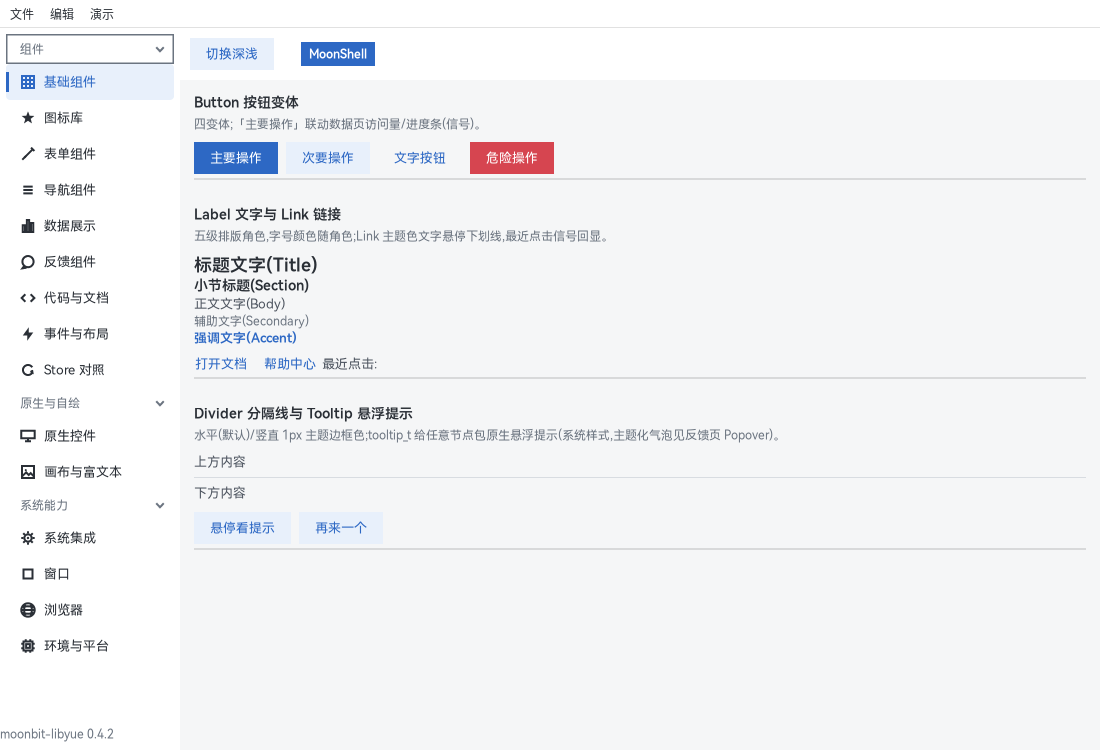
🎨 Modern theme — everything self-drawn, visually consistent across the three platforms; follows the system theme (light/dark + accent color) by default, and theme_apply reskins in one line (explicit theming opts out of system tracking, see on_system_theme_change):
@yue.theme_apply({ ..@yue.theme_from_system(), primary: "#1E4FA3" })📝 Declarative — describe the UI as a node tree, no hand-written new + set_xxx:
let window = @yue.mount_window(
  [
    @yue.label("Hello, MoonBit + libyue!", style=[("margin", 20.0)]),
    @yue.button("Quit", on_click=fn() { @yue.quit() }),
  ],
  title="Hello", size=Some((420.0, 160.0)), center=true, on_close=fn(_w) { @yue.quit() },
)
⚡ Signal reactivity — keep state in Signal / Store; bound spots refresh automatically, with no "update the text on click" glue:
let clicks = @yue.Signal::new(0)
let text = @yue.Signal::computed(fn() { "Clicked \{clicks.get()} times" })  // dependencies auto-collected

@yue.button("Click me", on_click=fn() { clicks.update(fn(n) { n + 1 }) }),
@yue.bind(text, fn(s) { s }),
🖥 Desktop-grade system integration — system tray · notifications · global shortcuts · clipboard · native menu bar · file dialogs · drag & drop · multiple monitors:
match @yue.Tray::new("icon.png") {
  Ok(t) => t.on_click(fn() { window.show() })
  Err(_e) => ()
}

let n = @yue.Notification::new()
n.set_title("Build finished")
n.show()
📊 Flagship app — process manager & hardware monitor (examples/sysmonitor): a pure-MoonBit data layer over /proc and /sys (CPU two-sample diff, memory, 1000-row process table, hwmon temperatures, disk IO + capacity, PCI GPUs, NIC rates) with one 1Hz timer driving five tabbed pages — 1053 processes fully sampled in 14.94ms:
moon run examples/sysmonitor55 native widgets fully bound · 57 themed self-drawn components · wrapper overhead startup on par with C++, memory +0.8MB · three-platform CI · published on mooncakes
#Quick start
Don't know MoonBit? The five-minute tutorial takes you from moon new to your first window.
Upgrading to 0.5.0: the Browser binding moved to a standalone package. Add "NoahLiu/moonbit-libyue/yue/browser" to your imports (@yue.Browser → @browser.Browser, API unchanged). Apps that don't import it are no longer linked against WebKit/WebView2.
#Documentation index
| Document | Content |
|---|---|
| tutorial.md | Five-minute quick start: from moon new to a running window, avoiding the three newcomer pitfalls |
| declarative.md | Declarative Node/mount render tree + Store reactive bindings |
| layout.md | Layout style key quick reference: all style keys + common-combination examples |
| components-ui.md | Themed component library quick reference: per-API signatures + parameter tables, including theme customization / light-dark switching |
| components.md | Widget API quick reference: both the classic setter and X::make props styles |
| Troubleshooting & topics | Platform adaptation notes · Linux tray · native-layer relink (three standalone documents) |
#Platform support
Ubuntu 24.04 (XFCE / GNOME / KDE) ✅ · Deepin 23 / 25 ✅ · Windows 10/11 ✅ · macOS builds pass (CI, no real machine)
Exes built on Windows run as a GUI subsystem — no console window on double-click.
#Contributing
Everyone is welcome: reporting platform-compatibility issues, adding widgets, improving docs — macOS real-machine testing is especially appreciated. A few basic requirements:
- Commit gate: moon check && moon test zero errors and zero warnings repo-wide
- Experience on record: write field-tested pitfalls together with their fixes into adaptation.md — not only in commit messages
- Small batches: one cohesive change per commit, short commit messages
The full process for adding widgets, native-layer releases, and more is in AGENTS.md.
#References
Install
Download ziplibyue 的 MoonBit 封装:统一跨平台 GUI API,平台差异由库内部吸收,消费方无感
guidesktopnativecross-platformlibyue

 MIT
MIT
 Updated 7 hours ago
 37 downloads