bm2
A lightweight Linux process manager for Bun and Node.js applications, written in MoonBit
bun
nodejs
process-manager
linux
Author
Version
0.11.0
License
MIT
Repository
Last updated
2 hours ago
Downloads
219
#bm2
Node.js 与 Bun 项目的进程管理器。
两个原生二进制,管一个项目时常驻约 5 MB,日志与告警都在里面。
#目录
#背景
Node.js 项目部署到服务器,需要一个进程管理器负责三件事。
一是应用退出后拉起,二是多实例分发,三是异常时通知到人。
常见选择是 pm2。它自己也跑在 Node.js 上,由此带来几个固定开销。
空闲常驻约 50 MB 内存;多实例之间多一层 cluster master 转发。
日志轮转要另装插件;看管进程被系统杀掉时,业务进程跟着一起停。
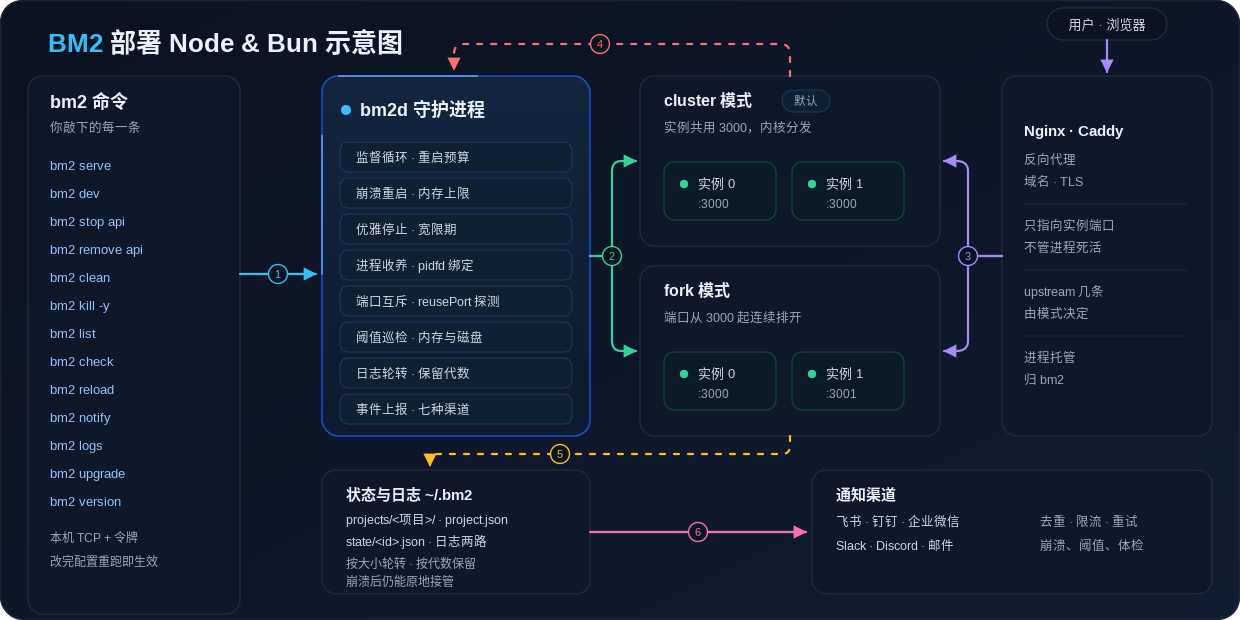
bm2 是 MoonBit 编译出的原生二进制,不依赖运行时,管一个项目时常驻约 5 MB。
多实例分发交给内核 SO_REUSEPORT,日志轮转与告警都在二进制内部。
看管进程崩溃或升级时,应用进程继续运行。
#应用场景
| 场景 | 说明 |
|---|---|
| 一台服务器放多个项目 | 常驻开销小,装上之后基本不用维护 |
| 接口需要多实例扛并发 | 多个实例共用端口,网关侧只写一条 upstream |
| 夜间故障需要有人知道 | 崩溃、恢复、阈值越线都推到群里或邮箱 |
| 每日运行情况要留档 | 每天一份统计,逐实例列出状态与资源占用 |
| 换进程管理器不想停业务 | 升级 bm2 本身不重启应用 |
#快速上手
#安装
需要 MoonBit 工具链与 C 工具链,只需装一次。
curl -fsSL https://cli.moonbitlang.com/install/unix.sh | bash
moon install chensuiyi/bm2/...
bm2 与 bm2d 一起装进 ~/.moon/bin。
安装时在本机编译一次;运行 bm2 不再需要工具链。
国内网络拉依赖慢时,把包下载地址换成中科大镜像,索引仍留在官方。
{
  "registry": "https://mooncakes.io/",
  "download": "https://mirrors.ustc.edu.cn/mooncakes",
  "index": "https://mooncakes.io/git/index",
  "api": "https://mooncakes.io",
  "symbols": "https://mirrors.ustc.edu.cn/mooncakes/symbols.zip"
}
写进 ~/.moon/config.json,文件不存在就新建。
#写配置
在项目目录建一份 bm2.toml,四项即可启动。
name = "api"
script = "src/index.ts"
instances = 2
port = 3000#启动
bm2 start        # 登记、拉起实例、写状态,成功时无输出
bm2 list         # 看实例表
应用监听 bm2 分配的端口,不要写死。
const port = Number(process.env.BM2_APP_PORT)

Bun.serve({ port, reusePort: true, fetch: () => new Response("ok") })
reusePort 只在多实例共用端口时需要;instances = 1 时可以去掉。
#命令
一条命令一行说明。动作型命令成功时不打印任何东西,退出码就是结果。
#bm2 start
登记项目、拉起实例、写状态。有三种给配置的方式:
bm2 start                 # 读当前目录的 bm2.toml
bm2 start api/bm2.toml    # 指定配置文件
bm2 start api             # 指定目录,找其中的 bm2.toml
已经在这跑的时候它什么都不做,退出码仍是 0——启动脚本与 CI 里重复执行是安全的。要换进程用 restart。
#bm2 restart
停掉旧实例、重新读磁盘上的配置、再拉起。改过端口或实例数之后用它,改动会生效。
bm2 restart api#bm2 list
看所有项目的实例表,也可以只看一个。
bm2 list
bm2 list api
bm2 list --json
│ 名称 │ 实例 │ PID │ 端口 │ 执行 │ 状态 │ 次数 │ 内存 │ 运行时长 │
│ bench │ 0 │ 108176 │ 4601 │ 独立 │ online │ 1 │ 26 MB │ 1h 12m │--json 给脚本用,每行一个实例对象。
#bm2 stop
停下实例,保留登记。之后再 bm2 start 就回来了。
bm2 stop
bm2 stop api
停止是持久的:停止标记写进登记信息,看管进程重启也不会把它带回来。
提交即返回,实例还在优雅退出的路上;bm2 list 看它什么时候落到「已停止」。
#bm2 delete
删除:停下、注销、交还名字。日志默认保留。
bm2 delete api       # 日志留着,随时能翻
bm2 delete api -f    # 连状态目录与日志一起删
delete 与 stop 的区别:前者之后这个名字可以给别的项目用,后者不行。
-f 是唯一会等结果的变形:删目录前必须确认项目已经从名册里消失。
#bm2 clean
清掉状态目录里没有登记信息的残留目录。
bm2 clean --dry-run   # 先看会删哪些
bm2 clean#bm2 check
只校验当前目录的 bm2.toml,顺带探端口是否可用。
bm2 check配置正常:项目 "bench",1 个独立实例,端口 4601,运行时 bun
通知:未启用
端口 4601~4601:空闲字段写错、端口段重叠、脚本不存在,都会在这里被点出来。
#bm2 reload
换入新的看管进程,应用继续跑。
bm2 reload换了 bm2 相关配置、或者装了新版运行时之后用它。
看管进程的 PATH 在启动那一刻定格,所以要让它看到新的 bun 或 node,得 reload 一次。
#bm2 upgrade
升级 bm2 本身,服务不中断。
bm2 upgrade新版本装好之后换班:旧看管进程退场,新进程接管运行中的应用。
#bm2 notify
给本项目所有通知目标发一条测试消息。
bm2 notify配置完通知之后先跑一次,通道不通会当场报错。
没配通知时它也会直说:
project api has no notifications enabled: set [notify].enabled = true and add at least one [[notify.target]] in bm2.toml#bm2 kill
停掉全部项目并退出看管进程。要确认才动手。
bm2 kill -y#bm2 version
bm2 versionbm2 0.10.0#配置
一份 bm2.toml 管一个项目,放在项目目录里。
没写出来的字段取默认值,写错字段名会被直接指出是哪一个。
#必填四项
name = "api"          # 项目名,也是状态目录名
script = "index.js"   # 入口文件,相对 cwd
instances = 4         # 实例数
port = 3020 # 起始端口#常用字段
| 配置键 | 默认 | 什么时候写 |
|---|---|---|
| cwd | 配置文件所在目录 | 应用在别处,必须是绝对路径 |
| runtime | bun | 用 Node 就写 "node" |
| exec_mode | cluster | 要独立端口写 "fork" |
| max_memory_mb | 512 | 调整内存上限与告警线 |
| max_tree_processes | 512 | 应用会 fork 出很多子进程时调大 |
| max_restarts | 10 | 调整自愈次数,0 是首次异常即停 |
| restart_delay_ms | 1000 | 调整重启间隔 |
| min_uptime_ms | 10000 | 活够这么久才算真的起来了 |
| stop_timeout_ms | 10000 | 停机时给应用的优雅退出时间 |
| log_max_size_mb | 10 | 单个日志文件的上限 |
| log_keep_files | 10 | 保留几代历史 |
| lang | 跟随操作者 | 钉死这个项目的输出与通知语言 |
| [notify] | 关闭 | 开告警与每日统计 |
name 会成为状态目录下的目录名,所以只允许字母开头,后面是字母、数字与下划线。
port 要保证最后一段端口不越界:port + instances - 1 不超过 65535。
写错就是这样:
bm2: InvalidField: root has unknown field max_size_mb#完整示例
name = "api"                # 项目名,也是状态目录名
script = "index.js"         # 入口文件,相对 cwd
instances = 4               # 实例数
port = 3020                 # 起始端口

cwd = "/wwwroot/api"        # 默认是配置目录,应用在别处才写
runtime = "bun"             # 用 Node 写 "node"
exec_mode = "cluster"       # 要独立端口写 "fork"
max_memory_mb = 768         # 单实例内存上限,也是告警基准
max_restarts = 10           # 自愈次数,0 是首次异常即停
restart_delay_ms = 1000     # 异常退出后等多久再拉起
min_uptime_ms = 30000       # 活过这么久才算真的起来了
stop_timeout_ms = 15000     # 停机的优雅退出时间
lang = "zh"                 # 输出与通知语言

log_max_size_mb = 10        # 单个日志文件上限
log_keep_files = 10         # 保留几代历史

[notify]
enabled = true
mail_url = "smtps://smtp.example.com:465"    # 用邮箱才写
mail_from = "bm2@example.com"

[[notify.target]]
platform = "feishu"         # 也可填 email
url = "__FEISHU_WEBHOOK__"
events = ["!lifecycle"]     # 不写就收全部事件
凭据用 __NAME__ 占位符,真值放 .env 或启动环境里。
#多实例与网关
instances 大于 1 时,两种执行模式的区别只有一处:端口怎么分。
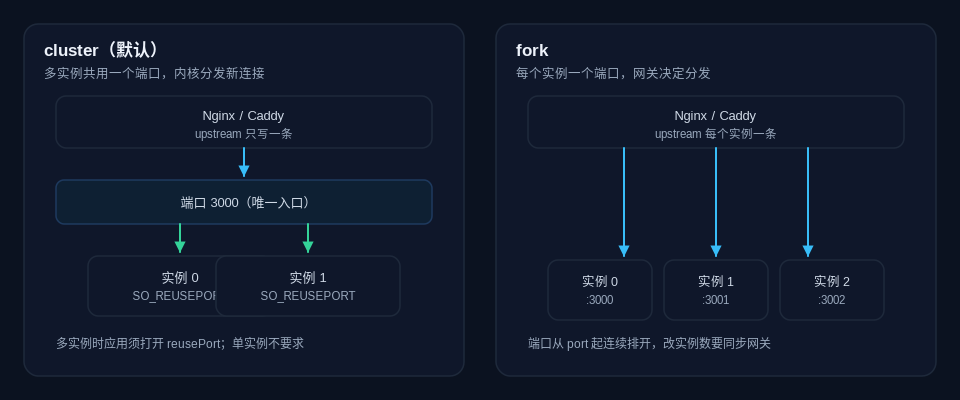
| 对比项 | cluster | fork |
|---|---|---|
| 端口 | 所有实例共用 port | 从 port 起连续排开 |
| 分发者 | 内核 SO_REUSEPORT | 网关,或没人分发 |
| 应用要求 | 多实例时须开 reusePort | 无 |
| 网关写法 | 一条 upstream | 每个实例一条 upstream |
| 改实例数 | 不用动网关 | 要同步 upstream 并 reload |
| 请求落点 | 新连接按内核规则分配 | 由网关决定,可按权重与健康状态 |
port = 3000、instances = 3 时,两种模式的端口分配不同。
cluster 下三个实例都监听 3000;fork 下分别是 3000、3001、3002。
拿不准用哪个就先试 cluster:网关配置最省事。应用改不动、或者需要按实例单独分配端口时,换 fork。
两种模式都要网关才能接域名与 TLS。bm2 不管证书,也不管域名解析。
#Nginx
cluster 只需要一条后端。
upstream api {
    server 127.0.0.1:3000;
}

server {
    server_name api.example.com;
    location / {
        proxy_pass http://api;
    }
}
fork 把每个实例写全。
upstream api {
    server 127.0.0.1:3000;
    server 127.0.0.1:3001;
    server 127.0.0.1:3002;
}

server {
    server_name api.example.com;
    location / {
        proxy_pass http://api;
    }
}
需要应用读到真实客户端 IP 时,再补一行 proxy_set_header X-Real-IP $remote_addr;。
#Caddy
Caddy 自动处理证书,两种模式各一行。
# cluster
api.example.com {
    reverse_proxy 127.0.0.1:3000
}

# fork
api.example.com {
    reverse_proxy 127.0.0.1:3000 127.0.0.1:3001 127.0.0.1:3002
}#两种模式互相切换
cluster 换 fork:网关从一条 upstream 改成每个实例一条并 reload。
应用可以去掉 reusePort,留着也无害。
fork 换 cluster:应用必须打开 reusePort;网关改回一条 upstream;端口段只保留起始端口。
#环境变量
应用拿到的环境是一个最小集合,不是启动 bm2 的那个 shell 的全部。
好处是同一份配置在任何机器上跑出同一个环境;代价是 export FOO=1 不会跟着进应用。
#.env 文件
项目的变量只有一个来源:与 bm2.toml 并排的 .env 文件。
按顺序读四个文件,后者覆盖前者:
| 顺序 | 文件 | 用途 |
|---|---|---|
| 1 | .env | 通用 |
| 2 | .env.production | 生产覆盖 |
| 3 | .env.local | 本机覆盖 |
| 4 | .env.production.local | 本机覆盖且生产 |
bm2 只管部署,所以 NODE_ENV 固定是 production,没有第二套环境。
文件不存在是正常的;存在却读不了、或格式写错,会直接报出文件与行号。
InvalidDocument: /srv/api/.env line 4: expected '=' after DATABASE_URL解析规则跟随 Node 生态的 dotenv,支持引号、跨行值、# 注释,KEY= 表示空值。
.env 里不做变量展开:FOO=${BAR} 的字面值就是 ${BAR}。
#应用能拿到的变量
| 变量 | 值 |
|---|---|
| BM2_APP_NAME | 项目名 |
| BM2_INSTANCE_ID | 实例编号,第一个是 "0" |
| BM2_APP_INSTANCE | 同实例编号,命名对齐 pm2 的 NODE_APP_INSTANCE |
| BM2_APP_PORT | 分配给这个实例的端口 |
| NODE_ENV | serve 下是 production,dev 下是 development |
BM2_APP_PORT 随模式变化:cluster 下每个实例都是 port,fork 下依次递增。
// 读到这里,就不用关心自己被第几个拉起
const port = Number(process.env.BM2_APP_PORT)
NODE_ENV 固定是 production,.env 里写成别的值会被拒绝。
除保留变量与项目变量外,只有 PATH、HOME、TMPDIR 会传下去,以及所有以 BM2_ 开头的变量。
BM2_ 透传是一条实用通道:凭据只需在 shell 里 export 一次,应用与 bm2.toml 的占位符都能读到。
PATH 决定应用用哪个 bun 或 node,它在看管进程启动那一刻定格。
换了运行时版本之后,先 bm2 reload 再启动项目。
#日志
应用的标准输出与错误各一条链,所有实例合并写在一起。
#位置
~/.bm2/projects/<项目名>/logs/
├── api.log              当前普通日志
├── api.1.log            上一代,依次 .2 .3
├── api.error.log        当前错误日志
└── api.error.1.log每行带时间戳与来源:[0] 是实例号,[bm2] 是 bm2 自己写的。
2026-11-22T14:35:12.345Z [0] GET /api/user/profile 200 12ms
2026-11-22T14:35:12.401Z [3] TypeError: Cannot read properties of undefined
2026-11-22T14:35:13.900Z [bm2] 实例 0 pid=4021 原因=exit_code 退出码=1 重启次数=1
第三行是崩溃记录,写在 api.error.log 里,写清了退出原因与累计重启次数。
#查看
日志就是普通文件,路径固定,直接用系统工具看。
tail -f ~/.bm2/projects/api/logs/api.log          # 跟随普通日志
tail -50 ~/.bm2/projects/api/logs/api.error.log   # 最近 50 行错误
grep ' 原因= ' ~/.bm2/projects/api/logs/api.error.log   # 只看崩溃记录
bm2 不提供自己的查看命令:tail、less +F、grep 比包一层更灵活,也能进任何编辑器。
#轮转
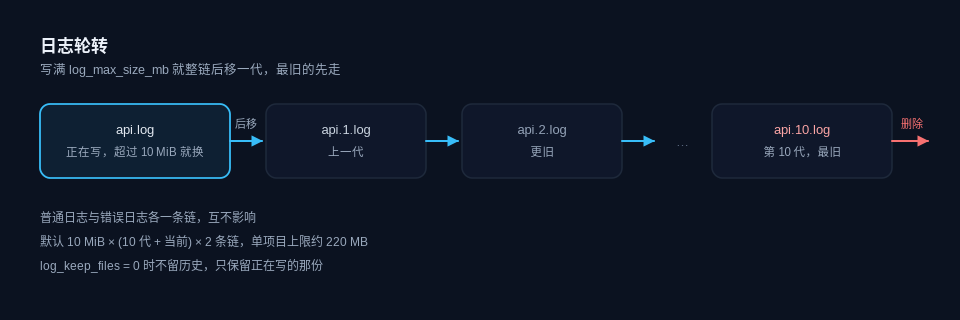
单个文件超过 log_max_size_mb 就换成新的一份,旧的往后挪一代。
超出 log_keep_files 的最旧那份删掉。
普通日志与错误日志各算各的,两条链互相不影响。
默认 10 MiB 与 10 代,单个项目最多约 220 MB;日志安静的项目占不满零头。
轮转只看大小、不看日期,时间覆盖因此不固定。
安静时一份 10 MB 可能很久不换,吵起来 10 代也许只够几小时。
找具体时间点靠 grep '2026-11-22T1[0-2]',不依赖文件名。
想只留当前那份,把 log_keep_files 写成 0。
#崩溃记录
崩溃记录只在异常退出或启动失败时写,人工停机不写。
内存超限时会多带两个数:超限时占用的内存与上限本身。
2026-11-22T12:32:20.608Z [bm2] 实例 0 pid=39335 原因=memory_limit 内存=560MB 上限=512MB 重启次数=2原因= 后面对应的处理方式,见常见问题。
#事件
事件是「发生了什么」的记录,一行一条,也是通知的开关单位。
#事件表
| 事件 | 含义 |
|---|---|
| crash | 实例崩溃,异常退出或启动失败,稍后重启 |
| errored | 自愈失败,重启次数用完,停下等人处理 |
| memory_limit | 超过 max_memory_mb,按异常重启 |
| oom_kill | 内存逼近上限时被系统杀掉 |
| reuseport_missing | 多实例没开 reusePort,项目被停 |
| lifecycle | 项目启停:启动、停止、退役、干净退出后重启 |
| daemon | 看管进程启动或换班接管项目 |
| threshold | 阈值告警:内存逼近、离线过久、重启过频 |
| disk_pressure | 状态盘剩余空间不足 |
| start_timeout | 拉起后端口一直没监听 |
| daily_stats | 每日统计 |
#事件日志
事件同时写到两个文件,一行一条,排查问题时先看这里。
~/.bm2/bm2d.events.log   看管进程与监督
~/.bm2/bm2.events.log    命令侧连接与重试
2026-11-22T12:32:19.379Z instance_exited app=worker instance=0 pid=39335 detail="exit_code=1"
2026-11-22T12:32:19.380Z instance_restart_scheduled app=worker instance=0 detail=exit_code字段是英文键,值按需出现,所以脚本可以直接按 instance_exited 过滤。
两个事件日志按大小轮转:10 MiB 一份、保留 10 代,文件名形如 bm2d.events.1.log。
#过滤
通知里用 events 决定收哪些,三种写法不能混用。
| 写法 | 效果 |
|---|---|
| 不写 | 收全部事件 |
| events = ["crash", "oom_kill"] | 只收列出的 |
| events = ["!lifecycle"] | 除了列出的都收 |
同一件事在 dedupe_window_s 内只说一次,默认一小时。
#阈值
阈值不写就是推荐值,写 0 才关闭。
| 配置键 | 含义 | 默认 |
|---|---|---|
| threshold_rss_percent | 内存占 max_memory_mb 的百分比 | 80 |
| threshold_offline_min | 实例离线多久算异常 | 5 分钟 |
| threshold_restarts | 连续重启几次算异常 | 5 |
| start_timeout_ms | 拉起后多久未监听算超时 | 30000 |
| threshold_disk_mb | 状态盘剩余空间的下限 | 1024 |
| threshold_storm | 十分钟内重启次数的上限 | 20 |
[notify]
threshold_rss_percent = 85    # 内存占上限 85% 时提醒
threshold_offline_min = 3     # 离线 3 分钟即报
threshold_storm = 0 # 关掉风暴告警#每日统计
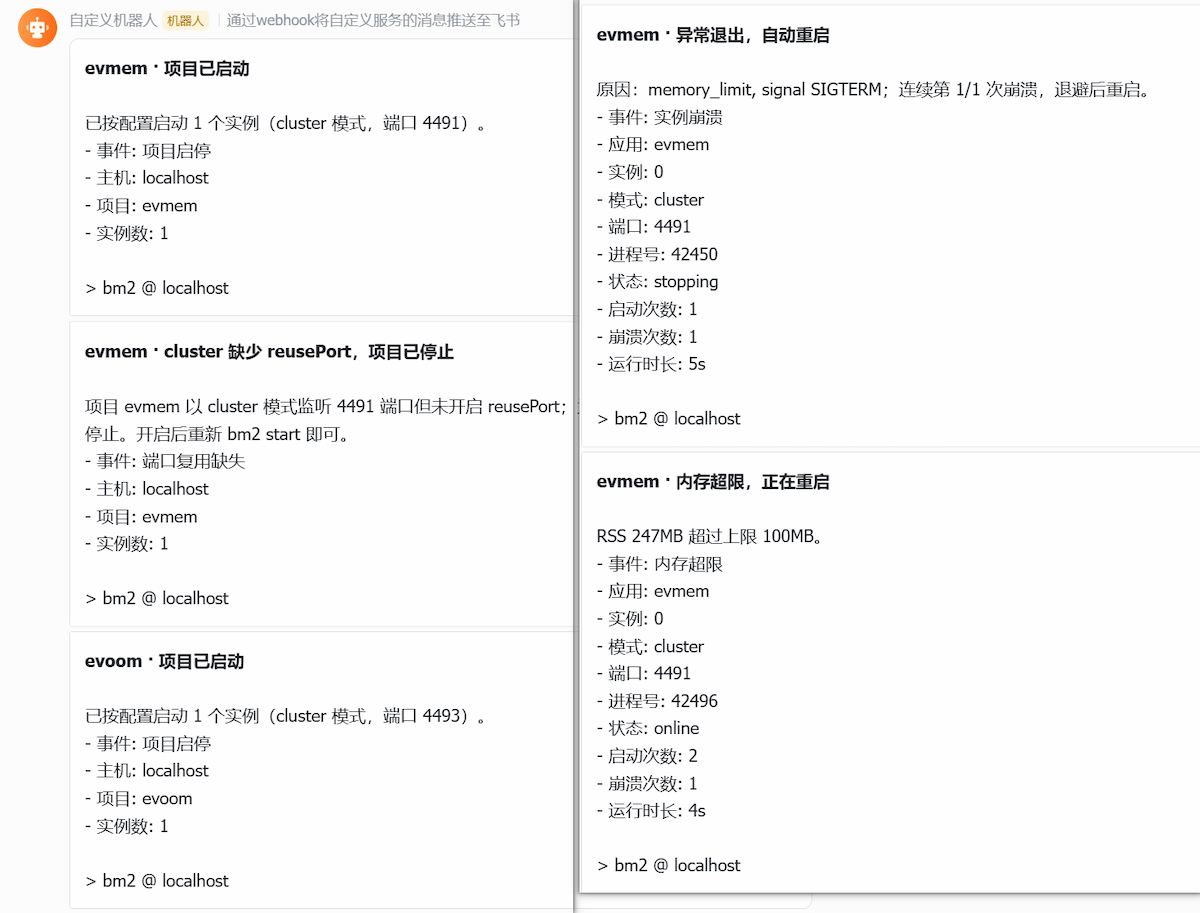
默认每天 8 点发一份,逐实例列出状态、端口、内存、运行时长与重启次数。
配置键是 [notify] daily_report_hour,取值 0~23。
不想要就在每个目标上排除它:
events = ["!daily_stats"]#通知上报
通知属于项目,写在同一份 bm2.toml 里。
只决定两件事:哪些事要说,说给谁听。
#上报平台
| 平台 | platform | 需要的字段 |
|---|---|---|
| 飞书 | feishu | url,可选 secret 加签 |
| 钉钉 | dingtalk | url,可选 secret 加签 |
| 企业微信 | wecom | url |
| Slack | slack | url |
| Discord | discord | url |
| 自定义接口 | webhook | url,可选 secret 作令牌 |
| 邮箱 | to,通道写在 [notify] |
邮件目标共用 [notify] 上的 SMTP 通道。
通道字段是 mail_url、mail_from、mail_username、mail_password。
其余平台都写 url,自定义接口可加 format 选报文形状,取值 text、markdown、card。
[[notify.target]]
platform = "slack"
url = "__SLACK_WEBHOOK__"
format = "markdown"
events = ["crash", "errored", "memory_limit"]
[[notify.target]]
platform = "email"
to = ["ops@example.com"]
events = ["!lifecycle"]一个项目可以写多个 [[notify.target]],各收各的事件。
#凭据
写在 bm2.toml 里的凭据用占位符,真值放 .env 或启动环境。
url = "__FEISHU_WEBHOOK__" # 真值在 .env 的 FEISHU_WEBHOOK这样配置文件可以进版本库,凭据不必。
#测试
改完配置先 bm2 check,它会指出字段与凭据的问题。
再发一条测试消息,通道不通会当场报错。
bm2 notify消息语言跟随项目 lang,中文项目的通知全中文。
#状态目录
~/.bm2 是 bm2 的工作目录,权限 0700,一个用户一份。
~/.bm2/
├── daemon.endpoint           控制通道
├── bm2d.pid                  看管进程号
├── bm2d.log                  看管进程自己的输出
├── bm2d.events.log           看管事件
├── bm2.events.log            命令侧事件
└── projects/
    └── api/
        ├── project.json      登记信息
        ├── state/            每个实例的运行状态
        ├── logs/             日志
        └── .tempLogs/        应用输出的暂存
state/<实例号>.json 记着 pid、启动时间、重启次数与上次退出原因。
看管进程崩溃后重新起来,靠它认回还在运行的应用进程,不会重复拉起。
一个用户一个看管进程、一份状态目录。
不要把 bm2 装在 root 下替其他用户管应用;需要隔离时每个用户各装一份,互不可见。
#常见问题
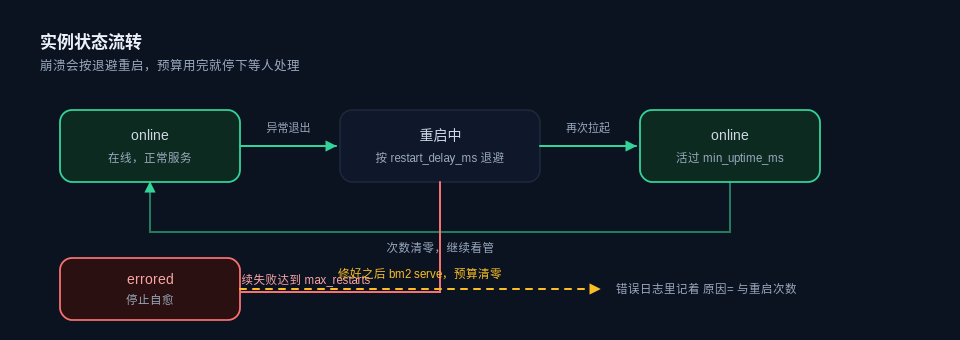
#状态显示 errored
errored 不代表进程崩了,而是 bm2 停止自愈了:重启次数用完,或遇到无法自动恢复的情况。
看错误日志里的 原因=,对症处理之后回到项目目录 bm2 start,重启预算会清零。
tail -5 ~/.bm2/projects/api/logs/api.error.log2026-11-22T12:32:20.608Z [bm2] 实例 0 pid=39335 原因=exit_code 退出码=1 重启次数=10#提示正在删除中
刚 bm2 delete 完又马上 bm2 start,会看到这一句:
api 正在删除中,稍等再启动删除是异步的:它发完停止信号就返回,实例还在退出、端口还没放开。等 bm2 list 里这个名字消失再 start,或者一开始就用 bm2 restart——它本来就是「停下再起」,不会撞上这个时间差。
#报 reuseport_missing
多实例模式要求应用打开 reusePort,没开就无法共用端口。
bm2 会把项目停下,而不是让它半死不活。
Bun.serve({ port, reusePort: true, fetch: (req) => new Response("ok") })三选一:打开 reusePort、把 instances 改成 1、或者改用 exec_mode = "fork"。
#报 script not found
script 相对 cwd 解析,不是相对你敲命令的目录。
cwd 不写时取 bm2.toml 所在目录。
所以配置文件和应用不在同一个目录时,两个字段都要写对。
cwd = "/wwwroot/api"
script = "dist/server.js"#端口冲突
两个项目的端口段有重叠,bm2 check 会直接指出。
cluster 下所有实例共用一个端口,fork 占用 port 到 port + instances - 1。
port conflict: worker port range 4401~4401 overlaps api 4400~4401#应用起来就退出
多数是环境变量缺失或配置写错,错误日志的第一行通常就是原因。
也检查运行时:runtime 按 PATH 解析,看管进程的 PATH 决定了用哪个 bun 或 node。
#收不到通知
按顺序确认三件事:[notify] enabled = true、目标写对、事件没被 events 排除。
再发一条测试消息。
bm2 notify#日志占用超出预期
两个配置键同时决定上界:log_max_size_mb × (log_keep_files + 1) × 2。
默认 220 MB。日志量大的项目把这个上限调小,比事后清理省事。
log_max_size_mb = 5
log_keep_files = 3#从 pm2 迁移
三步,应用代码不用改。
- 在项目目录写 bm2.toml,字段对应 ecosystem.config.js 里的那一组。
- 应用里把写死的端口换成 process.env.BM2_APP_PORT。
- pm2 stop 停旧的,再 bm2 start 拉起新的。
| pm2 | bm2 |
|---|---|
| pm2 start ecosystem.config.js | 项目目录里 bm2 start |
| pm2 list | bm2 list |
| pm2 logs api | tail -f ~/.bm2/projects/api/logs/api.log |
| pm2 stop api | bm2 stop api |
| pm2 restart api | bm2 restart api |
| pm2 delete api | bm2 delete api |
| pm2 flush | 由轮转自动处理 |
| pm2 startup + pm2 save | 交给 systemd |
确认新方案稳定之后,再 bm2 delete api 清掉登记。
pm2 那边用 pm2 stop 而不是 pm2 delete,留一条退路。
#运行机制
- bm2 是命令行客户端,bm2d 在后台看管项目
- 一份 bm2.toml 管一个项目,互不干扰
- 看管进程只做三件事:拉起、重启、写状态
- 应用输出先落到暂存,再合并进项目日志,看管进程崩了也不影响业务
- 看管进程退出或升级时应用继续跑,新进程读状态接管
- 状态与事件都落盘,重启后能对上原实例
需要连接排空的应用要自己处理 SIGTERM:拒绝新连接、处理完进行中的请求、再退出。
#与 pm2 对比
以下数字在 WSL2 的 Debian 上实测,同一个 server.ts、同一个 Bun 1.4.5。
内存是静置 60 秒后的 RSS,取三次采样中的稳定值;耗时重复三次,取区间。
| 指标 | pm2 7.0.4 | bm2 |
|---|---|---|
| 看管进程内存(管一个项目) | 71 MB | 5.2 MB |
| 单实例总占用(看管 + 应用) | 118 MB | 31 MB |
| 安装体积 | 25 MB | 5.1 MB |
| 运行时依赖 | Node.js 24 | 无 |
| 安装带来的包 | 70 个 npm 包 | 2 个可执行文件 |
| 重启到可用 | 229 ~ 272 ms | 113 ~ 131 ms |
| 日志轮转 | 需装 pm2-logrotate | 内置 |
| 多实例分发 | cluster master 进程 | 内核 SO_REUSEPORT |
| 配置 | ecosystem.config.js | bm2.toml,字段写错直接报 |
#环境要求
- Linux,内核 5.4 及以上
- Bun 1.4.0+,或 Node.js 24.0.0+
- 装 bm2 需要 MoonBit 与 C 工具链,运行不需要
#联系方式
- 仓库:https://github.com/chenbimo/bm2
- 邮箱:yicode@qq.com
Install
Download zipA lightweight Linux process manager for Bun and Node.js applications, written in MoonBit
bunnodejsprocess-managerlinux

 MIT

 Updated 2 hours ago
 219 downloads