 README
- TrEntity
- TEntityId
- ::newRawEntity::new
- ::to_stepRawEntity::to_step
- TRef
- TUnknownEntity
- Vfmt_num
- Vstep_str
- Vunknown_entity_witness
step
Port of https://github.com/tscircuit/stepts to MoonBit
cad
step
3d
modeling
Author
Version
0.1.24
License
Apache-2.0
Repository
Last updated
6 days ago
Downloads
264
#gmlewis/step (MoonBit)
A high-level 3D modeling DSL and lossless STEP (ISO 10303-21) parser/serializer in MoonBit.
This repo allows you to build 3D models using a simple API and export them to valid,
topologically-sound STEP files.
Onshape design: https://cad.onshape.com/documents/b8320fedf1f1ea6028755ae8/w/50dfab2e1185c97711b860a6/e/20263eabe6f1f22cc85a5a09?renderMode=0&uiState=695414a99e93423471a30e60
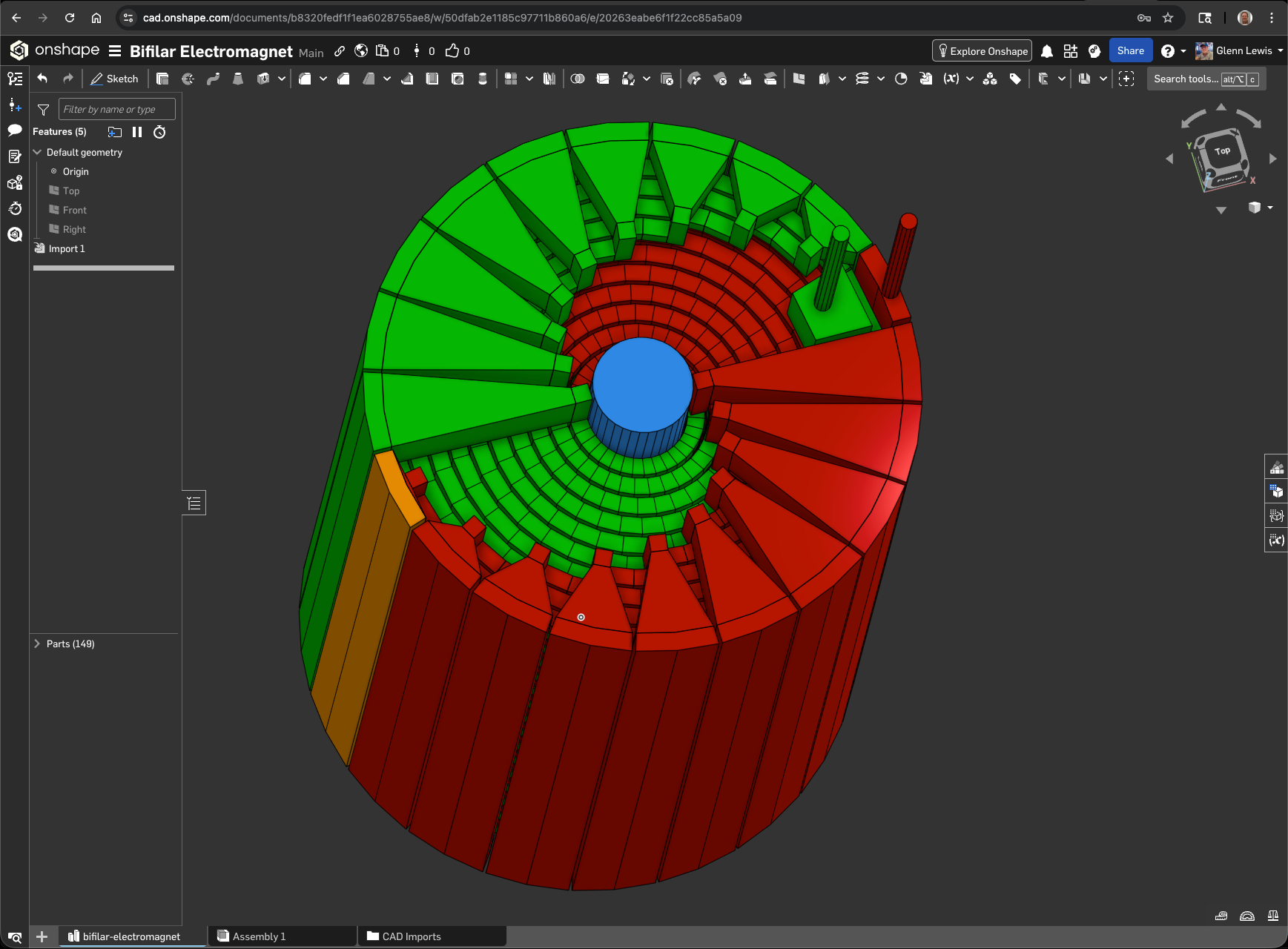
Example 12: The Bifilar Electromagnet, an invention of mine with interesting electrical properties.
#Quick Start (Modeling)
Building a model is intuitive:
async fn main {
  let design = @cad.Design::new(name="my-model")
    .add(
      @cad.Cuboid::new(20, 20, 20)
        .with_name("base")
        .with_color(@cad.Rgb::orange())
    )
    .add(
      @cad.CalibrationChamferBlock::new(10, 10, 5, chamfer_size_mm=1.0)
        .with_name("top-part")
        .translate(z=20)
    )

  design.write_step(Some("model.step"))
}#Quick previews (no built-in viewer)
The library writes files; it has no embedded viewer. For a fast look:
| Format | How | Notes |
|---|---|---|
| STEP | ./examples/run-example.sh 39 -o fits.step | Exact B-Rep; opens in any CAD viewer or slicer. |
| STL | ./examples/run-example.sh 39 -o fits.step -stl | OCCT tessellation; set STL_DEFLECTION=<mm> (default 0.05). |
| PNG | ./examples/run-example.sh 39 -o fits.step --png=preview.png | Four views (iso/top/front/side); needs OCCT, macOS sips, and Inkscape (one view without it). |
| Blender | ./examples/run-example.sh 39 --blend model.blend | Real booleans and an editable scene; see below. |
| glTF | ./examples/run-example.sh 39 --gltf fits.gltf | Z-up JSON with an embedded buffer; opens in web/three.js glTF viewers. Written by the example itself. |
Run ./examples/run-example.sh --help for all wrapper options, or
./examples/run-example.sh 39 -- --help for an example's own parameters.
#Exporting to Blender (Python)
This repo can generate Blender 5.0 Python scripts that recreate your model with correct physical scale. The generated script uses meters (Blender’s default), while your CAD dimensions remain in millimeters.
#From your own model
- Implement your design in MoonBit (see the modeling example above).
- Emit Blender Python instead of STEP:
design.write_blender_python(Some("model.py"))- Open Blender and run the script from the Scripting workspace, or run Blender directly from the command line:
blender --background --factory-startup --python model.py#From the included examples
Generate Blender scripts and ".blend" files for all examples:
./scripts/manage_examples.py all --bpyThis produces .py and .blend files in bpy-out.
Each script removes the default cube (if present), recreates the model, and selects all created geometry.
#Exporting to glTF
Design::to_gltf() writes a self-contained glTF 2.0 document (embedded base64
buffer) from the compiled B-Rep, with one mesh/primitive and material per
SceneNode. Coordinates are Z-up (the STEP convention); rotate the root
node by -90 degrees about X if your viewer assumes Y-up. Circular and
swept-curve bands are tessellated at 64 segments.
design.to_gltf_file(Some("model.gltf"))From the included examples, pass --gltf (it replaces STEP output, like
--blend/--bpy):
./examples/run-example.sh 39 --gltf fits.gltfThe exporter tessellates PLANE, CYLINDRICAL_SURFACE, and
SURFACE_OF_LINEAR_EXTRUSION faces; any other surface aborts with an explicit
error rather than emitting an invalid mesh.
#Quick Start (Parsing)
Parsing from a string:
fn parse_example(step_text : String) -> Unit {
  match @parse.parse_repository_from_string_result(step_text) {
    @parse.ParseRepositoryResult::Ok(repo) => {
      let normalized = repo.to_step_file()
      println("entities=" + repo.len().to_string())
      println(normalized)
    }
    @parse.ParseRepositoryResult::Err(info) =>
      @cli.eprintln(@parse.format_step_parse_error(info))
  }
}#Features
- Fluent 3D DSL: Chain transformations like .translate(), .with_color(), and .with_name().
- Lossless Roundtrips: Unknown/unmodeled entities are preserved during parse/serialize cycles.
- Robust CLI: Built-in validation, proper stderr reporting, and short-circuiting exit codes.
- Deterministic: Serializer output is stable (parse → serialize → parse is idempotent).
#Booleans are nominal
In the STEP backend, difference() and union_all() are nominal: they
concatenate the faces of their children; they do not trim or subtract. The
resulting file still describes valid closed shells, but overlapping geometry is
not resolved. The Blender backend (create_blender_file /
write_blender_python) performs real boolean operations instead.
Use Design::to_step_file_checked() (or write_step(..., checked=true)) as the
recommended export entry point: it refuses to write a file when the design has
an error diagnostic, such as a boolean nested inside another boolean (those
children contribute no faces). Design::diagnostics() reports every nominal or
dropped boolean, and designs containing a nominal boolean carry a one-line
notice in the STEP header. to_step_file() and write_step() remain
unchecked for backward compatibility.
The toolkit is not limited by this. The STEP entity layer models real
boolean and CSG constructs — BOOLEAN_RESULT (.UNION., .INTERSECTION.,
.DIFFERENCE.), CSG_SOLID, CSG_SHAPE_REPRESENTATION, HALF_SPACE_SOLID, and
the CSG primitives (BLOCK, SPHERE, RIGHT_CIRCULAR_CYLINDER,
RIGHT_CIRCULAR_CONE, TORUS, RECTANGULAR_PYRAMID, RIGHT_ANGULAR_WEDGE) —
and any data entity it does not recognize is preserved verbatim as RawEntity
through parse/serialize. So a file containing true booleans, complex surfaces,
or constructs the DSL does not model can still be represented and handed to a
full CAD kernel. The nominal caveat applies only to the convenience builders
difference() and union_all() in the @cad DSL.
Design::to_csg_step() / write_csg_step() emit the real boolean tree
(CSG_SOLID wrapping BOOLEAN_RESULT nodes) instead. OCCT's STEP reader cannot
consume that tree directly, so scripts/csg_eval.py evaluates it as a
development-time step: it extracts each leaf B-Rep, folds the tree with OCCT's
bfuse/bcut/bcommon, and writes a flat B-Rep that passes the full
validator. The library stays kernel-free; the script only needs DRAWEXE or
occt-draw installed:
- python3 scripts/csg_eval.py part-csg.step -o part.step
Design::write_step_evaluated() wires that evaluation into the export flow.
It writes the CSG tree to a temp file, runs scripts/csg_eval.py (resolved via
$MOONBIT_STEP_ROOT, falling back to ./scripts/csg_eval.py), and writes the
evaluated flat B-Rep. The method is async and aborts with an explicit message
when the script or OCCT is missing; the nominal paths are unchanged.
design.write_step_evaluated(Some("part.step"))Every example accepts --eval <path>, and run-example.sh supports
--eval[=<path>] (it also derives -stl/--png previews from the evaluated
file):
./examples/run-example.sh 40 --eval=hole.step --png=hole.png#Face queries and sketch-on-face
Design::planar_faces() compiles the design and walks
MANIFOLD_SOLID_BREP -> CLOSED_SHELL -> ADVANCED_FACE -> PLANE, returning a
FaceSet of planar faces in world coordinates. Each FaceInfo carries the
plane normal, a point on the face, its area, the outer boundary, and a
right-handed frame (u, v, normal, with u x v = normal) so a 2D profile
can be mapped onto the face. Cylindrical/conical/B-spline faces are skipped.
The query API mirrors MakerCad's Faces().AlignedWith(...).SortByZ(...):
let block = @cad.Cuboid::new(40.0, 30.0, 10.0).with_name("block")
let top = @cad.Design::new(name="probe")
  .add(block)
  .planar_faces()
  .aligned_with((0.0, 0.0, 1.0))   // normal parallel to +Z
  .sort_by_z(ascending=false)      // highest first
  .first_matching(fn(_f) { true }) // -> FaceInfo?

let profile = @cad.Profile2D::new(@cad.Profile2D::circle(8.0, segments=48))
let design = @cad.Design::new(name="hole").add(
  @cad.cut_on_face(
    block,
    profile,
    top,                            // FaceInfo
    10.0,                           // cut depth
    center=top.local_xy(top.center()),
  ),
)
Profile2D::on_face / ExtrudedProfile::on_face place a profile in the face
frame (into=true grows inward for a cutter), and Design::add_profile_on_face
adds it as a node. In the flat STEP backend the cut is still nominal face
concatenation; use write_step_evaluated() (below) or the Blender backend for
a real trimmed cut. See examples/40-face-query-hole.
#Deterministic profile helpers
Profile2D construction helpers compute exact coordinates — no solver runs at
export time, so the STEP text depends only on your numbers and stays diffable:
@cad.bolt_circle(6, 22.0)                 // hole centers on a bolt circle
@cad.grid_of_holes(3, 2, 20.0, 15.0)      // centered, row-major centers
@cad.point_on_circle(10.0, 90.0)          // one point at an angle
@cad.midpoint(a, b)
@cad.project_point_to_line(p, a, b)       // perpendicular foot

let profile = @cad.Profile2D::new(@cad.Profile2D::centered_circle(60.0))
  .with_hole_at(0.0, 0.0, 20.0)                       // central bore
  .with_bolt_circle(6, 22.0, 5.0, fit=@cad.Fit::Free) // holes grow by the fit
let plate = @cad.ExtrudedProfile::new(profile.outer, 8.0, holes=profile.holes)
with_holes_at and with_grid_of_holes bulk-add holes; every helper returns
concrete Array[Vec2]. centered_circle and tangent_rect are named aliases
of circle and rounded_rect. See examples/41-flange-bolt-circle.
#Fits and clearances
Fit captures printed-hole clearance as intent instead of a hand-computed
number: Nominal (0.00 mm per face), Close (0.10), Free (0.25), and
Press (-0.05, interference). Clearance is per face, so the hole diameter
changes by 2 * per_face_mm(); only voids grow.
let hole = @cad.Profile2D::hole_with_fit(5.0, fit=@cad.Fit::Free)
let plate = @cad.ExtrudedProfile::new(
  @cad.Profile2D::rect(40.0, 20.0),
  5.0,
  holes=[hole],
)
STEP export stays nominal: a fit changes the modelled void, not a printer
compensation layer. The values are a starting point for FDM printing, not a
universal standard.
#Development & Validation
#Verification
Run the unit tests and formatters:
- ./test-all.sh
#STEP validation
scripts/validate_step.py is the compatibility gate. It checks ISO 10303-21
syntax (including the real-number grammar: upper-case E, mandatory decimal
point, no lower-case e), #id reference integrity, per-shell edge
usage/orientation, PLANE-face planarity, OCCT checkshape, and watertight
tessellation:
- python3 scripts/validate_step.py part.step
- python3 scripts/validate_step.py --no-mesh part.step (syntax/topology only)
- python3 scripts/validate_step.py --gmsh part.step (adds a second mesher)
manage_examples.py --validate runs the same gate for every generated
example. CI runs manage_examples.py all --validate --no-mesh on every push
and the tessellation gate daily.
#Geometric Validation & Rendering
We use Open CASCADE (occt-draw or DRAWEXE) to ensure topological validity and generate previews:
- ./scripts/manage_examples.py all --validate --render --readme
#Fonts
Text examples use the baloo font from gmlewis/fonts-b/baloo. Its data is
vendored in assets/fonts/baloo.json.gz (SIL Open Font License 1.1; see
assets/fonts/LICENSE-baloo.txt), so the
examples work in a fresh checkout without any setup.
@cad.load_font("name") checks these paths in order:
- ./assets/fonts/name.json.gz
- ./all-fonts/name.json.gz
- $MOONBIT_STEP_ROOT/assets/fonts/name.json.gz
- $MOONBIT_FONTS_DIR/all-fonts/name.json.gz
To use another font, set MOONBIT_FONTS_DIR to a
gmlewis/fonts checkout containing an
all-fonts/ directory.
#Goals
- Provide a pleasant authoring UX for 3D models in MoonBit.
- Parse real-world STEP files without panicking.
- Provide actionable parse errors (line/col + statement snippets).
#License
Apache-2.0
#Status
The code has been updated to support compiler:
$ moon version --all
moon 0.1.20261016 (1af328f 2026-10-16) ~/.moon/bin/moon
moonc v0.10.16+b1a0e846e (2026-10-16) ~/.moon/bin/moonc
moonrun 0.1.20261016 (1af328f 2026-10-16) ~/.moon/bin/moonrun
RawEntity
pub struct RawEntity {
  name : String
  args : String
}
 Apache-2.0

 Updated 6 days ago
 264 downloads