

tui
Terminal UI library for MoonBit with reactive signals
tui
terminal
ui
cli
moon add mizchi/tui@0.10.0
Download zipAuthor
Version
0.10.0
License
MIT
Repository
Last updated
2 months ago
Downloads
62K
Dependencies
- mizchi/layout0.2.0
- mizchi/crater-core0.18.0
- mizchi/crater-layout0.18.0
- mizchi/css0.2.0
- mizchi/signals0.6.4
- mizchi/tui-terminal-buffer0.1.3
- moonbitlang/async0.19.2
- mizchi/syntree0.2.3
- moonbitlang/x0.4.45
 README
#mizchi/tui
Terminal UI library for MoonBit with virtual DOM-based rendering.
#Features
- Virtual DOM with diff-based ANSI rendering
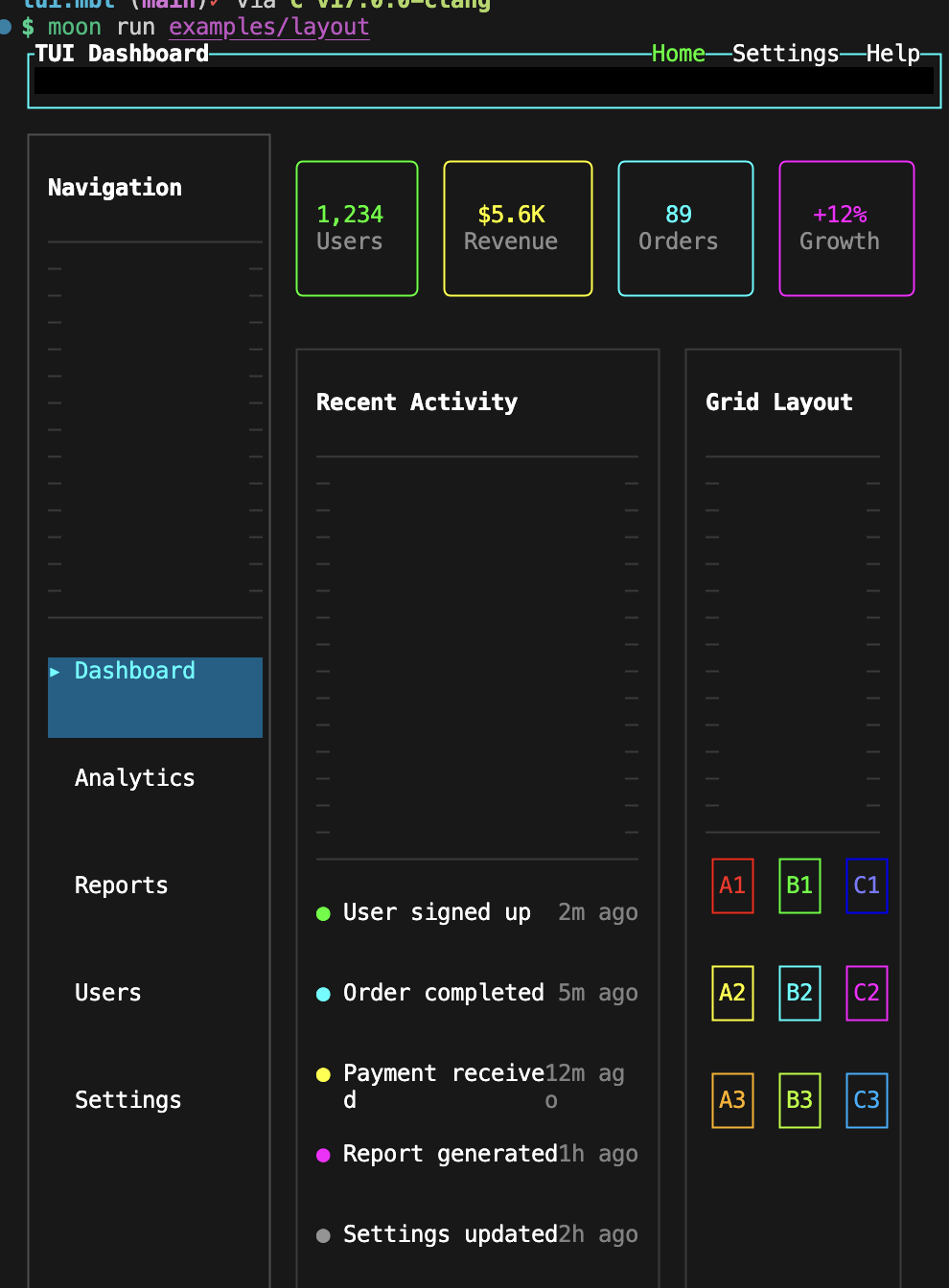
- Flexbox and CSS Grid layout (powered by mizchi/crater)
- Reactive signals integration (mizchi/signals)
- Styled UI components (@components)
- Keyboard and mouse input handling
#Installation
{
  "import": {
    "mizchi/tui": "0.3.0"
  }
}#Package Structure
mizchi/tui/
├── vnode/      # Virtual DOM primitives (row, column, view, grid, text)
├── components/ # Styled UI components (button, modal, table, etc.)
├── headless/   # State types (ButtonState, InputState, etc.)
├── events/     # Input parsing (KeyEvent, MouseEvent)
├── render/     # ANSI rendering engine
├── io/         # Platform I/O (terminal size, keypress)
└── core/ # Low-level types (Component, Color)#Quick Start
fn main {
  let node = @vnode.column(gap=1.0, padding=1.0, border="rounded", [
    @vnode.text("Hello, TUI!", fg="cyan", bold=true),
    @components.button("Click me"),
    @components.progress_bar(0.7),
  ])

  // Render to string
  let output = @vnode.render_vnode_once(80, 24, node)
  println(output)
}#Layout Primitives (@vnode)
// Flex containers
@vnode.view([...])                    // column by default
@vnode.view(direction="row", [...])   // horizontal
@vnode.row([...])                     // shorthand for direction="row"
@vnode.column([...])                  // shorthand for direction="column"

// Grid layout
@vnode.grid(columns=[1.0, 2.0, 1.0], [...])  // 1fr 2fr 1fr
@vnode.grid_item(column_span=2, child=...)   // span multiple cells

// Named grid areas
@vnode.grid(
  areas=["header header", "sidebar main", "footer footer"],
  [
    @vnode.grid_area("header", header_content),
    @vnode.grid_area("sidebar", sidebar_content),
    @vnode.grid_area("main", main_content),
    @vnode.grid_area("footer", footer_content),
  ]
)

// Text
@vnode.text("Hello", fg="cyan", bold=true)

// Spacing
@vnode.spacer()      // flexible space
@vnode.hspace(2.0)   // horizontal space
@vnode.vspace(1.0) // vertical space#Styled Components (@components)
// Buttons
@components.button("Submit", state=@headless.ButtonState::Focused)
@components.icon_button("✕")
@components.text_button("Learn more")

// Form
@components.checkbox("Remember me", true)
@components.radio("Option A", true)
@components.switch(true, "Dark mode")
@vnode.input("value", placeholder="Enter text...")

// Selection
@components.listbox(items, selected_id)
@components.tab_bar(tabs, selected_id)
@components.combobox_trigger("Select...", open=false)

// Feedback
@components.progress_bar(0.5)
@components.spinner(tick)
@components.gauge("CPU", 0.75)
@components.sparkline(data)

// Modal
@components.modal("Title", [...])
@components.alert_dialog("Error occurred")
@components.confirm_dialog("Delete?")

// Dashboard
@components.table(columns, rows)
@components.stat("Users", "1,234")
@components.meter("Memory", 0.8)#Layout Evaluation (experiments/eval_ui)
The experiments/eval_ui package provides a layout regression harness and
layout-rect snapshots (IDs only, auto/root filtered).
# Base patterns
moon -C experiments/eval_ui run . -- --layout-snapshot

# Persona 5 patterns
moon -C experiments/eval_ui run . -- --layout-snapshot-p5
For running eval with layout-rect inference (no AA parsing), add --infer-layout:
moon -C experiments/eval_ui run . -- --infer-layoutSnapshots:
- __snapshots__/eval_ui_layout.txt
- __snapshots__/eval_ui_layout_p5.txt
#Examples
moon run examples/simple            # Minimal counter app
moon run examples/command-launcher   # Raycast-style command palette
moon run examples/completion         # Inline completion UI
moon run examples/components         # Component showcase gallery
moon run examples/editor             # Text editor with syntax highlighting
moon run examples/form               # Form with inline editing
moon run examples/grid-area          # Named grid area layout
moon run examples/grid-layout        # Grid layout demo (dashboard/calendar)
moon run examples/kitty-graphics     # Kitty terminal graphics protocol demo
moon run examples/roguelike          # Roguelike game UI
moon run examples/wizard             # Multi-step setup wizard (inquirer.js-style)
Note: The chat example moved to mizchi/vivebox.
#Documentation
See docs/tutorial.mbt.md for detailed API documentation.
#License
MIT
#App
App manages the render loop and diff-based updates
#BorderChars
Re-exports for convenient access to commonly used types and functions
Users can import @tui and access most APIs from there.
#CharCell
A single character cell in the terminal
#Color
Re-exports for convenient access to commonly used types and functions
Users can import @tui and access most APIs from there.
#Component
Re-exports for convenient access to commonly used types and functions
Users can import @tui and access most APIs from there.
#EditConfig
Configuration for editable input behavior
#FocusContext
Focus context for managing Tab navigation
#FocusNav
Focus navigation helper for keyboard navigation
#RenderStyleMap
Re-exports for convenient access to commonly used types and functions
Users can import @tui and access most APIs from there.
#Role
Re-exports for convenient access to commonly used types and functions
Users can import @tui and access most APIs from there.
#SelectionState
Selection state for single-select components
#TextContentMap
Re-exports for convenient access to commonly used types and functions
Users can import @tui and access most APIs from there.
#ToggleState
Toggle state for checkbox/switch
#TuiNode
Type alias for luna Node with TuiEvent and TuiAttrValue
#VNodeApp
VNodeApp manages the vnode render loop with diff-based updates
#ansi_full_reset
fn ansi_full_reset() -> StringFull terminal reset sequence for recovering from corrupted state
#column
fn column(id? : String, gap? : Double, margin? : Double, margin_x? : Double, margin_y? : Double, padding? : Double, padding_x? : Double, padding_y? : Double, width? : Double, height? : Double, min_width? : Double, min_height? : Double, flex_grow? : Double, justify? : String, align? : String, border? : String, border_color? : String, bg? : String, role? : String, tab_index? : Int, on_click? : (TuiEvent) -> Unit?, children : Array[Node[TuiEvent, TuiAttrValue]]) -> Node[TuiEvent, TuiAttrValue]Column container (vertical flex)
#enable_mouse_all
fn enable_mouse_all() -> StringEnable mouse with motion tracking (reports move events even without button press)
#form_edit_config
fn form_edit_config(field_name : String, signal : Signal[String], on_edit_start? : () -> Unit?, on_edit_end? : () -> Unit?, on_force_quit? : () -> Unit?) -> EditConfigHelper to create a standard edit config for form fields
#fragment
Fragment
#grid
fn grid(columns? : Array[Double], rows? : Array[Double], areas? : Array[String], auto_flow? : String, id? : String, gap? : Double, padding? : Double, padding_x? : Double, padding_y? : Double, width? : Double, height? : Double, border? : String, border_color? : String, bg? : String, role? : String, tab_index? : Int, children : Array[Node[TuiEvent, TuiAttrValue]]) -> Node[TuiEvent, TuiAttrValue]Grid container with CSS Grid layout
Supports both explicit columns/rows and named areas
#grid_area
Grid area - place child in a named grid area
Used with grid(areas=[...]) for semantic layout
#grid_item
fn grid_item(column? : Int, row? : Int, column_span? : Int, row_span? : Int, tab_index? : Int, child~ : Node[TuiEvent, TuiAttrValue]) -> Node[TuiEvent, TuiAttrValue]Grid item with placement control (explicit column/row positioning)
#hspace
Horizontal space with fixed width
#init_vnode_terminal
fn init_vnode_terminal(width : Int, height : Int, output_fn : (String) -> Unit, mouse? : Bool, raw_mode? : Bool) -> (VNodeApp, () -> Unit)Initialize a VNodeApp with terminal setup and return a cleanup function.
#input
fn input(value : String, id? : String, placeholder? : String, state? : InputState, fg? : String, bg? : String, placeholder_fg? : String, focus_border_color? : String, edit_border_color? : String, disabled_fg? : String, disabled_bg? : String, width? : Double, min_width? : Double, padding_x? : Double, padding_y? : Double) -> Node[TuiEvent, TuiAttrValue]Create an input component
#input_plain
fn input_plain(value : String, placeholder? : String, state? : InputState, fg? : String, placeholder_fg? : String) -> Node[TuiEvent, TuiAttrValue]Create an input field without border (inline style)
#is_printable_char
fn is_printable_char(c : Char) -> BoolCheck if a character is printable (for IME input detection)
#is_printable_string
fn is_printable_string(s : String) -> BoolCheck if a string is all printable characters (for IME input detection)
#render_once
Simple render function for one-shot rendering (no reactivity)
#render_vnode_once
Simple render function for one-shot rendering (no reactivity)
#resolve_button_state
fn resolve_button_state(id : String, hover_id : String, focus? : FocusNav?, disabled? : Bool) -> ButtonStateResolve button state from hover_id and optional FocusNav
#row
fn row(id? : String, gap? : Double, margin? : Double, margin_x? : Double, margin_y? : Double, padding? : Double, padding_x? : Double, padding_y? : Double, width? : Double, height? : Double, min_width? : Double, min_height? : Double, flex_grow? : Double, justify? : String, align? : String, border? : String, border_color? : String, bg? : String, role? : String, tab_index? : Int, on_click? : (TuiEvent) -> Unit?, children : Array[Node[TuiEvent, TuiAttrValue]]) -> Node[TuiEvent, TuiAttrValue]Row container (horizontal flex)
#run
fn run(render_fn : () -> Component, on_event : (InputEvent) -> Bool, mouse? : Bool, on_hover? : (String) -> Unit?) -> UnitRun a TUI application with simplified lifecycle management.
Handles terminal setup, event loop, and cleanup automatically.
Parameters:
- render_fn: Function that returns the component tree
- on_event: Event handler that returns false to quit
- mouse: Whether to enable mouse support (default: true)
Example:
@tui.run(
  fn() { @tui.text("Hello") },
  fn(event) { if event.is_quit() { false } else { true } },
)#run_vnode_app
fn run_vnode_app(width : Int, height : Int, render_fn : () -> Node[TuiEvent, TuiAttrValue], output_fn : (String) -> Unit) -> (() -> Unit)Full-screen vnode app helper: sets up alt screen and handles cleanup
#start_edit
fn start_edit(config : EditConfig, current_value : String, on_complete : () -> Unit, confirm_on_shift_enter? : Bool, esc_cancels? : Bool) -> UnitStart editing a field with cooked mode (IME support)
This exits alternate screen temporarily for proper IME input
confirm_on_shift_enter: if true, Shift+Enter confirms and Enter inserts newline
esc_cancels: if false, Esc is ignored
#start_edit_inplace
fn start_edit_inplace(config : EditConfig, current_value : String, row : Int, col : Int, width : Int, height : Int, multiline : Bool, on_complete : () -> Unit, confirm_on_shift_enter? : Bool, esc_cancels? : Bool, on_lines_change? : (Int) -> Int?, on_completion? : (String, Int) -> String??) -> UnitStart editing a field inplace (stays in TUI screen)
row/col are 1-indexed ANSI coordinates
width/height define the input area (supports multi-line wrapping)
multiline: if true, Enter can insert newline when confirm_on_shift_enter is true
confirm_on_shift_enter: if true, Shift+Enter confirms
esc_cancels: if false, Esc is ignored
on_lines_change: optional callback (line_count) -> new_height for dynamic resizing
on_completion: optional callback (text, cursor_pos) -> completion_suffix for Tab completion
#start_edit_inplace_in_bounds
fn start_edit_inplace_in_bounds(config : EditConfig, current_value : String, bounds : HitTestResult, multiline : Bool, on_complete : () -> Unit, confirm_on_shift_enter? : Bool, esc_cancels? : Bool, border? : Int, on_lines_change? : (Int) -> Int?, on_completion? : (String, Int) -> String??) -> UnitStart editing within bounds (HitTestResult) with border adjustment.
bounds.x/y are 0-indexed; row/col for ANSI are 1-indexed.
on_completion: optional callback (text, cursor_pos) -> completion_suffix for Tab completion
#start_keypress_listener
fn start_keypress_listener(callback : (String) -> Unit) -> UnitStart listening for keypresses (event-driven)
#text
fn text(content : String, fg? : String, bold? : Bool, underline? : Bool, role? : String) -> Node[TuiEvent, TuiAttrValue]Static text node
#text_dyn
fn text_dyn(getter : () -> String, fg? : String, bold? : Bool, underline? : Bool, role? : String) -> Node[TuiEvent, TuiAttrValue]Dynamic text node
#textarea
fn textarea(value : String, id? : String, placeholder? : String, state? : InputState, rows? : Int, fg? : String, bg? : String, placeholder_fg? : String, focus_border_color? : String, edit_border_color? : String, min_width? : Double, padding_x? : Double, padding_y? : Double) -> Node[TuiEvent, TuiAttrValue]Create a textarea component (multi-line input)
#view
fn view(direction? : String, id? : String, gap? : Double, margin? : Double, margin_x? : Double, margin_y? : Double, padding? : Double, padding_x? : Double, padding_y? : Double, width? : Double, height? : Double, min_width? : Double, min_height? : Double, flex_grow? : Double, justify? : String, align? : String, border? : String, border_color? : String, bg? : String, role? : String, tab_index? : Int, on_click? : (TuiEvent) -> Unit?, children : Array[Node[TuiEvent, TuiAttrValue]]) -> Node[TuiEvent, TuiAttrValue]Generic view container (flex layout with configurable direction)
Default direction is column (React Native style)
#vspace
Vertical space with fixed height
Source Files
Terminal UI library for MoonBit with reactive signals
tuiterminaluicli

 0.10.0
 MIT
MIT
 Updated 2 months ago
 62K downloads
Dependencies
- mizchi/layout0.2.0
- mizchi/crater-core0.18.0
- mizchi/crater-layout0.18.0
- mizchi/css0.2.0
- mizchi/signals0.6.4
- mizchi/tui-terminal-buffer0.1.3
- moonbitlang/async0.19.2
- mizchi/syntree0.2.3
- moonbitlang/x0.4.45