 README
tesseract
Tiny multi-key JSON value database over a 4D sudoku lattice (1..215 cells per axis, 81 by default), with a SQL surface and sudoku digit constraints.
sudoku
database
key-value
lattice
4d
Author
Version
0.1.10
License
Apache-2.0
Repository
Last updated
21 hours ago
Downloads
53
#Tesseract — 4D, 3 cells per axis by default



A tiny multi-key JSON value database stored over a 4D sudoku lattice, with a
SQL surface and sudoku digit constraints.
This is the MoonBit port of the C#/Avalonia tesseract project, and the C#
project itself has been lifted to the same 4D lattice. The two implementations
were run against the same 26-statement sequence and produce identical output —
same success flags, error codes, positions, coordinates and digits.
#Install
moon add riantr/tesseract@0.1.10The library is the package riantr/tesseract/src/tesseract:
///|
import {
  "riantr/tesseract/src/tesseract",
}cmd/main, cmd/persist, cmd/memory, cmd/sa and cmd/gui are the five
executables in the same module — the command line, the file-backed store, the
short-term memory, the scan database and the window. Registry entry:
mooncakes.io/docs/riantr/tesseract@0.1.10.
#What the release was checked on
moon 0.1.20261016 — the toolchain the release workflow installs, and the one
every number in this file was measured on. That is the toolchain this release
was verified against, not a tested minimum: no older toolchain has been
exercised here, and quoting a lower bound nobody ran would be a claim, not a fact.
#Packages and targets
| Package | Kind | Native | Wasm | Wasm-GC | JS |
|---|---|---|---|---|---|
| riantr/tesseract/src/tesseract | library | yes | yes | yes | yes |
| riantr/tesseract/src/tesseract_memory | library | yes | yes | yes | yes |
| riantr/tesseract/src/tesseract_dgp | library | yes | yes | yes | yes |
| riantr/tesseract/src/tesseract_sqlite | library | yes | yes | — | — |
| riantr/tesseract/src/tesseract_sa | library | yes | yes | — | — |
| cmd/main | executable | yes | yes | yes | yes |
| cmd/memory | executable | yes | yes | yes | yes |
| cmd/persist | executable | yes | yes | — | — |
| cmd/sa | executable | yes | yes | — | — |
| cmd/gui | executable | yes | — | — | — |
A — means the package's own moon.pkg restricts it that way. The whole module
type-checks on all four backends — moon check --target <native|wasm|wasm-gc|js>--deny-warn is exit 0 for each — and cmd/gui is native-only by design: it needs
a window, and Proton is native-only.
#The lattice
| C# original | this version | |
|---|---|---|
| shape | flat 9-cell ring shown as 3x3 | 3x3x3x3 lattice, 81 cells (default) |
| addressing | grid_position 1..9 | grid_position 1..81, or (x,y,z,w) |
| sudoku | none | digits 1..3, one set per axis-parallel line |
| structure | 9 rows / 1 box | 4 axes x 27 lines = 108 lines, 12 slabs |
#Cells per axis is a value, not a constant
side — how many cells each of the four axes has — is chosen when the database
is built. Everything above follows from it:
| side = 3 (default) | side = 4 | |
|---|---|---|
| cells | 81 | 256 |
| digit domain | 1..3 | 1..4 |
| lines | 108 | 256 |
| slabs (each) | 12 of 27 cells | 16 of 64 cells |
| peers per cell | 8 | 12 |
The sudoku rule is unchanged by this: digit(x,y,z,w) = (x+y+z+w) mod side + 1
steps by one along every axis for any side, so every axis-parallel line is a
permutation of 1..side. A side-4 lattice solves with 0 line violations and
0 slab imbalances, checked in the test suite at every side from 1 to 4.
The range is 1..215, and the upper bound is storage rather than arithmetic.
Array is indexed by Int, which is 32-bit on this toolchain, so side^4
cells have to stay addressable and 215^4 = 2,136,750,625 is the largest count
that fits. With Int64 index arithmetic alone the root would be 55108; lifting
it needs storage that is not one flat array. lattice_of refuses a side above
the limit and says which rule it applied rather than truncating.
moon run cmd/main -- --side 4 .status
moon run cmd/main -- --side 4 .solve .verify
Omitting --side gives 3, the lattice every existing .tsr and .db file was
written under, so an invocation without the flag behaves exactly as before.
Two numbering schemes coexist deliberately:
- coordinates (x, y, z, w) are 0-based, matching array indexing;
- positions 1..total are 1-based, matching the C# grid_position column, so stored SQL and .tsr files keep the same shape.
position = 1 + x*side^3 + y*side^2 + z*side + w (row-major, x slowest)The mapping is exact in both directions for every cell.
#Importing across sides
A position number only means something relative to the side it was written
under: 78 of the 81 positions in a 3-per-axis lattice name a different cell
once the side is 4 (position 40 is (1,1,1,0) at side 3 and (0,2,1,3) at
side 4). So .tsr import places a record by the coordinates the file
carries, and consults the position number only for a record that has no
coordinates at all. A coordinate the target lattice cannot hold is an error
naming that coordinate — never a clamp, and never a fall-through to a number
that would quietly address a different cell.
#What the sudoku constraint is at this size
Worth stating plainly, because the 2D intuition misleads here.
A 2D sudoku has two constraint families: 9 rows/columns of 9 cells, and 9
boxes of 3x3. Both draw from one digit domain of 9. Along a 3-long axis the row
rule still works — 3 cells, digits 1..3 — but the box rule degenerates: a box is
only non-trivial when the axis length is at least the digit domain, and at side 3
the only box is the whole grid.
So what survives as a real constraint is the line family: 4 axes x 27 lines x
3 cells, each line a permutation of 1, 2, 3. Two cells share such a line exactly
when they agree on three of four coordinates, and each cell has exactly 8 peers.
Slab balance — each digit appearing 9 times in a 27-cell slab — is a consequence
of the line rule, not an independent one: a slab is exactly nine lines parallel to
any axis within it, and each contributes one of every digit. The code checks this
rather than assuming it (slab_violations), and solve_lattice produces solutions
by independent backtracking so the implication is tested on solutions nobody
designed, not only on the closed form.
A closed-form solution exists and is used as the default fill:
digit(x,y,z,w) = (x + y + z + w) mod 3 + 1Stepping one cell along any axis adds 1 mod 3, so every axis-parallel line cycles
through all three digits.
#Layout
src/tesseract/
  text.mbt       ASCII helpers: trim, case folding, integer parse, split/join, characters
  coords.mbt     the lattice: coordinates, positions, neighbours, shares_line
  lattice.mbt    lines, slabs, planes, peers
  sudoku.mbt     digits, the line rule, slab balance, backtracking solver
  txn.mbt        transactions: the undo journal, savepoints, statement atomicity
  types.mbt      GridCell, Record, Computed, DBResponse, DBStatus, formatting
  logger.mbt     bounded log ring (100 entries, matching the C# logger)
  clock.mbt      the injected clock and its ISO-8601 rendering
  db.mbt         the store, and the in-place resize between shapes
  lexer.mbt      the SQL tokenizer
  ast.mbt        the parsed shape of a statement
  parser.mbt     recursive descent, precedence climbing
  exec.mbt       the executor: expressions, aggregates, ordering, transactions
  jsonpath.mbt   the JSON path: parsing it, walking it, reading a number from text
  serialize.mbt  .tsr JSON, .md table, .sql dump, lattice rendering
src/tesseract_memory/
  memory.mbt     the memory: put, get, capacity, the statistics
  scope.mbt      the scopes: partitions of one keyspace, one budget, one clock
  spec.mbt       the spec of an entry: its lifetime, its weight, its labels
  entry.mbt      one remembered thing, and when its time is up
  metadata.mbt   the labels of an entry, and the filters that select them
  ttl.mbt        Never / Absolute / Sliding, and the deadline arithmetic
  clock.mbt      the injected clock, system or manual
  evict.mbt      LRU, LFU, soonest-expiry, oldest
  similar.mbt    the similarity policies and the recency weight
  score.mbt      tokenising, the four similarities, JSON leaf paths
  search.mbt     top-k over the live entries, filtered or not
  size.mbt       the UTF-8 size of a text, in bytes
cmd/main/        command line front end
cmd/memory/      the short-term memory, from a shell
cmd/gui/         the proton desktop window
  main.mbt       the App: entry point, page asset, command registration
  state.mbt      the store the window drives, and its JSON projections
  commands.mbt   the seven typed commands the page can call
  web/index.html the page itself - inline CSS and JS, no build step
proton.project.json   bundle identity, backend package, packaging settings
gui-smoke.mjs         end-to-end smoke test driven through Chromium DevTools
The library has no external dependencies: the core library in this toolchain
carries no file I/O and no stdin reader, so what the package needs is implemented
here rather than pulled in. cmd/main inherits that. It does carry two core
packages — @env.now() from moonbitlang/core/env and @json.parse from
moonbitlang/core/json — which are the toolchain rather than mooncakes imports,
so the wall clock and the JSON parser cost two lines of moon.pkg, not a
dependency. The memory tier adds @math.pow from moonbitlang/core/math, for
the same reason.
cmd/gui is the one exception, and only because it needs a window: it depends on
moonbit-community/proton@0.5.1. Proton is native-only, so that package declares
supported_targets = "native" and the rest of the module stays target-agnostic.
#The window
proton is Electron-shaped: the page is HTML/CSS/JS, the windows and lifecycle
live in MoonBit, and the two talk over a typed command bridge. The page never
touches the lattice directly — it calls seven operations and renders what comes
back, so the store's rules still decide everything:
| operation | what it does |
|---|---|
| app:state | occupancy, cursor, digit count, the current side × side plane, sudoku health, log tail |
| app:lattice | change side; rebuilds the store in place and reports kept/dropped |
| app:write | insert / update / delete / clear / cursor, plus solve and demo |
| app:query | one SQL statement, returning rows and a repaint |
| app:geometry | line / slab / peers around a cell, with the covered positions |
| app:export | .tsr, .md, .sql, or the ASCII lattice |
| app:import | load a .tsr, .md or .sql dump back in |
A digit collision in the window returns the same SUDOKU_CONFLICT and the same
message the CLI prints, because it is the same Tesseract::insert call. solve
and demo run the CLI's .solve and .demo statement for statement, and the
smoke test pins the end state: after demo the store holds 2 records and 1
digit, with user_002 still at {"age": 30} — the same numbers
moon run cmd/main -- .demo prints.
Three things the window refuses to do, all because the library's own semantics
would otherwise make a mistyped form destructive:
- A position outside 1..side⁴ is an error, not "use the cursor." The page omits position only when the box is empty; anything the user actually typed goes through, so 999 gets INVALID_POSITION at side 3 instead of quietly landing on the cursor cell.
- delete needs a key or a position. With neither, the library means "empty the whole lattice", which is what 清空整个点阵 is for; the delete verb refuses that form with INVALID_INPUT rather than wiping 81 cells from an empty form.
- delete in the window is cell-scoped. A bare key is the library's "remove every cell carrying it" form, and this button sits in a form framed around one cell — so a key with no position (and nothing selected) is refused at the page rather than removing rows that are not on screen. Deleting all cells by key stays reachable in the SQL console, where the statement says so.
The 清除 digit button is likewise a no-op on a cell that is already empty: it
used to take the insert branch and materialise a cell_N record carrying
nothing but the string 0. And 「无」 in the digit select is sent as an explicit
digit: 0, because update reads 0 as "drop the digit" — omitting the field
would have kept the old one, so the select and the digit row disagreed about
the same intent.
示例数据巡演 starts with DELETE FROM tesseract;, so it is marked as destructive
and its button says 「先清空」: it cannot preserve what is already stored.
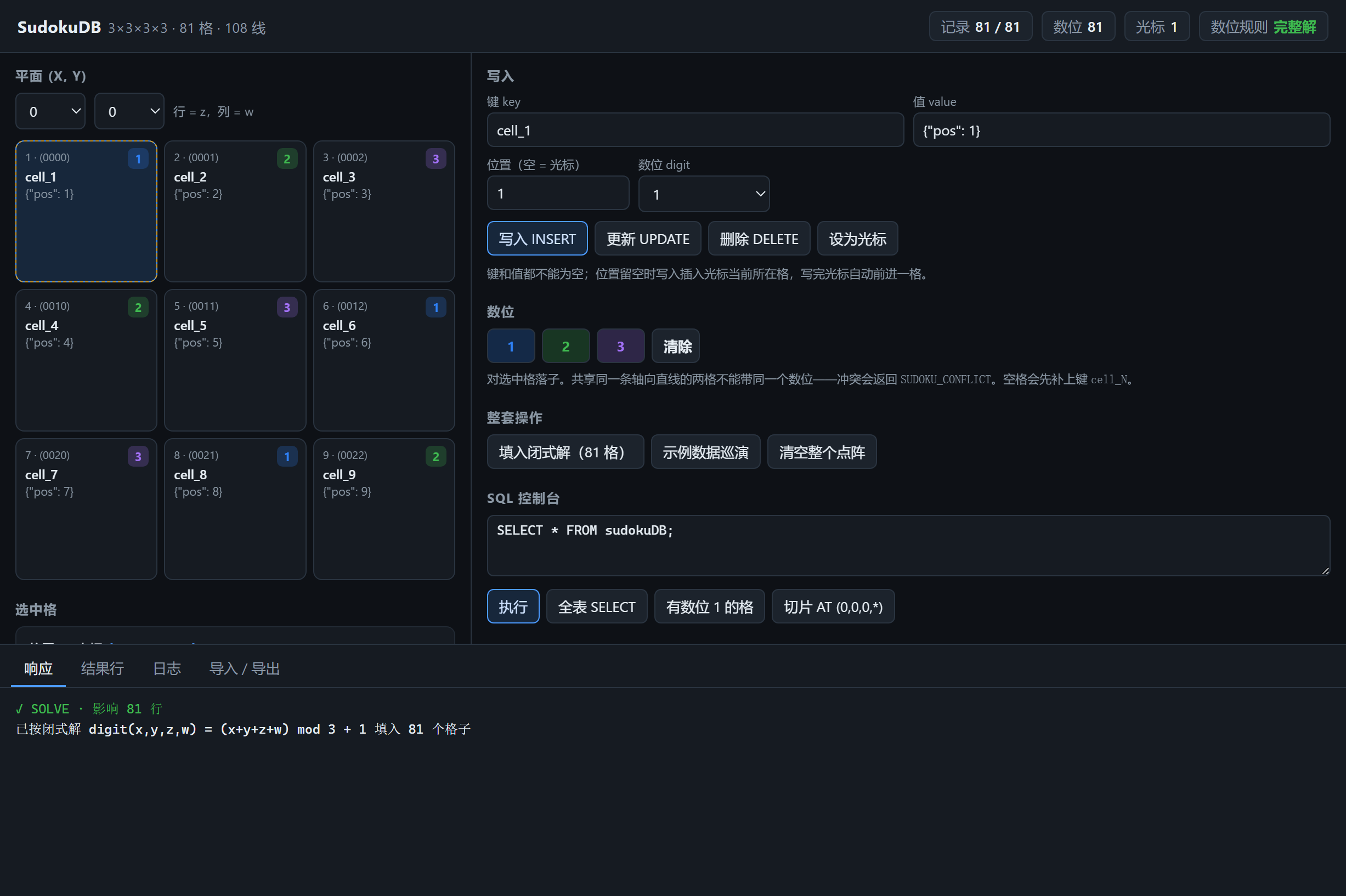
The page picks one of the (x, y) planes — side of them — and shows it as a
side × side grid over (z, w), addressed exactly as the library does. At the
default side 3 that is one classic sudoku box, which is where the picture below
was taken.
The selector beside the plane pickers changes the side. It offers 1..9, not the
full 1..215 the library accepts: side 9 is 6561 cells, which a window cannot draw,
and the SQL console and --side still reach the whole range. The page is not
allowed to remember the shape between snapshots — app:state carries side every
time — because a page holding a stale shape would offer a digit the store refuses.
Changing the side calls Tesseract::set_side, which resizes in place and carries
records by coordinate, the same rule .tsr import uses. It does not re-solve: a
side-3 solution carried to side 4 stays 81 digits in 256 cells, and the badge says
无冲突(81/256)rather than 完整解, because there is nothing there to be a solution
of yet.
Two things about that bridge are worth writing down, because both cost a debugging
round:
- Optional request fields are omitted, never sent as null. MoonBit's decoder for Int? accepts a number or no key at all, and treats an explicit null as a type error. Sending position: null fails the whole dispatch with InvalidPayload before the handler runs.
- is_solution means "no rule is broken", not "every cell is filled." The library's line and slab checks skip empty cells, so a lattice with one hole still reads as a solution. The window's chip shows the placed count alongside the verdict for exactly that reason.
solve runs the closed form through SQL inserts, so it obeys the digit rule like
everything else: filling a partially-filled lattice can legitimately be refused
at some positions. Both surfaces name the first refusal — the window in its
response, the CLI as placed 80 digits first refused at position 1:SUDOKU_CONFLICT (Digit 1 already used at position 55).
#SQL
A real lexer, a real AST and a real executor: lexer.mbt → parser.mbt →
exec.mbt. Not SQLite, and not a hand-rolled scan either — the earlier version was
932 lines of repeated string scanning whose WHERE was a struct holding at most
one predicate per field, and the shape of that struct was the bug.
The rule the executor is built around: a clause the parser accepts is a clause the
executor applies, or the statement is refused. The version it replaced parsed
LIMIT 1 and ORDER BY key DESC as nothing, dropped them, and reported success
— so LIMIT 1 returned all three rows and ORDER BY ... DESC returned them in
insertion order. A filter that silently answers a different question than the one
asked is worse than a filter that fails, so nothing here can fail that way.
| before | now | |
|---|---|---|
| WHERE key='a' AND key='b' | 1 row — the last conjunct overwrote the first | 0 rows |
| WHERE key='a' OR key='b' | INVALID_SYNTAX | 2 rows |
| LIMIT 1 | 3 rows | 1 row |
| ORDER BY key DESC | insertion order | sorted |
| WHERE digit=1+1 | INVALID_SYNTAX | evaluates |
#What the surface does, and what it does not
| Area | Supported |
|---|---|
| statements | CREATE DATABASE, INSERT, UPDATE, DELETE, SELECT, transaction control |
| columns | key value position grid_position digit timestamp x y z w side |
| expressions | arithmetic, comparison, AND / OR / NOT, LIKE, parentheses |
| functions | length upper lower abs coords digits json_extract; geometry line slab peers; aggregates count sum min max avg |
| clauses | WHERE GROUP BY ORDER BY LIMIT OFFSET DISTINCT |
| three-valued logic | null is unknown; only WHERE folds it to false, everything else carries it |
| not supported | joins, subqueries, window functions, UNION, CTEs, and DDL beyond CREATE DATABASE |
Two limits worth stating plainly, both measured rather than inferred:
- The column list is the cell anatomy and it is fixed. There is no CREATE TABLE, so a record's own attributes are never queryable as columns — only the eleven above, plus the whole value, which is text and is queryable inside with json_extract.
- A column name is checked against that list in every clause — WHERE, GROUP BY, ORDER BY and the select list — before a row is read, so an unknown column is an error whether or not the table has anything in it. It was not, and the answer it gave instead was the dangerous kind: GROUP BY nosuchcol evaluated the name to null on every row and reported one group holding the whole table, which is the same shape a legitimately uniform column reports; ORDER BYnosuchcol returned the rows in storage order; and a bare unknown column in a grouped select list was dropped without a word.
The C# statement shapes and error codes still work, so existing dumps load:
CREATE DATABASE tesseract;
INSERT INTO tesseract (key, value) VALUES ('user_001', '{"age": 25}');
SELECT * FROM tesseract WHERE key = 'user_001';
SELECT * FROM tesseract WHERE value LIKE '%age%';
UPDATE tesseract SET value = '{"age": 26}' WHERE key = 'user_001';
DELETE FROM tesseract WHERE key = 'user_001';
The 4D additions:
-- explicit address, as a position or as coordinates
INSERT INTO tesseract (key, value) VALUES ('k', 'v') AT 42;
INSERT INTO tesseract (key, value) VALUES ('k', 'v') AT (1,2,0,2);

-- sudoku digits, enforced against the lines through the cell
INSERT INTO tesseract (key, value, digit) VALUES ('k', 'v', 2);
UPDATE tesseract SET value = 'v', digit = 3 WHERE grid_position = 42;

-- coordinate predicates
SELECT * FROM tesseract WHERE x = 1 AND y = 2;
SELECT * FROM tesseract WHERE digit = 1;

-- geometry
SELECT * FROM tesseract WHERE line(42, 0);   -- the 3-cell axis-parallel line
SELECT * FROM tesseract WHERE slab(42, 1);   -- the 27-cell slab
SELECT * FROM tesseract WHERE peers(42);     -- the 8 cells sharing a line
Every condition in a WHERE applies, including alongside a geometry predicate —
line(42, 0) AND digit = 2 is the digit-2 cell of that line, not the whole line:
SELECT * FROM tesseract WHERE peers(42) AND key = 'user_001';#Expressions
WHERE is an expression tree, so a conjunction over one column is a conjunction
rather than the last one winning, and NOT negates a comparison rather than the
whole clause. Operators, loosest first:
OR  <  AND  <  NOT  <  = <> != < <= > >= LIKE IN IS NULL
    <  + -  <  * / %  <  unary -  <  literals, columns, ( ), functions
SELECT * FROM tesseract WHERE key = 'a' OR key = 'b';
SELECT * FROM tesseract WHERE digit = 1 + 1;
SELECT * FROM tesseract WHERE key IN ('a', 'b', 'c');
SELECT * FROM tesseract WHERE NOT (x = 1 AND y = 2);Three-valued throughout: NULL is unknown, AND/OR/NOT propagate it, and a
row is kept only on a known true. WHERE digit = NULL is therefore not digit =0 — it matches nothing, which is the difference between "no digit" and "digit
zero".
IS NULL and IS NOT NULL follow the same rule: IS NULL is true exactly when
the value is unknown, and IS NOT NULL is true exactly when it is known. They
were the other way round until 0.1.3 — a row that had a value satisfied ISNULL, and a row that had none satisfied IS NOT NULL. Nothing caught it,
because the parser test only checked the shape of the node and no executor test
asked what the predicate answered.
Columns are key, value, position (or grid_position), digit, timestamp,
x, y, z, w and side. An unknown one is INVALID_COLUMNS, including on
an empty table — whether the table has data is not a fact that decides whether a
statement is well formed, and a filter evaluated against no rows used to make an
unknown column look acceptable.
Functions: length, upper, lower, abs, coords, digits, json_extract,
the three geometry predicates, and the aggregates count, sum, min, max,
avg.
#Reading inside a JSON value
value is text, and it usually holds JSON. json_extract(value, '$.a.b[0]')
reads a path inside it:
SELECT json_extract(value, '$.name') FROM tesseract WHERE key = 'user_001';
SELECT key FROM tesseract WHERE json_extract(value, '$.age') > 30;
SELECT sum(json_extract(value, '$.amount')) FROM tesseract;
The path grammar is deliberately small — $ for the root, .name for an object
key, [n] for an array index, and ["name"] for a key that is not a plain
identifier:
$            the whole document
$.name       a key
$.a.b        a key inside a key
$.tags[1]    the second element of an array
$["a b"]     a key that is not an identifier
The name matches SQLite's json_extract on purpose — the path syntax is the
same, so the function is familiar — but nothing of SQLite is underneath. The
parse is moonbitlang/core/json, which this package already depended on for
its own .tsr reader.
Two rules, and they are different rules because the mistakes live in different
places:
- The path belongs to the statement. A malformed path is an error (INVALID_INPUT), never a null: the path is the same for every row, so it is not the data's business whether it is well formed. Answering null for it would be indistinguishable from a document that simply has no such field.
- The value belongs to the row. A row whose text is not JSON, or whose JSON has no such key, answers null. One row holding a plain string must not take the whole query down with it.
Both arguments are ordinary expressions, so the path can be a literal or a
column holding one. A malformed path is an error whichever way it was spelled;
in a WHERE the call is checked against a synthetic row before any row is read,
and in a select list it is evaluated when the first row is — the same rule the
engine already applies to an unknown function and to a wrong argument count.
What a path can land on, and what it answers:
| lands on | answers |
|---|---|
| a whole number | the integer, at full 64-bit width |
| a number that is not a whole number | its own text, unrounded — 2.5 stays 2.5 |
| a string | the string |
| true / false | 1 / 0 |
| null | null |
| an object or an array | its JSON text, so it can be fed back in |
| nothing there | null |
A number is read from the text of the document rather than from a parsed
double, because a double cannot hold a 64-bit integer exactly:
9007199254740993 is one more than 2^53, and reading it as a double would
change it by one without saying so. SqlValue has no floating-point variant
either, so a number that is not a whole number keeps the text it was written as
rather than being rounded to something the engine can hold.
This is what value LIKE '%name%' could not do. The substring match found the
word "name" — it matched a document whose only mention of it was
{"other":"name"} — and it could neither compare a number nor follow a path:
-- matched every row that mentioned the word, including one with no such key
SELECT key FROM tesseract WHERE value LIKE '%name%';

-- matched the rows that have the key
SELECT key FROM tesseract WHERE json_extract(value, '$.name') IS NOT NULL;
Not supported, and deliberately so: path wildcards ($.a.*), the -> and ->>
operators, and the mutating and table-valued JSON functions (json_set,
json_array, json_each). This is one function that reads a path, not a second
query language.
#Grouping, ordering, limits
SELECT digit, count(*) FROM tesseract GROUP BY digit;
SELECT sum(digit) FROM tesseract WHERE digit > 0;
SELECT key FROM tesseract ORDER BY key DESC, digit ASC;
SELECT key FROM tesseract ORDER BY key LIMIT 10 OFFSET 20;
SELECT DISTINCT value FROM tesseract;
ORDER BY is stable: rows whose sort keys tie keep their position order, so
LIMIT after a tie picks the same rows in two runs of the same query.
Record has a fixed shape, so a narrower select is an emptied row rather than a
narrower one, and an aggregate cannot live in a cell column. Non-column select
items are evaluated into Record.computed, each under the label it was written
with (count(*), sum(digit), length(key)), and format_response prints them.
SELECT DISTINCT value compares what was selected: the projection empties
position and coords when they were not asked for, which is what makes three
cells holding one value collapse to one row.
#Transactions
BEGIN;
INSERT INTO tesseract (key, value) VALUES ('a', '1') AT 1;
SAVEPOINT sp;
INSERT INTO tesseract (key, value) VALUES ('b', '2') AT 2;
ROLLBACK TO sp;     -- the 'b' insert goes; the transaction stays open
COMMIT;

ROLLBACK;           -- or undo the whole thing
Implemented as an undo journal of before-images, not a snapshot, so a
transaction costs what it wrote rather than what the lattice holds — a copy of all
81 cells per statement would make side = 215 impossible in a way it currently is
not. Every mutation goes through one function (Tesseract::write_cell), so a
transaction cannot quietly cover six of the seven write paths.
Two properties worth stating separately:
- Every statement is atomic, with or without BEGIN. Each one opens an implicit savepoint, so a multi-row UPDATE refused on its last row commits none of its earlier ones. This is the case the journal exists for.
- ROLLBACK TO sp keeps sp and drops only the savepoints after it, matching SQL. RELEASE sp forgets it and keeps the work — the opposite effect, under the same kind of name, which is why both have their own test.
BEGIN inside a transaction is refused rather than nested; SAVEPOINT is the
supported way to have a rollback point inside one.
LIKE follows the SQL spelling rather than being a substring test: %x% is a
contains test and a bare literal is equality. So value LIKE 'hello' matches
the value hello exactly, and value LIKE '%hello%' matches any value
containing it. An unwrapped literal used to be stripped to "no predicate" and
matched every row, which is the direction a filter must not be wrong in.
A malformed literal is an error rather than a value: WHERE key = 'a and
WHERE key = 'a' garbage both return INVALID_SYNTAX instead of quietly
becoming a key that matches nothing. Both \' and the standard '' spell an
embedded quote.
Error codes: INVALID_INPUT, INVALID_DIGIT, INVALID_POSITION,
INVALID_COLUMNS, INVALID_SYNTAX, KEY_NOT_FOUND, POSITION_NOT_FOUND,
POSITION_EMPTY, POSITION_OUT_OF_RANGE, SUDOKU_CONFLICT, UNSUPPORTED_SQL,
EMPTY_SQL. That list is the complete set this port emits — every code in it is
reachable and nothing outside it is produced.
#The short-term memory
riantr/tesseract/src/tesseract_memory is a second store, in its own
package: entries that expire, a capacity the caller sets, and retrieval by
similarity rather than by equality.
It is a separate tier rather than a feature of the core because the two are
different shapes of store. The core is durable — a cell keeps its record until
somebody deletes it, the lattice's cell count is the bound, and overfilling it
is an INVALID_POSITION error. A memory is the tier above that: an entry has
a deadline, the bound is a number the caller sets, and going over it evicts an
entry by a named policy rather than refusing the write.
///|
import {
  "riantr/tesseract/src/tesseract_memory",
}
moon run cmd/memory -- "put greeting hello world" "get greeting"
moon run cmd/memory -- --capacity 3 "put a 1" "put b 2" "put c 3" "put d 4" "keys"
moon run cmd/memory -- --max-bytes 10 "put a 12345" "put b 12345" "put c 12345" "stats"
moon run cmd/memory -- --manual-clock "put a x --ttl 1000" "advance 1000" "get a"
moon run cmd/memory -- "put a x --meta kind=note" "entries --where kind=note"
moon run cmd/memory -- --capacity 2 "put keep kept --pinned" "put other dropped" "put new new" "keys"
moon run cmd/memory -- demo#TTL
An entry has a deadline, and there are two kinds, because the difference
between them is the difference between a cache and a memory:
| expires | |
|---|---|
| ttl_absolute(ms) | ms after it was written |
| ttl_sliding(ms) | ms after it was last read |
| ttl_never() | never |
The boundary is exact: an entry with deadline D is live while now < D and
gone at now == D, so a 1000ms TTL is 1000 milliseconds of life and not one
more.
A lifetime of zero or less is refused. An entry written with one is dead
the moment it was written — the deadline is the moment of the write, and the
boundary is exclusive at the live end — so accepting the write would be
accepting a write that does nothing, and the caller would be told the value
was stored. ttl_never() is how a caller says "no deadline", and the two are
not the same thing.
Whether an entry expires is decided by its window, not by its deadline.
A deadline of zero is also the deadline an entry that never expires carries,
so a store that told those two apart by the deadline would give a
zero-lifetime entry the other one's meaning — it would live forever. The
window is unambiguous: an entry with no deadline has a window of zero, and
every entry with a lifetime has a window of at least one millisecond.
Expiry is eager — every operation that observes the clock first removes
what has expired — so the store never holds a dead entry, size is the number
of live entries, and a key that has expired is gone from get, contains,
keys and search alike. An entry that is gone from one view and present in
another is a store that answers two different questions.
#Capacity and eviction
The memory holds at most capacity entries. A put of a new key when it
is full evicts one entry; a put of a key that is already there replaces it in
place and evicts nothing, because overwriting a key must not cost another
key its place.
| policy | evicts |
|---|---|
| evict_lru() | the entry nobody has touched for longest |
| evict_lfu() | the entry nobody has read |
| evict_soonest_expiry() | the entry closest to expiring — an entry that never expires goes last |
| evict_oldest() | the entry written longest ago |
Ties are broken by the scope and then the key, so the same sequence of
operations always evicts the same entry. A store that evicts differently on two
runs of the same program is a store nobody can test. The scope comes first
because a key is only unique within a scope, and both are compared by their
letters — see the order of keys.
#A pinned entry is never thrown away
Some entries must not be lost to make room for something else. A pinned
entry is not a candidate for eviction at all: not the oldest, not the least
used, not the one whose time is up soonest.
///|
let m = @tesseract_memory.new_memory(100)
ignore(
  m.put_spec(
    "keep",
    "the thing that must not be lost",
    @tesseract_memory.default_spec().with_pinned(true),
  ),
)
The pin is absolute rather than a preference. A store that broke a pin
when it had to would make the promise depend on the state of the store, and a
caller who pinned an entry could not tell from the answer whether the entry
had survived. So a store that cannot make room for a write without evicting a
pinned entry refuses the write, and the refusal leaves the store exactly
as it was.
That last part is the one that is easy to get wrong, and the store does it
explicitly: the room is planned before it is taken. If even throwing away
every entry that could be thrown away would not make room, the write is
refused and nothing is evicted. A refused write that had already thrown
something away would cost the caller an entry it did not ask to lose — and
the caller would never hear about it, because the write was refused.
The pin says nothing else:
- A pinned entry still expires when its lifetime is up. "Do not evict me" and "never die" are two different promises.
- A pinned entry is still found by a search, and its score is unchanged.
- A pinned entry still takes up room: it is counted against the capacity and the byte budget like any other.
- The pin belongs to the entry, so it survives a read and a touch, and it is the store's eviction that respects it, not the scope's.
| with_pinned(true) | write an entry that is never evicted |
| Memory::pin(key) / unpin(key) | change the pin of an entry that is there |
| Scope::pin(key) / unpin(key) | the same, in one scope |
| Entry::pinned() | whether the entry is pinned |
pin and unpin change only the pin: the entry keeps its age, its hit
count, its deadline and its labels, because pinning something is not the
same as reading it. Writing the key again replaces the entry, and so replaces
the pin with whatever the new write asked for.
From a shell: put <key> <value...> --pinned, and the pin and unpin
commands.
#The byte budget
A count of entries and a count of bytes are two different limits, and a caller
may want both: a store of a hundred one-byte entries and a store of ten
hundred-byte entries are the same shape to the first and not to the second.
with_max_bytes sets the second, and the tighter of the two is the one that
binds.
///|
let m = @tesseract_memory.new_memory_with(
  @tesseract_memory.default_config().with_capacity(100).with_max_bytes(65536L), // 64 KiB of values
)
The budget counts UTF-8 bytes, and that is not a detail. String::length
counts code units: 苹果 is 2 and 🍎 is 2, while in UTF-8 they are 6 and 4.
A budget measured in code units would shrink when the content turned Chinese,
which is not a number anybody can reason about.
Two rules follow from the budget being a hard limit:
- A value larger than the whole budget is refused, even in an empty store. The budget is what the memory holds, and a value that does not fit in it does not fit in it. Refusing it loudly is better than accepting it and breaking the limit the caller asked for — and the refusal leaves the store as it was, because a write that fails must not empty the memory on its way out.
- A replacement can push the store over the budget, and then it makes room. Five bytes replaced by ten is ten bytes of content plus whatever else is there, not five. The key being written is never the one evicted to make room for itself.
Lowering the budget with set_config does not evict on the spot: the store is
brought back within its new limit by the next write that has to make room, and
until then size_bytes honestly reports a store that is over its budget. A
negative budget is refused, so that a number smaller than none cannot be
mistaken for "no limit".
The budget counts the values and the labels — the content of an entry, which
is what the memory holds. The keys and the scopes are bounded by the capacity
instead, and the overhead of the store itself is not counted at all, so
size_bytes is the size of the content a memory holds, not the size of the
process holding it.
#Scopes
A scope is a named partition of the memory's keyspace. Two scopes can hold
the same key without either of them seeing the other's entry, and a key belongs
to exactly one of them.
///|
let m = @tesseract_memory.new_memory(100)
let work = m.scope("work")
ignore(work.put("todo", "ship 0.1.10"))
ignore(m.scope("notes").put("todo", "buy milk"))
// Two entries, one key.
assert_eq(work.get("todo"), Some("ship 0.1.10"))
assert_eq(m.scope("notes").get("todo"), Some("buy milk"))
A scope is not a second store. It shares the memory's clock, its budget, its
statistics and its eviction, and the only thing it has of its own is the set of
keys it holds. The capacity and the byte budget are the store's, spent
across every scope, so a write into one scope can evict an entry from another —
and a store that gave each scope a budget of its own would hold
scopes × capacity entries, which is not a limit.
Memory is the store, and its own methods address the default scope, so a
program that never mentions a scope behaves exactly as it did before.
| addresses | |
|---|---|
| Memory::put, put_with_ttl, get, contains, touch, delete, entry | the default scope |
| Memory::keys, entries, search, search_keys | the default scope |
| Memory::size, size_bytes | the whole store — the limits are the store's |
| Memory::scopes | the scopes that hold something |
| Memory::search_all, search_all_keys | the whole store |
| Memory::clear | the whole store |
| Memory::sweep, stats, now, advance, capacity, max_bytes | the whole store |
A scope is reached with Memory::scope(name), and Scope answers for itself:
name, put, put_with_ttl, get, contains, touch, delete, entry,
keys, entries, search, search_keys, size, size_bytes, clear and
default_ttl.
Three things are easy to get wrong, so they are stated here:
- A scope is a handle, not a copy. Two handles on the same scope see the same entries and the same byte total, so the total cannot drift between them.
- A key is unique only within a scope. A hit from search_all says which scope it is in, and an Entry carries its scope — otherwise an entry could not be told from the same key in another scope.
- Memory::size is the store's count and Scope::size is one scope's. The number to compare with capacity is the store's, because the capacity is spent across the scopes; a scope's count would under-report how full the store is, and a caller who believed it would think there was room when there was none.
Memory::scopes lists the scopes that hold something: a scope with no live
entries is not a scope yet, and listing it would send the caller looking in a
place where there is nothing to find.
From a shell, the scope is the partition the commands work in:
moon run cmd/memory -- --scope work "put todo ship 0.1.10" "keys"
moon run cmd/memory -- "put a the cat sat" "scope work" "put a the cat sat on the mat" "scopes"
moon run cmd/memory -- "put a the cat sat" "scope work" "put a the cat sat on the mat" "search-all cat"
--scope sets the scope the run starts in, the scope command switches to
another one for the commands that follow, scopes lists them, and search-all
looks in all of them at once — each hit prefixed with the scope it is in.
#The order of keys is by their letters
keys, entries, scopes and the eviction tie-break are ordered by the
letters of the text, and that order is written out in the core's
compare_text rather than taken from the runtime's String::compare.
The runtime's String::compare compares the lengths first: "work" sorts
before "default", because it is shorter, whatever its letters say. That is a
total order, so it was never ambiguous — but it is not the order the
documentation promised, and a reader who sorted a list of keys by hand would
get a different answer. The memory's key order and its eviction tie-break had
that rule before 0.1.7; they are ordered by their letters now. The core's own
SQL comparison was never affected: it compares text by code unit, in its own
code.
#A configuration is either usable or it is refused
Two settings are not usable: a capacity of zero or less, and a negative byte
budget. Config::is_valid says which:
///|
if !config.is_valid() {
  // the memory will not hold this
}
The two paths differ on purpose. A new memory has no entries to protect,
so the setting it cannot use is replaced — the capacity falls back to the
default, a negative budget falls back to no budget — and the rest of the
configuration is kept, because only the impossible setting is the caller's
mistake. A memory that is already running refuses an invalid
configuration and keeps the old one: there are entries in it, and a limit that
changed under them would throw them away.
#The store's internals are not part of the API
Memory's fields are private, and that is a promise rather than a detail. A
Map is mutable in place, so a public field would let a caller remove an
entry behind the store's back — and the byte total, which is a running count
of the values, would then be counting something that is no longer there. The
limits a memory enforces are only worth anything if the store cannot be edited
behind its own back, so the published interface is the methods and nothing
else.
#Similarity retrieval
search returns the entries most like a query, best first.
| policy | asks |
|---|---|
| similarity_jaccard() | how much they share, as a share of their whole vocabulary |
| similarity_cosine() | how similar they are as documents — a repeated word counts more |
| similarity_containment() | how much of the query the entry covers |
| similarity_structure() | whether two JSON documents have the same shape |
Containment is the one that answers a search: a two-word query should match
a long document that contains both words, and a symmetric measure punishes that
document for being long. Structure is the one a JSON store should have: two
records with the same keys are alike even when every value differs, and no
amount of word-matching will ever say so.
Every score is in 0.0..1.0 and every one of them is exact — the same two
texts always give the same score, with no model to drift.
Words are ASCII runs of letters and digits, plus any character outside ASCII
as a word of its own. Chinese has no spaces, so an ASCII-only tokenizer would
reduce a whole sentence to nothing and every Chinese document would score zero
against every other one.
#Recency weighting
On top of the similarity, a recency weight multiplies the score by
0.5 ^ (age / half_life), so an entry written more than one half-life ago
carries half the weight. This is the rule that makes a short-term memory prefer
what just happened — and it can overturn a better match, which is the point:
///|
let m = @tesseract_memory.new_memory_with(
  @tesseract_memory.default_config()
  .with_capacity(100)
  .with_recency(@tesseract_memory.recency_decay(3600000L)), // one hour
)#How much an entry counts
The score is a product of three weights, and the third one belongs to the
entry rather than to the store:
| weight | range | from |
|---|---|---|
| similarity | 0.0..1.0 | the store's similarity policy |
| recency | 0.0..1.0 | the store's recency policy |
| importance | (0.0, 1.0] | the entry itself |
An entry written with with_importance(0.5) is found half as strongly as
the same entry written with the default, for the same query and at the same
age — and it can lose to a better match, which is the whole point of a weight.
///|
let m = @tesseract_memory.new_memory(100)
ignore(m.put("trivia", "the cat sat on the mat"))
ignore(
  m.put_spec(
    "important",
    "the cat",
    @tesseract_memory.default_spec().with_importance(0.2),
  ),
)
// "the cat" is the better match on its own, and the importance is what
// turns the order over.
The range is (0.0, 1.0], and one is the default and the most an entry can
count. A caller demotes the entries that matter less rather than raising
the ones that matter more, and the score stays in 0.0..1.0 because every
one of the three weights is a fraction.
Both ends of the range are refused rather than clamped:
- Zero would make the entry unfindable — stored, readable by key, and never matched by a search — and a zero-initialised field is the easiest way to get there by accident. An entry that should not be found is an entry that should be deleted.
- Above one would carry the score past the 0.0..1.0 it is documented to be in.
The four settings an entry is written with travel together in an EntrySpec,
because they are written together:
| default_spec() | never expires, counts fully, carries no labels, is not pinned |
| with_ttl(ttl) | the lifetime |
| with_importance(n) | how much it counts |
| with_metadata(m) | the labels it carries |
| with_pinned(true) | that it is never evicted |
| put_spec(key, value, spec) | the write |
put and put_with_ttl are the two shorthands for the common cases, and
Scope::put_spec is the same thing in a scope. A spec the store cannot
honour is refused, and the refusal leaves the store exactly as it was.
#Labels on an entry
An entry can carry labels: key/value pairs that say what the entry is,
as opposed to what it says. A note is labelled kind=note, a task is labelled
kind=task, and a search can ask for one of them.
///|
let m = @tesseract_memory.new_memory(100)
ignore(
  m.put_spec(
    "deploy",
    "the deploy failed",
    @tesseract_memory.default_spec()
    .with_metadata(@tesseract_memory.new_metadata([("kind", "deploy")])),
  ),
)
The metadata is a set: the pairs are sorted, and a pair written twice is
one pair, so two entries built from the same pairs carry the same metadata
however they were written. A key may carry several values — "tag" can be
both "urgent" and "infra".
A label with no name is refused. The key is the name of the label, and a
label with no name is not a label: no filter can select it, and a report of it
renders as =value, which says nothing. A label whose value is empty is
fine.
#Filtering a search
A filter says which entries a search may look at. It is a value rather
than a call, so it can be built, printed and handed to a shell — and a filter
is the thing a caller composes.
| filter | asks for |
|---|---|
| filter_has(k) | the label k, with any value |
| filter_lacks(k) | the label k to be absent |
| filter_equals(k, v) | the label k with the value v |
| filter_not_equals(k, v) | the label k not to carry the value v |
| filter_all([...]) | every one of them to hold |
| filter_any([...]) | at least one of them to hold |
An empty All holds — nothing was asked, so nothing was missed — and an
empty Any does not: nothing was asked, so nothing was found. A key that
is not there satisfies not_equals: it certainly does not carry the value.
The filter is applied to the candidates, before they are scored. That
matters, and the difference is not academic: a store that ranked first and
filtered afterwards would give back nothing when the best match is one the
filter turns away.
///|
let hits = m.search_filtered(
  "deploy",
  3,
  @tesseract_memory.filter_equals("kind", "deploy"),
)
The limit is on the answer, not on the candidates: the store scores every
entry the filter admits and keeps the best k, so a filter that admits fewer
than k entries gives fewer than k — rather than padding the answer with
the entries the filter turned away.
The labels do not change what the store evicts, and they do not change how
strongly an entry is found. They say what an entry is; the importance says
how much it counts, and the eviction policy says what goes when the store is
full. A store that evicted by its labels would make the eviction depend on a
field nobody promised anything about.
| Memory::search_filtered | the default scope, the entries the filter admits |
| Memory::search_all_filtered | every scope, the entries the filter admits |
| Memory::search_filtered_keys | the same, without the values |
| Memory::search_all_filtered_keys | the same, over every scope |
| Memory::entries_filtered | the entries the filter admits, by their labels alone |
| Scope::search_filtered | one scope |
| Scope::search_filtered_keys | one scope, without the values |
| Scope::entries_filtered | one scope, by their labels alone |
The labels are part of the content, so the byte budget counts them: the
budget is about what the memory holds, and a label is something the memory
holds. The key and the scope are not counted — they are the name of an entry
rather than its content.
#The clock is injected
The memory's clock is a value, for the same reason the core's is: a test
that reads the host clock cannot assert that something has not happened yet.
memory_clock_system() reads the host; memory_clock_manual(ms) only moves
when Memory::advance says so, so every TTL boundary in the test suite is a
number rather than a race. cmd/memory --manual-clock exposes the same thing
to a shell.
The clock moves forward. advance refuses a negative interval: a clock
that runs backwards is not a clock, and an entry would then be older than the
moment it was written — which makes the recency weight larger than one and the
search score larger than the 0.0..1.0 it is documented to be in. It refuses
an interval so large that the clock would pass the end of what an instant can
hold, for the same reason: the arithmetic would wrap round into the past, and
the clock would run backwards by nine hundred million years while reporting
that it had moved forwards. Reading the clock also purges what has expired,
because reading the clock is reading the store.
A deadline that would not fit in an instant saturates rather than
wrapping: the entry lives as long as the store can express, which is the
closest true thing to say about a lifetime of nine hundred million years.
#What it does not do
- Not SQL, and not a second query language. The memory has a native API. Putting it behind the core's SQL would mean the core's executor learned about a tier it does not own.
- Not embeddings. A semantic similarity needs a model, and a model is a dependency and a download.
- Not persistent. A short-term memory is the tier above the durable store, not a replacement for it. What is worth keeping is what the durable store is for.
- Not thread-safe, for the same reason the core is not: the runtime is single-threaded, and the store is mutated in place.
- Not eviction by importance. The importance weights retrieval — what a search finds — and not what the store throws away. That is the policy's business, and the four policies are about age, use and expiry.
- Not a soft pin. A pin is absolute. A store that broke a pin when it had to would make the promise depend on the state of the store, so a store that cannot make room refuses the write instead.
- Not immortality. A pinned entry still expires when its lifetime is up. "Do not evict me" and "never die" are two different promises.
- Not eviction by the labels. The labels say what an entry is, and a filter says what a search may look at. Neither is a weight, and a store that evicted by them would make the eviction depend on a field nobody promised anything about.
- Not per-scope budgets. A scope partitions one pool, and the capacity and the byte budget belong to the pool. A scope with a budget of its own would make the store's size a function of how many partitions a caller happened to use.
The full plan and the measurements behind it are in LOOP3.md, LOOP4.md,
LOOP5.md, LOOP6.md, LOOP7.md and LOOP8.md.
#Running it
#Command line
moon check --target all     # type-check every backend
moon test                   # 361 tests
moon fmt --check            # canonical formatting

node cli-smoke.mjs          # the CLIs, as real processes (builds them first)
node gui-smoke.mjs          # the window, over CDP (needs `proton_cli dev` running)

moon run cmd/main -- .help
moon run cmd/main -- .status
moon run cmd/main -- .demo
moon run cmd/main -- .solve .verify
moon run cmd/main -- "INSERT INTO tesseract (key,value) VALUES ('a','1') AT 5;" "SELECT * FROM tesseract;"
moon run cmd/main -- .export tsr > dump.tsr

# the short-term memory
moon run cmd/memory -- .help
moon run cmd/memory -- "put greeting hello world" "get greeting"
moon run cmd/memory -- --scope work "put todo ship 0.1.10" "keys" "scopes"
moon run cmd/memory -- "put a x --meta kind=note" "search x --where kind=note"
moon run cmd/memory -- "put a x --pinned" "pin a" "unpin a"
moon run cmd/memory -- demo

# 256 cells, digits 1..4
moon run cmd/main -- --side 4 .status
moon run cmd/main -- --side 4 .solve .verify
--side N (or --side=N) sets the cells per axis for the run and may appear
anywhere among the commands; only the first occurrence counts. A value that is
not an integer, is below 1, or is above 215 is refused before any statement
runs:
$ moon run cmd/main -- --side 999 .status
--side side 999 is above the maximum 215 (cells are stored in one flat array indexed by a 32-bit Int)#Persistence
cmd/persist is the same store and the same SQL parser with a .db file behind
it. It is a separate binary, not a flag on cmd/main, because
moonbit-community/sqlite3
builds for native and wasm only — adding it to cmd/main or to
src/tesseract would drop those packages from js and wasm-gc and break the
zero-dependency core. cmd/main is untouched, and so is every behaviour in
src/tesseract; the one change to the library is that Tesseract::insert_stamped
is now pub rather than private, so this adapter can restore timestamps the way
import_tsr already did.
moon run cmd/persist --target native -- .open sudoku.db \
  "INSERT INTO tesseract (key,value,digit) VALUES ('user_001','{\"age\": 25}',1) AT 1;" \
  .save .status .verify

# a second process reads the same file back
moon run cmd/persist --target native -- .open sudoku.db .status| command | effect |
|---|---|
| .open <path> | replace the store with the file's contents |
| .save [path] | write the store out, to <path> or to the last .open |
| .status | occupancy, digits, cursor, and the file in use |
| .verify | line and slab check over the digits in the store |
Everything else runs as SQL through the same parser cmd/main uses, so the sudoku
digit rule still decides what happens: an INSERT that clashes on a shared line
comes back SUDOKU_CONFLICT whether the store came from memory or from a file.
Three things to know before relying on it:
- It is a snapshot, not a mirror. The lattice lives in memory between .open and .save; nothing is written back on exit. A session that opens a file and never saves says so rather than losing the work quietly.
- Timestamps round trip. Each cell is written with its timestamp and loaded back through the public Tesseract::insert_stamped, the same call import_tsr makes, so a reopened .db carries the stamps it was saved with instead of ones minted from this process's log counter. What does not carry over is the log: sequence numbers continue from where the new process started, so stamps made after a load do not continue the saved file's numbering. .tsr is the format when that continuity matters — .db restores what it stored.
- A load replaces, it does not merge, the same way import_tsr clears first. Rows the store refuses — a hand-edited file can hold two cells with the same digit on a shared line — are reported as rejected rather than dropped, because "loaded 3 of 4" and "loaded 4" are different answers.
The CLI is driven by its arguments, one statement or .command each, run in
order against one shared database. MoonBit's core library exposes no stdin reader
and no file I/O, so exports go to stdout for the shell to redirect, and a REPL is
a shell loop over the same commands:
A command and its argument are two arguments, as a shell splits them —
.export md is .export and md, and the two are rejoined before matching.
cli-smoke.mjs covers that, because matching only the joined form is what once
let .export md write an .tsr document under a .md name and .open fall
through to the SQL parser as Unsupported SQL statement: .open.
while read -r line; do moon run cmd/main -- "$line"; done#Static analysis
src/tesseract_sa and cmd/sa run
riantr/moonbit_static_analysis over this project and
keep the result in a SQLite database, so a scan is queryable history rather than
text that scrolled past.
moonx riantr/moonbit_static_analysis@0.4.1 . > scan.tsv
moon run cmd/sa --target native -- store scan.tsv scan.db
moon run cmd/sa --target native -- runs scan.db
moon run cmd/sa --target native -- show scan.db
moon run cmd/sa --target native -- files scan.db
moon run cmd/sa --target native -- unparsed scan.db| table | holds |
|---|---|
| sa_runs | one row per scan: coverage, counts, target |
| sa_files | each file the analyzer reported on, with outcome, defects, notices, shown |
| sa_findings | the findings that were actually rendered |
| sa_by_kind | the per-.mbt/.mbti/.mbt.md rollup the tool prints |
| sa_unparsed | per reason: how many files, and up to three example paths |
Runs accumulate, so a 0.3.5 scan and a 0.4.0 scan of the same tree sit in one
file and runs prints them side by side. The parser accepts both formats;
refusing the older one would mean a database that can only ever hold scans from
one version of the tool.
Six things to know before reading a number out of it:
- Quote the coverage, not the finding count. The analyzer's frontend covers a subset of MoonBit, so most .mbt files come back unread and their findings are withheld — they measure what the analyzer does not understand, not what your code does wrong. actionable is the only column that describes the code.
- 0.4.0 splits every file into three outcomes. clean and found mean the file was read end to end; partial means it was read up to its first parse error and nothing after it was looked at. sa_files.read_up_to and sa_files.not_shown keep where that line was. On this project all 12 fully read files carry defects=0 and every actionable finding sits on a partially read file — so 30.7% coverage is the honest context for the number 4.
- Three of the four counters do not describe your code. notices are constructs outside the analyzed subset, unreliable are findings from a partial read, withheld are findings on files never read. They are stored in their own columns precisely so they cannot be summed into a defect count.
- The database keeps the truncation visible. The tool prints at most three examples per unparsed reason and only a few findings per file, so sa_files.defects/notices (what the header reported) and sa_files.shown (what was rendered) are both stored. A list shorter than the count is a sample, and the table says so.
- Withheld findings have nowhere to go on purpose. There is no column for them, because a database that held 1487 rows of them would read as 1487 problems.
- A run that did not finish is refused. The tool exits 0 even when it cannot find its target, printing only an ERROR line. parse treats a missing SUMMARY as the failure it is, so a failed scan cannot be stored as a clean one.
One thing about the tool itself, pinned in the tests rather than corrected here:
0.4.0 labels its SUMMARY line (actionable+notices+unreliable+withheld =total), and that identity does not hold. On this project 4 + 67 + 5122 +1487 = 6680 against a reported total of 5193; the sum that does hold omits
withheld. sa_runs.total stores what the tool printed rather than a
recomputation.
The counts quoted above come from src/tesseract_sa/testdata_scan.tsv, a
captured run of the tool that is kept frozen so the parser has a fixed input to
be tested against. Re-running the analyzer today gives slightly different
numbers — the tree has changed — and that is expected; refresh the capture with
_verify/capture.ps1 and update the pinned values in sa_test.mbt with it.
moonx is invoked separately and its output read from a file, because the tool
is designed so the analysed project neither depends on it nor is modified.
#The window
Pin proton_cli to the same version as the proton dependency, then install
the CEF runtime once:
moon update                                        # refresh the registry index
moon install moonbit-community/proton_cli@0.5.1   # match the library version
proton_cli cef setup                               # CEF runtime + subprocess helper

proton_cli doctor                  # identity, toolchain and runtime
proton_cli dev                     # run the window
proton_cli build                   # native build
proton_cli package --dry-run       # check the packaging plan
proton_cli package                 # produce dist/
proton_cli and the CEF layout it installs are both version-keyed, so a CLI left
on an older version still works — it resolves the same CEF build — but it prints
an upgrade notice on every run. Matching them keeps doctor output meaningful.
proton_cli dev builds cmd/gui for the native target and launches it with the
resource directory pointed at the repository root, so cmd/gui/web/index.html is
found relative to that root. Editing the HTML and re-running dev is the whole
edit loop; there is no bundler and no generated front end.
Packaged builds resolve the same relative path against Resources/ beside
proton-package.json, so the page has to be declared or the shipped app starts
with nothing to show. That is what package.resources in proton.project.json
does — each entry is copied to Resources/<its path relative to the repo root>,
which lands the page exactly where @proton.asset looks for it:
"resources": [ "cmd/gui/web" ]proton_cli dev opens a Chromium DevTools endpoint; a packaged build does not,
because debug mode is off by default. Set TESSERACT_DEBUG=1 to get the same
endpoint out of a packaged build — that is how the packaged path is checked with
the same tooling as the dev path.
gui-smoke.mjs drives the running window through Chromium's remote-debugging
endpoint — it clicks the real buttons and asserts on what the page renders, so it
covers HTML → bridge → typed command → lattice → JSON reply, not just that the
binary starts:
node gui-smoke.mjs#Verification
The gate, and the result it produced for this version:
| Command | Result |
|---|---|
| moon fmt --check | exit 0 |
| moon check --target wasm --deny-warn | exit 0 |
| moon check --target js --deny-warn | exit 0 |
| moon check --target native --deny-warn | exit 0 |
| moon check --target wasm-gc --deny-warn | exit 0 |
| moon test --target wasm --deny-warn | 361 passed, 0 failed |
| moon build --target wasm | exit 0 |
| typos (v1.50.3 — the version the workflow pins) | exit 0 |
| node cli-smoke.mjs | 65 passed, 0 failed |
| node gui-smoke.mjs | 45 passed, 0 failed |
The release workflow runs the first two check targets plus the test and build; the
native and wasm-gc checks and the two smoke tests were run here as well, and
are listed because they were run, not because CI depends on them.
cli-smoke.mjs drives the CLIs as real processes against a built database —
cmd/main, cmd/persist and cmd/memory.
gui-smoke.mjs drives the window over the Chromium DevTools protocol and needs
proton_cli dev running.
Two things deliberately not claimed. No production-load testing has been
done, and no comparison against another store on the same workload has been run.
The 26-statement parity against the C# original is a separate comparison, not part
of the gate above, and reproducing it needs the C# project alongside this one.
#Export formats
| format | role |
|---|---|
| .tsr | JSON, the native save format; round-trips key, value, position, digit and timestamp losslessly |
| .md | Markdown table, human-readable and diffable |
| .sql | SQL dump this package's own parser re-imports |
The C# exporter's .sql dialect still loads: backticked `key` / `value`
quoting is stripped and a timestamp column is accepted and ignored.
A value keeps every character it went in with, including the ones that
take two code units in the runtime's string. An emoji is one character and
four UTF-8 bytes, and half of a character is not a character at all — so
copying the two halves apart used to turn every emoji in a value into two
question marks, in the .tsr JSON, in the .md table and in the .sql dump
alike. The text helpers now copy characters rather than code units, which is
what char_at is for.
#Deliberate departures from the C# original
Each of these is a behaviour change, so each is deliberate:
- The grid is 81 cells, not 9, and is addressable by coordinate. The cell count per axis is a value rather than a constant, so 81 is the default rather than the only shape; --side 4 gives 256.
- current_count is computed from occupancy, not accumulated. The C# counter saturated at 9 on the first wrap and then only decremented, so it drifted away from the number of stored records; reporting the real occupancy is what GetStatus was always asking for.
- A malformed address never resolves to another cell. Out-of-range positions and unparsable coordinates are errors, not clamped values — a silent clamp would write to a cell the caller never asked for.
- Out-of-range positions give a clean error code instead of the C# KeyNotFoundException surfacing as a generic failure. Which code depends on the verb, and the split is deliberate: POSITION_OUT_OF_RANGE for the verbs that address an existing record (update, delete, the geometry queries), and INVALID_POSITION for INSERT, whose position names a target to write rather than a record to find.
- Timestamps are stamped, not read at the call site. The C# original put DateTime.UtcNow in the logger. MoonBit's core library does carry a clock — @env.now(), milliseconds since the Unix epoch, implemented for native, js and wasm — so a real one was available without a dependency and without pinning the package to a target. It is injected as a Clock rather than called inline because a clock read at the call site makes every stamp a function of when the process started. cmd/main, cmd/persist and the window read the host; the library default is a logical sequence number, which is what keeps the test suite byte-comparable between runs. So log lines and records show 2026-10-16T19:45:00.123Z, and a .tsr written by either clock still imports into the other.
- There is a window, and it is not Avalonia. The C# original was Avalonia; this is a proton app — the same HTML/CSS page surface and native-window model, rebuilt on a different runtime. The CLI is still there and still shares the library.
- The store lives in memory, and so does the window's copy of it. The C# app had the same in-memory model; there is no file backing either, so closing the window discards what is in it. The export formats are the way out — and, if you want a file that a SQL engine can read, cmd/persist below.
Three format caveats: the Markdown table writes newlines as <br>, so a value
containing that literal text comes back as a newline — .tsr is the lossless
format. The SQL dump escapes \n, \r, \t, \' and \\, matching what
the parser reverses. And the Markdown table escapes TAB and CR as \t and
\r rather than reformatting them, which is why all three formats round-trip
these values.
Timestamps are restored by .tsr and by the .db adapter below, both of which
reinsert through Tesseract::insert_stamped. The other two formats do not:
import_markdown re-stamps from the log counter, and import_sql ignores the
column — so .md exports carry a timestamp column that its own importer throws
away, and .sql carries none. Use .tsr or .db when the stamps matter.
An import replaces the store rather than merging into it, so a failed load
leaves an empty database instead of a half-overwritten one, and a record with
no usable address is refused by name rather than being written to cell 1.
#What this is not
Stated plainly, because "it has a SQL surface" invites the wrong assumption.
- It is not SQLite and does not embed one. The parser, AST and executor are in this repository — lexer.mbt, ast.mbt, parser.mbt, exec.mbt. There is no C library behind them and no FFI. moonbit-community/sqlite3 appears in this module's dependencies for exactly one package, src/tesseract_sqlite, which backs the .db file adapter in cmd/persist; the SQL surface does not go through it.
- It is not a graph database. The lattice is one flat Array indexed by a 32-bit Int. peers, slab and line are computed from coordinates at query time, not stored edges.
- It is not a wrapper around an existing store. There is no KV core being dressed up. The grid, the sudoku digit rule and the solver are the reason the package exists, and dropping them would leave a much smaller program.
- It is not a vector database. The memory's similarity is lexical and structural, computed at query time, and exact — the same two texts always give the same score. There is no embedding, no index, and no model to drift.
- The window is Proton, not a native GUI toolkit. cmd/gui depends on moonbit-community/proton@0.5.1 and is therefore native-only. The library and cmd/main do not depend on it.
- The core library has no third-party dependencies. File I/O and stdin are not in this toolchain's core, so what the package needs is implemented here. The additions are @env.now() from moonbitlang/core/env and @json.parse from moonbitlang/core/json — both are the toolchain rather than mooncakes imports, and both were already here: the clock for the timestamps and the JSON parser for the .tsr reader. The memory tier adds @math.pow from moonbitlang/core/math, also the toolchain.
Apache-2.0. Provenance of the ported behaviour is in
Deliberate departures below, which
records every place the MoonBit version answers differently from the C# original
and why.
Install
Download zipTiny multi-key JSON value database over a 4D sudoku lattice (1..215 cells per axis, 81 by default), with a SQL surface and sudoku digit constraints.
sudokudatabasekey-valuelattice4d

 Apache-2.0
 Updated 21 hours ago
 53 downloads