 README
- UDrawable
- UFillStyle
- UGenerator
- UOp
- UOpSet
- UOpSetType
- UOptions
- UPathError
- UPathInfo
- URandomSource
- UResolvedOptions
- UShape
- Vdrawable_to_svg
- Vgenerator
- Vops_to_path
- Vsvg_document
moon_rough
A MoonBit port of rough.js 4.6.6: hand-drawn, sketchy shapes rendered to backend-agnostic op sets and SVG.
rough
sketch
hand-drawn
svg
roughjs
Author
Version
0.2.1
License
MIT
Repository
Last updated
6 days ago
Downloads
169
#moon_rough

rough.js 4.6.6 的 MoonBit 移植:把线条、矩形、椭圆、多边形、曲线和 SVG 路径画成手绘草图风格。
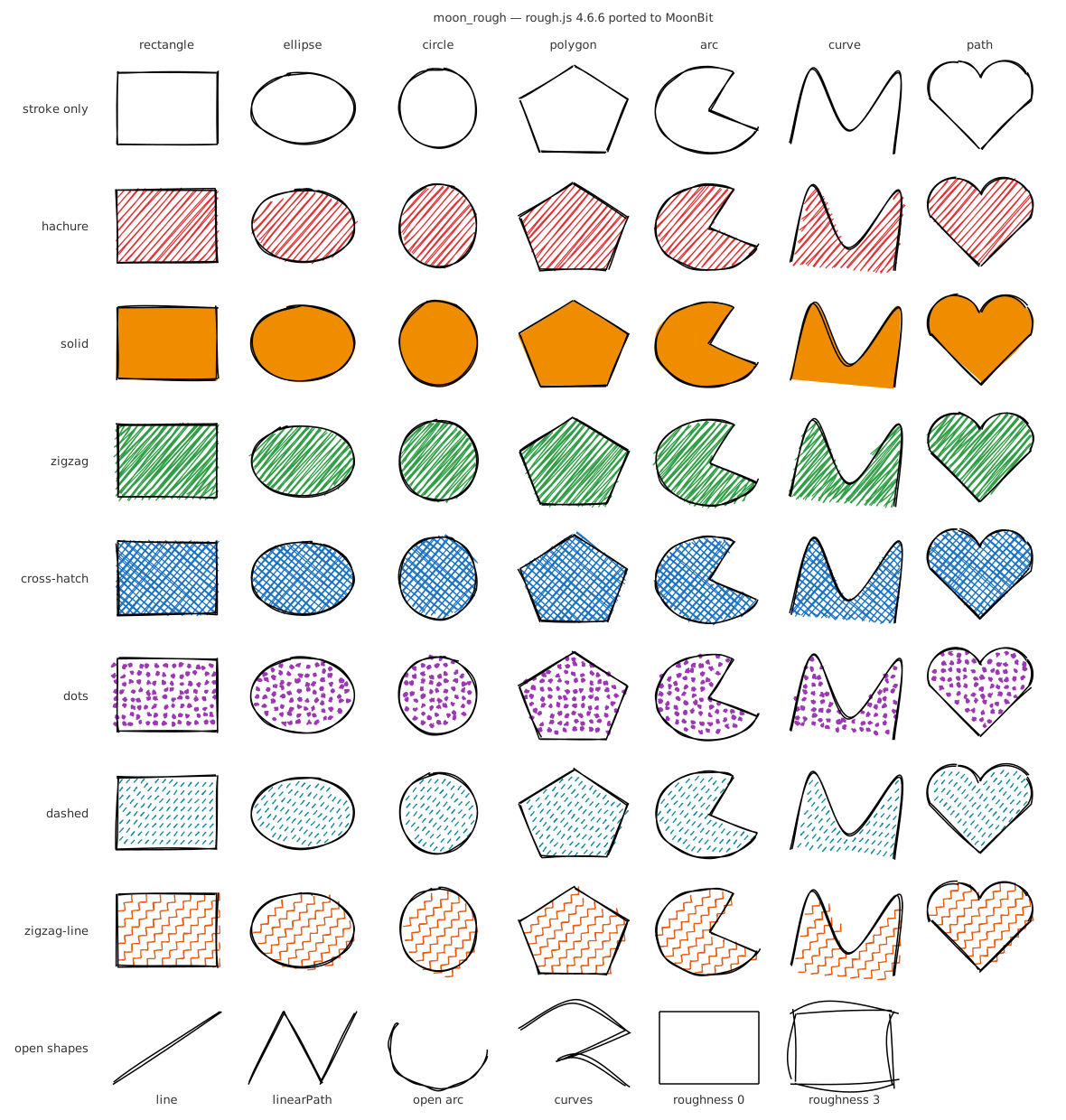
(上图由 moon run src/examples/gallery > gallery.svg 生成,js / wasm-gc / native 三个后端输出的文件逐字节相同。)
#定位
rough.js 是 Excalidraw、Mermaid 等工具手绘风格的底层库。MoonBit 生态里目前还没有同类库:diago(moonbit-community/diago,原 Milky2018/diago)的 CompileOptions.sketch 目前返回 UnsupportedFeature,mizchi/moonlight 也没有手绘渲染。
moon_rough 是移植,不是重新实现。目标是:**给定相同的 seed 和参数,生成和 rough.js 一样的图形。**实际结果比这更进一步:在下面的所有对照测试里,MoonBit 和 rough.js 的输出逐位相同,最大误差为 0。
#安装
需要 MoonBit 工具链,moonc 0.10.16 或更新(CI 用的是 0.10.16+b1a0e846e),moon version --all 可以看当前版本。在你自己的项目里:
moon add sayoi7799/moon_rough这条命令从 mooncakes.io 取最新版本,并把依赖写进 moon.mod(例如 "sayoi7799/moon_rough@0.2.0")。然后在要用它的包的 moon.pkg 里导入,代码里就可以写 @moon_rough:
import {
  "sayoi7799/moon_rough",
}
子包单独导入,例如 Canvas 后端是 "sayoi7799/moon_rough/canvas"(@canvas)。js、wasm-gc、native 三个后端都能用,下面的"用法"在这三个后端上我都在一个新建的空模块里跑过。
想从源码试用:克隆仓库,在克隆出来的目录里运行测试和示例。
git clone https://github.com/sayoi7799/moon_rough.gitmoon test --target jsmoon run src/examples/gallery > gallery.svg#用法
fn main {
  let gen = @moon_rough.generator()
  let rect = gen.rectangle(
    10.0, 10.0, 200.0, 100.0,
    options=@moon_rough.Options::new(
      seed=42,
      fill="#e66",
      fill_style=CrossHatch,
      roughness=1.5,
    ),
  )
  // 和后端无关的数据:OpSet 列表,每个 op 是 Move / LineTo / BCurveTo
  for set in rect.sets {
    println("\{set.kind.name()}: \{set.ops.length()} ops")
  }
  // 转成 SVG:每个 OpSet 一个 <path>,整个 Drawable 一个 <g>
  println(@moon_rough.svg_document(220.0, 120.0, @moon_rough.drawable_to_svg(rect)))
}
moon.pkg 里导入 "sayoi7799/moon_rough"。各个子包也可以单独使用:
| 包 | 内容 | 移植来源 |
|---|---|---|
| sayoi7799/moon_rough | 门面:generator()、常用类型、drawable_to_svg | — |
| .../core | Generator、Options、Drawable / OpSet / Op、renderer、7 种填充 | roughjs generator.ts、renderer.ts、fillers/* |
| .../svg | drawable_to_svg、svg_document | roughjs svg.ts(输出字符串,不操作 DOM) |
| .../random | Random(Park–Miller)、RandomSource | roughjs math.ts |
| .../path_data | parse_path、absolutize、normalize(含弧线转贝塞尔)、serialize | path-data-parser 0.1.0 |
| .../curve | points_on_bezier_curves、simplify、curve_to_bezier、points_on_path | points-on-curve 0.2.0、points-on-path 0.2.1 |
| .../hachure | hachure_lines(扫描线填充) | hachure-fill 0.5.2 |
| .../geometry | 可变的 Point | roughjs geometry.ts |
| .../jsmath | 和 V8 逐位一致的 sin / cos / tan / asin / atan、Math.round、toFixed、Number#toString、parseFloat、Math.min/max | — |
#API 对照
| rough.js | moon_rough |
|---|---|
| rough.generator({ options }) | @moon_rough.generator(options=…, source=…) |
| gen.line(x1, y1, x2, y2, o) | gen.line(x1, y1, x2, y2, options=o) |
| gen.rectangle / ellipse / circle | 同名方法 |
| gen.linearPath(points, o) / gen.polygon(points, o) | gen.linear_path(points) / gen.polygon(points),points : Array[(Double, Double)] |
| gen.arc(x, y, w, h, start, stop, closed, o) | gen.arc(x, y, w, h, start, stop, closed=true) |
| gen.curve(Point[]) / gen.curve(Point[][]) | gen.curve(points) / gen.curves(points_list) |
| gen.path(d, o) | gen.path(d),非法路径 raise PathError |
| gen.opsToPath(set, digits) / gen.toPaths(d) | ops_to_path(set, fixed_decimals=…) / gen.to_paths(d) |
| RoughSVG.draw(drawable) | drawable_to_svg(drawable)(属性及顺序与 setAttribute 一致) |
| { roughness: 2, fillStyle: 'zigzag' } | Options::new(roughness=2.0, fill_style=Zigzag) |
#给 diago 的流程图加手绘风格
diago 能把 D2 文本画成流程图,但它自己的手绘(sketch)模式还没有实现。examples/diago_sketch 是一个独立的小模块:先让 diago 照常生成 SVG,再把形状、连线和箭头的几何换成 moon_rough 的手绘线条,文字、颜色、主题和深色模式不变。
| 普通版(diago) | 手绘版(moon_rough) |
|---|---|
let svg = @diago.compile(source)
let sketch = @diago_sketch.sketchify(svg, seed=7)
同样的输入和 seed,输出逐字节相同,js、wasm-gc、native 上都一样(CI 逐一比对提交的 SVG)。它不是发布模块的一部分,因为要依赖 diago 和它的一批依赖;详细说明和限制见 它的 README。
#Canvas 后端和浏览器演示页
sayoi7799/moon_rough/canvas 对应 rough.js 的 RoughCanvas:
// js 目标。ctx 是 JavaScript 传进来的 canvas.getContext("2d")
pub fn paint(ctx : @canvas.JsContext) -> Unit {
  let rc = @canvas.RoughCanvas::new(ctx, options=@moon_rough.Options::new(seed=42))
  ignore(
    rc.rectangle(
      10.0, 10.0, 200.0, 100.0,
      options=@moon_rough.Options::new(fill="#e76f51", fill_style=CrossHatch),
    ),
  )
}- 绘制逻辑 draw(ctx, drawable) 按 canvas.js 逐句对应,写在 Canvas2D trait 上(save、restore、beginPath、moveTo、lineTo、bezierCurveTo、stroke、fill 和描边 / 填充 / 线宽 / 虚线属性),在所有目标上都能编译。
- JsContext 是它在 js 目标上的绑定(extern "js" 调用 CanvasRenderingContext2D)。Recorder 是另一个实现,只记录调用,测试用的就是它。
- wasm-gc 和 native 上没有真正的 canvas 绑定。 wasm-gc 需要宿主提供导入函数,目前没做;trait 让以后补一个实现很容易。
- 测试:预期值来自官方 rough.js。scripts/gen_fixtures.mjs 用一个会记录每次方法调用和属性赋值(并且禁止读取任何属性)的假 canvas 运行真正的 rough.canvas(),616 个 Drawable、40,147 次调用,顺序和每个数字(按位)都和 MoonBit 一致,三个后端都是。
浏览器演示页 examples/web:左边调参数(图形、填充样式、roughness、bowing、hachureAngle、hachureGap、strokeWidth、seed、颜色),右边并排显示 moon_rough 和官方 rough.js 4.6.6 画的同一张图,页面实时对比三项:操作序列、每个坐标、每个像素。
在本地打开(需要 MoonBit 工具链和 Node.js 18 以上):
node examples/web/build.mjsnode examples/web/serve.mjs然后访问 http://localhost:8000/ 。第一条命令把 MoonBit 编译成 examples/web/moon_rough_demo.js,第二条启动一个不依赖任何包的静态服务器;不能直接双击打开 html,浏览器不允许从 file:// 加载 ES 模块。换端口:node examples/web/serve.mjs 8080。不开浏览器也能检查:node examples/web/test.mjs 用 588 组描述对比 draw 和 generate 与官方 rough.js 的输出,需要先运行 npm ci(在 scripts/ 里)。
动画页 animation.html(演示页右上的"看动画",或直接访问 http://localhost:8000/animation.html )有两种动画,都只用 rough.js 本来就有的行为,没有给 moon_rough 加新接口:
- 抖动线条:每一帧用 seed + 帧号 把同一幅图(矩形、椭圆、箭头、圆、一条路径,带五种填充)重画一遍,线条就像手绘动画一样抖动。
- 描线:只画 Drawable 的前 k 个 op,k 从 0 增长到全部,笔就一笔一笔写出图形。draw_prefix 在 src/examples/web_demo 里,不在发布包里。
页面上每一帧都和官方 rough.js 对比(操作序列、坐标、像素),并累计显示。node examples/web/animation_test.mjs 在 Node 里做同样的事:180 帧抖动(3 种 roughness、60 个 seed、6 个图形)和 1,739 个前缀(每个图形的每一个 k),操作序列和 canvas 调用都必须和官方一致,现在的最大误差是 0。
页面上"完全一致"的含义。 官方 rough.js 用浏览器自己的 Math.sin / cos / tan,moon_rough 用 fdlibm,和 Node 24 / x64 上的 rough.js 逐位相同(测试用的就是它)。但较新的浏览器的数学函数最后一位可能不同:我在 Chrome 152(x64 Windows)里把 9 种图形和 8 种填充设置(含不填充)、4 组参数共 288 种组合都试了一遍,191 种逐位一致,另外 97 种(主要是椭圆、圆、扇形,它们用 sin / cos)有数值差别,最大 1.14e-13,没有任何一个像素不同,操作序列的结构也全部相同。页面会如实显示是哪种情况,并给出你的浏览器里 Math.tan(1e22) 的值作为参考,不会写死"一致"。Safari 和 Firefox 我没有测过。
#支持范围
| 功能 | 状态 |
|---|---|
| 图形:line、rectangle、ellipse、circle、linearPath、polygon、arc(开 / 闭)、curve(单条 / 多条)、path | ✅ 全部 |
| 填充:hachure、solid、zigzag、cross-hatch、dots、dashed、zigzag-line | ✅ 全部 |
| 选项:maxRandomnessOffset、roughness、bowing、stroke、strokeWidth、curveFitting、curveTightness、curveStepCount、fill、fillStyle、fillWeight、hachureAngle、hachureGap、simplification、dashOffset、dashGap、zigzagOffset、seed、strokeLineDash、strokeLineDashOffset、fillLineDash、fillLineDashOffset、disableMultiStroke、disableMultiStrokeFill、preserveVertices、fixedDecimalPlaceDigits、fillShapeRoughnessGain | ✅ 全部(默认值照 generator.ts) |
| SVG 路径:M L H V C S Q T A Z 及其相对形式、隐式重复、紧凑数字写法、弧线转三次贝塞尔 | ✅ |
| 输出:Drawable(OpSet 列表)、SVG 字符串、opsToPath、toPaths | ✅ |
| 给 diago 的流程图加手绘风格 | ✅ 示例模块 examples/diago_sketch,见上文「给 diago 的流程图加手绘风格」 |
| Canvas 后端(RoughCanvas) | ✅ sayoi7799/moon_rough/canvas:绘制逻辑在所有目标上编译,js 目标有真正的 canvas 绑定,wasm-gc 和 native 暂无(见上文「Canvas 后端和浏览器演示页」) |
| 浏览器演示页:和官方 rough.js 并排对比 | ✅ examples/web,见上文「Canvas 后端和浏览器演示页」 |
| 动画:抖动线条(每帧换 seed)、描线(逐步画出前 k 个 op) | ✅ examples/web/animation.html,每一帧和官方 rough.js 对比,见上文 |
| 性能测试:和 Node 上的 rough.js 对比 | ✅ src/perf,结果见下文「性能」 |
| 答辩材料 | ✅ docs/defense.md |
#与 rough.js 的差异
正常输入下,输出与 rough.js 逐位一致。差异只出现在 API 形式,以及 rough.js 自身会出错的输入上:
- Math.random() 可以注入。 rough.js 在三处用未加种子的 Math.random():seed 为 0 时、dots 填充的点位置、hachure 的一个回退分支。所以 rough.js 的 dots 填充即使设了 seed 也不可复现。moon_rough 把这些调用交给 RandomSource:默认是固定种子(DEFAULT_FALLBACK_SEED)的 Park–Miller 序列,传 RandomSource::park_miller(n) 可以换种子(测试就是这样对照 dots 的)。注意默认序列每次运行起点相同,并不像 Math.random() 那样每次不同;需要每次不同时请自己提供 RandomSource::new(f)。
- 不修改调用方的数据。 hachure-fill 会原地旋转传入的多边形再转回来,rough.js 用户传进 polygon() 的点会被改动最后几位。moon_rough 内部复制一份,并在内部照样保留这种改动(rough.js 后续步骤依赖它)。
- rough.js 不会结束的输入,这里会结束:
- 起止角相同的 arc(以及任何角度步长 ≤ 0 的循环):跳过该循环;
- dashOffset + dashGap = 0 的 dashed 填充、zigzagOffset = 0 的 zigzag-line 填充:不画这条线上的填充;
- Z 后面跟数字(如 M 1 1 Z 5):path-data-parser 会无限循环,这里 raise NumberAfterClose。
- rough.js 抛异常的输入: 非法路径数据 raise PathError(InvalidCharacter(偏移) / ParamNotANumber / EndedShort);带图案填充的空 polygon([]) 不画填充(hachure-fill 会抛 TypeError);curve_to_bezier 少于 3 个点时 raise CurveTooShort。
- 以 npm 实际加载的 bundle 为准。 generator.path() 的第三个 replace 在 bin/ 里是 '/(\s\s)/g',在 bundled/rough.cjs.js 里是 "/(ss)/g"(都是字符串而非正则,正常路径下都不起作用)。这里照 Node 实际运行的 bundle 实现。
- 类型收紧: seed 是 32 位 Int(rough.js 接受任意 number);fixed_decimal_place_digits 限制在 0–100(JS 超出范围会抛 RangeError);fill_style 是枚举,FillStyle::from_name 和 rough.js 一样,未知名称按 hachure 处理。
- 未移植: DOM 版 RoughSVG(改为输出字符串)、OpSet 里生成器从不填写的 size / path 字段,以及 _curve 的 closePoint 分支(4.6.6 的所有调用方都传 null)。
- roughness < -1 的 path: points-on-path 会用负的简化距离无限递归,这里同样不支持。
#怎么保证一致
- 随机数顺序。 rough.js 很多地方在一个表达式或参数列表里多次取随机数,JS 从左到右求值,差一次后面就全错。移植时每次取随机数都单独写成一条语句,按 JS 的求值顺序排列(例如 _bezierTo 里终点的随机数先于控制点,ellipse 的 _offset(0.1, _offset(0.4, 1, o), o) 内层先算)。fixture 生成器包装了 Math.imul(bundle 里只有 Random.next 用它)和 Math.random,记录每个用例取了多少个随机数,测试先比较次数,再比较数值。
- 对象共享语义。 rough.js 的随机数生成器懒创建在 options 对象上;{ ...o } 复制时,已存在的会被共享,还不存在的则各自新建;cloneOptionsAlterSeed 用 seed + 1 重新开始;不传 options 时,所有图形共用生成器的默认 options 对象,随机状态跨调用延续。MoonBit 里带 mut 字段的 struct 是引用类型,{ ..o, f: v } 复制的是指针,行为和 JS 相同。点也是可变的引用对象,JS 共享数组的地方 MoonBit 也共享(比如 simplify 对单点集合返回 [p, p],hachure 会把它旋转两次)。
- 浮点函数。 native 后端上,core 的 sin / cos 调用 C 库,约 2.5% 的参数与 V8 差 1 ulp;js 后端调用宿主 Math,在 arm64 上也差 1 ulp。这种差别会翻转离散判断(循环终止、Math.round、ceil / floor 计数、toFixed(9)),使 op 数量都对不上。所以 jsmath 在 js 和 native 上改用 fdlibm 算法(与 V8 和 core 的 wasm 实现相同)。另外按 ECMAScript 规范精确实现了 toFixed、Math.round、Math.min/max(含 NaN 和 ±0 的处理),并验证了 Math.pow(x, 2) === x * x、% 与 JS 一致。
#测试
moon test --target jsmoon test --target wasm-gcmoon test --target native所有预期值都来自官方 rough.js(见下一节),没有手写的数值预期:
| 类别 | 内容 |
|---|---|
| 底层 | Random 13 个 seed(含 −2³¹、2³¹−1、cloneOptionsAlterSeed 产生的非 int32 的 2³¹)各前 1000 个输出、seed 0 的回退;约 2.9 万条数学 / toFixed / toString / parseFloat 用例;456 条路径的 parse / absolutize / normalize / serialize;Bézier 采样、简化、curveToBezier、pointsOnPath(含点对象的身份);600 组 hachure-fill(含旋转回来后的多边形坐标) |
| 图形 × 填充 | 642 个用例:所有图形 × 描边 / solid / hachure × 多组选项;415 个用例:8 种可填充图形 × 7 种填充 × 多组选项 |
| 随机组合 | 600 组随机图形 + 随机选项(roughness、bowing、角度、间距、preserveVertices、disableMultiStroke(Fill)、曲线参数、虚线 / 锯齿参数、simplification、各种 fill 值和填充样式) |
| 边界情况 | 宽高为 0、长度为 0、roughness 0、单点 / 两点 / 空的 polygon、linearPath 和 curve、空路径、只有 M 的路径、带相对命令和弧线的复杂路径、非法路径(返回错误)、无穷坐标、curveStepCount 1 和 2 等 321 个用例;同一生成器连续调用的序列;以及 rough.js 会死循环或抛异常的输入(只检查能正常结束) |
比较方式:shape 名、OpSet 类型、每个 OpSet 的 op 类型序列、随机数调用次数必须完全一致;坐标要求 |a − b| ≤ 1e-9 × max(1, |b|)。这个容差只是保险:正常情况下所有运算都是相同顺序的 IEEE 基本运算,结果应逐位相同;而随机数顺序出错造成的偏差在 roughness × offset 量级(0.1–2),1e-9 不可能把它掩盖。
三角函数不依赖宿主。 ECMAScript 只要求 Math.sin / cos / tan / asin / atan 近似正确,最后一位在不同 V8 版本和 CPU 架构上可能不同:CI 里 macOS arm64 的 Node 24 算 tan(1e22) 就和 x64 差 1 ulp,圆弧转贝塞尔这类对微小差异敏感的路径会把它放大到 1e-7 量级。所以这五个函数在四个后端上都用同一份 fdlibm 代码(js 和 native 用 src/jsmath/fdlibm.mbt,wasm 和 wasm-gc 用 core 里的 fdlibm 实现),生成的 JS 里没有对宿主 Math.sin 等函数的调用,结果不随运行环境变化,等于 rough.js 在 Node 24 / x64 上的结果,fixtures 就是在那里生成的。fdlibm 也是 V8 自己的实现。剩下的 Math.abs、sqrt、floor、ceil 是 IEEE 精确运算,各处一致。fixtures 里的 NaN 统一写成标准的 7ff8000000000000,因为 NaN 的低位随 V8 版本变化。
#误差报告
node scripts/error_report.mjs 在三个后端运行测试并汇总每个套件的最大绝对误差(括号里是不逐位相同的数值个数):
| suite | values | js | wasm-gc | native |
|---|---|---|---|---|
| core edge cases | 69890 | 0 (0 inexact) | 0 (0 inexact) | 0 (0 inexact) |
| core fills | 309900 | 0 (0 inexact) | 0 (0 inexact) | 0 (0 inexact) |
| core random | 249504 | 0 (0 inexact) | 0 (0 inexact) | 0 (0 inexact) |
| core sequences | 3248 | 0 (0 inexact) | 0 (0 inexact) | 0 (0 inexact) |
| core shapes | 196962 | 0 (0 inexact) | 0 (0 inexact) | 0 (0 inexact) |
| curve curve_to_bezier | 10614 | 0 (0 inexact) | 0 (0 inexact) | 0 (0 inexact) |
| curve points_on_bezier_curves | 51712 | 0 (0 inexact) | 0 (0 inexact) | 0 (0 inexact) |
| curve points_on_path | 67786 | 0 (0 inexact) | 0 (0 inexact) | 0 (0 inexact) |
| curve simplify | 7796 | 0 (0 inexact) | 0 (0 inexact) | 0 (0 inexact) |
| hachure | 994388 | 0 (0 inexact) | 0 (0 inexact) | 0 (0 inexact) |
| jsmath trig | 28085 | 0 (0 inexact) | 0 (0 inexact) | 0 (0 inexact) |
| jsmath trig edge cases | 12200 | 0 (0 inexact) | 0 (0 inexact) | 0 (0 inexact) |
| path_data | 43038 | 0 (0 inexact) | 0 (0 inexact) | 0 (0 inexact) |
| random | 13000 | 0 (0 inexact) | 0 (0 inexact) | 0 (0 inexact) |
共比较 2,058,123 个值,三个后端的最大误差都是 0(moon 0.1.20261016 / moonc v0.10.16,Windows 11,Node 24.20)。
CI 用同一版本的 toolchain(0.10.16+b1a0e846e)跑 check(不允许警告)、moon fmt --check、moon build --target all、moon info 后的接口文件检查,以及三个后端的测试。不同版本的 moon fmt 输出不同,所以格式只按这个版本检查。另外有三个任务:
- 用 scripts/package-lock.json 锁定的 roughjs 4.6.6 重新生成 fixtures,和仓库里的比较,必须完全一致;
- 在 macOS(arm64)和 Windows 上跑同样的测试,暂时不阻塞,因为 clang 可能把 a * b + c 合并成 FMA,需要先看一轮结果;
- 用最新版 MoonBit 跑 check 和测试,提前发现兼容性问题,同样不阻塞。
版本变化见 CHANGELOG.md。
#性能
用 moon bench 测 moon_rough,用同样的输入在 Node 上测官方 rough.js 4.6.6,对比生成速度。
AMD Ryzen 9 7945HX with Radeon Graphics,32 线程,win32 x64;Node v24.20.0;moon 0.1.20261016 (1af328f 2026-10-16)
| 项目 | rough.js(Node) | moon_rough js | wasm-gc | native |
|---|---|---|---|---|
| 10,000 个随机图形(生成) | 610 ms | 395 ms(1.5× 快) | 233 ms(2.6× 快) | 708 ms(1.2× 慢) |
| 500 个 dots 填充的图形 | 371 ms | 786 ms(2.1× 慢) | 269 ms(1.4× 快) | 666 ms(1.8× 慢) |
| 复杂路径:解析、绝对化、规范化 | 427 µs | 300 µs(1.4× 快) | 127 µs(3.4× 快) | 365 µs(1.2× 快) |
| 复杂路径:曲线采样和简化 | 754 µs | 750 µs(持平) | 392 µs(1.9× 快) | 1.8 ms(2.4× 慢) |
| 复杂路径:hachure 填充 | 2.7 ms | 2.2 ms(1.2× 快) | 1.4 ms(2.0× 快) | 3.8 ms(1.4× 慢) |
| 复杂路径:solid 填充 | 1.4 ms | 1.3 ms(1.1× 快) | 655 µs(2.2× 快) | 2.5 ms(1.7× 慢) |
| 复杂路径:cross-hatch 填充 | 4.0 ms | 3.2 ms(1.2× 快) | 2.1 ms(2.0× 快) | 5.2 ms(1.3× 慢) |
| 10,000 个图形转 SVG 字符串 | 1.10 s | 2.28 s(2.1× 慢) | 2.36 s(2.2× 慢) | 2.63 s(2.4× 慢) |
| 同上,保留两位小数 | 1.77 s | 4.06 s(2.3× 慢) | 3.72 s(2.1× 慢) | 12.12 s(6.9× 慢) |
括号里是和 rough.js 比:「快」是 moon_rough 更快,「慢」是更慢。每个后端跑一整轮,我另外又完整跑了第二轮,两轮对应项目的平均值最大相差 17%,多数在 10% 以内,结论没有变化。
怎么测的。
- 只计时生成,不含画到 canvas 或转 SVG(最后两行除外,它们测的就是转 SVG)。输入在计时开始之前做好。
- 两边用同一个确定性的随机数生成器,生成同样的 10,000 个图形(9 种图形,无填充或 6 种填充样式,随机 roughness、bowing、角度、间距、seed)和同一条 300 段的复杂路径(绝对和相对命令、平滑曲线、圆弧、多个闭合子路径)。官方 rough.js 对这些输入生成的 op 数量和所有数值之和,和 moon_rough 的逐位相同(src/perf/checksum_test.mbt,预期值由 scripts/gen_fixtures.mjs 生成),所以比的是同样的工作。
- moon_rough 用 moon bench --release,每个基准是 10 批,每批至少 100 ms。Node 的脚本照同样的方法计时:预热后把批次调到至少 100 ms,取 10 批。dots 填充只测 500 个图形,因为每个图形有成百上千个点。
- dots 填充的点位置来自没有种子的 Math.random(),两边画出的点不同,所以它不在校验和里(校验和里它用同一个固定序列);这一行只比时间。
- SVG 那两行:官方的 RoughSVG 需要 DOM,Node 里没有,所以 Node 一侧用 opsToPath 加字符串拼接写了一个输出相同字符串的版本(两边字符串的总长度相同,也在校验里)。
这些数字能说明什么,不能说明什么。 它们来自一台机器、一次部署,说明的是这个实现在这台机器上相对 rough.js 的位置,不是 MoonBit 和 JavaScript 的一般比较:Node 有即时编译和预热,wasm-gc 在 moon 自带的运行时里跑,native 是 cl /O2 编译的。换一台机器、换一个版本,倍数会变。
明显偏慢的地方和原因。 目前没有做任何优化。用一组小测量把偏慢的项目拆开(同样的输入,Node / js / wasm-gc / native),能确认的是:
- 三角函数(dots 填充、椭圆、圆、圆弧)。 1000 次 sin 加 cos:20 µs / 169 µs / 24 µs / 101 µs。为了在所有环境下得到同样的结果,moon_rough 自带了 fdlibm 的实现,而不是调用宿主的 Math。在 js 目标上,生成的 JS 里 UInt64 是用 BigInt 实现的,fdlibm 每次取浮点数的高 32 位都要走一遍;每次调用还要分配一个小数组。10,000 个椭圆:33 ms / 49 ms / 14 ms / 52 ms。
- SVG 输出。 其中的 escape_attribute 逐字符处理整段路径数据(每个图形平均 16 KB),对全部 op set 做一遍:26 ms / 987 ms / 520 ms / 412 ms,在 js 上占 SVG 输出时间的约四成。保留两位小数的 to_fixed 为了和 JavaScript 的 toFixed 完全一致,用大整数精确实现:对 140 万个数 96 ms / 197 ms / 263 ms / 1.35 s,这是 native 上这一行慢 6.9 倍的主要原因。ops_to_path:0.97 s / 1.07 s / 1.48 s / 2.0 s。
- native 整体偏慢。 大多数项目比 rough.js 慢 1.2 到 2.4 倍。release 构建用 cl /O2 /MT,并且定义了 MOONBIT_ALLOCATOR_SYSTEM(用系统的 malloc),而代码里有大量小对象(点、op、数组)。这是我对原因的判断,没有换分配器验证过。
重新生成这张表(需要 MoonBit 工具链,先在 scripts/ 里运行 npm ci,约 7 分钟,期间不要做别的事):
node scripts/bench.mjs也可以只看 moon_rough 一侧,例如 wasm-gc:
moon bench -p sayoi7799/moon_rough/perf --target wasm-gc --release#重新生成 fixtures
wasm-gc 后端不能读文件,所以 fixtures 生成为 .mbt 测试文件,放在被测包旁边(src/*/…_fixtures_test.mbt)。双精度数按 IEEE-754 的 16 位十六进制位模式存储,不经过任何十进制解析。
cd scripts && npm ci && npm run gen- 来源:scripts/package.json + package-lock.json 锁定 roughjs 4.6.6,以及 hachure-fill 0.5.2、path-data-parser 0.1.0、points-on-curve 0.2.0、points-on-path 0.2.1(通过 overrides 固定)。脚本启动时会检查这些版本。
- Drawable 用例用 Node 调用 require('roughjs')(即 bundled/rough.cjs.js)的 rough.generator() 生成,不需要浏览器;底层用例直接调用各依赖包和 roughjs/bin/math.js。
- Math.random 被替换成固定的 Park–Miller 序列(seed 1234567),测试注入同一序列。
- 只生成某几类:node gen_fixtures.mjs random jsmath path_data curve hachure core_shapes core_fills core_random core_edge svg。
- 输出确定,重新生成不会产生 diff。每个用例的数据上限为 6 万字符(极密的填充会产生几 MB 的 op),生成器会检查每种"图形 × 填充"组合仍被覆盖。
#移植来源和许可证
本项目以 MIT 许可证发布(见 LICENSE)。移植自以下项目,版权声明和许可证全文见 THIRD_PARTY_LICENSES:
| 项目 | 版本 | 许可证 | 作者 |
|---|---|---|---|
| roughjs | 4.6.6 | MIT | Preet Shihn |
| hachure-fill | 0.5.2 | MIT | Preet Shihn |
| path-data-parser | 0.1.0 | MIT | Preet Shihn |
| points-on-curve | 0.2.0 | MIT | Preet Shihn |
| points-on-path | 0.2.1 | MIT | Preet Shihn |
移植范围:上述五个包中由 rough.generator() 使用的全部代码(Canvas 部分只移植了绘制逻辑,见下一节;不含 DOM 部分)。src/jsmath/fdlibm.mbt 的 sin / cos / tan / asin / atan 改编自 moonbitlang/core(Apache-2.0),其算法源自 fdlibm(Sun Microsystems 的许可声明),两者的声明同样收录在 THIRD_PARTY_LICENSES 中。测试 fixtures 是用上述 MIT 软件生成的输出数据。
Drawable
A generated shape: backend-independent op sets plus the options needed
to paint them.
FillStyle
fillStyle. rough.js treats unknown names as hachure.
Generator
Generates Drawables: rough.js' RoughGenerator (rough.generator()).
OpSetType
How an OpSet is meant to be painted.
Options
Drawing options; None fields take the generator's defaults. This is
rough.js' Options, with the same meaning for every field.
PathError
Why a path string could not be parsed. rough.js throws (or, for
AfterClose, loops forever) on these inputs; moon_rough reports them.
PathInfo
PathInfo: one SVG path (d plus paint attributes), as returned by
Generator::to_paths.
RandomSource
Where the random numbers that rough.js takes from Math.random() come
from. rough.js uses Math.random() when the seed is 0, for the dot
positions of the dots fill style and as a fallback in the hachure filler,
so those outputs are not reproducible in rough.js itself; here the source
can be injected to make them deterministic.
A source is shared by all Randoms created from the same generator and
counts the numbers drawn, which the tests compare with rough.js.
ResolvedOptions
Options with every default applied: rough.js' ResolvedOptions.
Like the JavaScript object, it also carries the lazily created random
number generator. Copies made while drawing ({ ...o, ... } in rough.js)
share it if it already exists and create their own otherwise, and a
generator's default options keep theirs across calls; both behaviours are
reproduced because they decide which random numbers each shape gets.
Shape
The kind of shape a Drawable was generated from.
drawable_to_svg
A <g> element with one <path> per op set of drawable, with the
attributes RoughSVG.draw sets, in the same order. Coordinates are
rounded to fixed_decimal_place_digits when that option is set.
generator
rough.generator({ options }): a generator whose shapes use options
as defaults. source replaces JavaScript's Math.random() (used for seed
0 and the dots fill); pass RandomSource::park_miller(n) for fully
reproducible output.
ops_to_path
opsToPath (see Generator::ops_to_path).
svg_document
fn svg_document(width : Double, height : Double, content : String, background? : String) -> StringA standalone SVG document of the given size containing content
(for example the result of drawable_to_svg).
Source Files
Install
Download zipA MoonBit port of rough.js 4.6.6: hand-drawn, sketchy shapes rendered to backend-agnostic op sets and SVG.
roughsketchhand-drawnsvgroughjs

 MIT

 Updated 6 days ago
 169 downloads